
Introduction
At the heart of Ansys Scade One lies a model-based solution for developing embedded applicative software, enabling a seamless Model-Based Systems Engineering (MBSE) process. The main user interface is a graphical programming IDE, but under the hood, Scade One exposes a Python API called PyScadeOne, which we introduced in a previous article. It allows programmatic control over projects, jobs, simulations, code generation, and integration with external tools.
In this article, we’ll show how PyScadeOne can be used to automate model verification, code generation, and FMU exports. These activities are foundational for automated CI/CD actions, which we will cover in a follow-up article.
PyScadeOne Architecture Overview
First, let’s look at what we’re working with. The PyScadeOne package follows a clear, layered design:
|
Layer
|
Purpose
|
Key Classes
|
|
API Core
|
Entry point, access to tools and projects
|
ScadeOne
|
|
Project Management
|
Handles .sproj content, modules, resources, and dependencies
|
Project
|
|
Model
|
Contains Swan module and interface declarations
|
Model
|
|
Job Execution
|
Defines jobs (.sjob), properties, and execution
|
Job, JobLauncher
|
|
Service Layer
|
Provides services such as FMU export, Python wrappers, and simulation data
|
ansys.scadeone.core.svc.*
|
|
Interfaces
|
Decouples mutual dependencies between core classes
|
IScadeOne, IProject
|
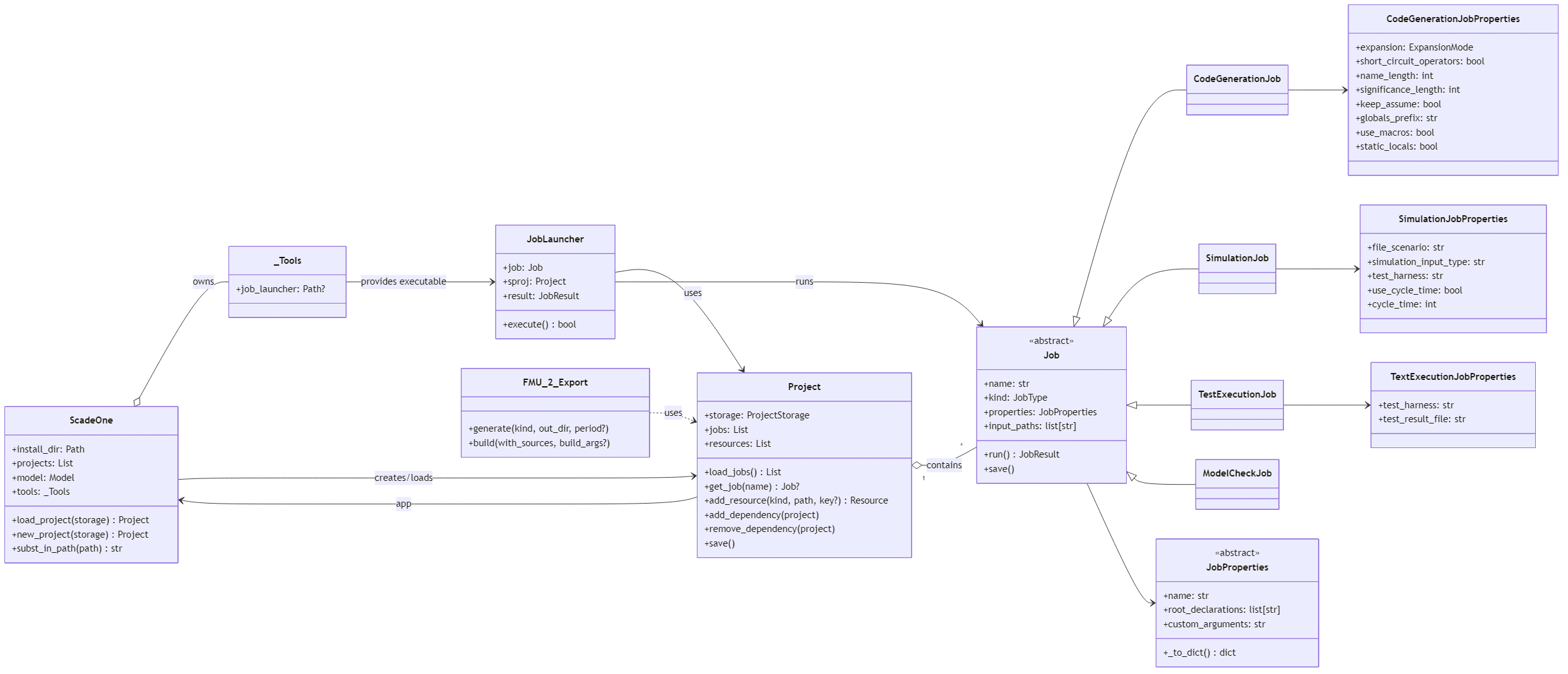
PyScadeOne overview (click to enlarge)
Launching jobs with PyScadeOne
The ScadeOne object manages the lifecycle of all loaded projects and provides access to tool executables.
from ansys.scadeone.core.scadeone import ScadeOne

# Initialize using the installation directory
sone = ScadeOne(r"C:\Program Files\Ansys Inc\vxxx\Scade One")

# Load an existing project
project = sone.load_project("MySystem.sproj")

project.load_jobs()

# Inspect jobs
for job in project.jobs:
    print(job.name, job._kind)
It exposes:
- Installation path resolution via
install_dir
- Project management:
load_project(), new_project()
- Tools, e.g.
sone.tools.job_launcher to invoke the external job launcher
- Context management for safe use with
with blocks
with ScadeOne("C:\Program Files\Ansys Inc\vxxx\Scade One") as sone:
    prj = sone.load_project("controller.sproj")
    ...
Scade One projects are persisted on disk as .sproj files. Each of these is modeled by PyScadeOne as a Project object that encapsulates all dependencies, resources, and jobs.
project = sone.load_project("MySystem.sproj")

# List available jobs
project.load_jobs()
for job in project.jobs:
    print(job.name, job._kind)

# Add a resource (e.g., simulation data)
from ansys.scadeone.core.project import ResourceKind
project.add_resource(ResourceKind.SIMULATION_DATA, "scenario.sd", key_name="NominalCase")

# Save changes
project.save()
Key features include:
- Dependency management: add or remove dependent projects (
add_dependency(), remove_dependency())
- Resource management: register simulation data, header, and source files
- Model integration: internally binds to
ansys.scadeone.core.model.Model
- Job loading: reads
.sjob descriptors and instantiates Job objects via a factory
In Scade One, Jobs define actions that a project can perform: model checking, simulation, code generation, and test execution.
All jobs derive from the abstract base class Job.
from ansys.scadeone.core.job import JobType

job = project.get_job("CodeGen_Main")
print(job._kind == JobType.CODE_GENERATION)  # True

# Execute the job
result = job.run()
print(result.code, result.message)
Job Types are as follows:
|
Type
(JobType enum)
|
Class
|
Purpose
|
|
MODEL_CHECK
|
ModelCheckJob
|
Validate model syntax and semantics
|
|
CODE_GENERATION
|
CodeGenerationJob
|
Generate C source code
|
|
SIMULATION
|
SimulationJob
|
Run model-based simulation
|
|
TEST_EXECUTION
|
TestExecutionJob
|
Execute defined test jobs
|
Each job has a .properties object mirroring the .sjob file fields.
For example, CodeGenerationJobProperties includes expansion, short_circuit_operators, use_macros, etc.
job.properties.name_length = 255
job.properties.keep_assume = True
job.save()   # writes updated .sjob file
When job.run() is invoked:
- The job is wrapped into a
JobLauncher.
- The external executable runs:
scade_one_job_launcher.exe run -p project.sproj -j JobName
- The process return code is captured and converted to a
JobResult.
With these components, a complete automation task in pure Python becomes straightforward, from running a model check to executing test jobs and exporting structured results.
Now, let’s look at a couple of automation examples.
Example 1: test execution with JUnit export
from ansys.scadeone.core.scadeone import ScadeOne
from ansys.scadeone.core.job import JobType, Job
import ansys.scadeone.core.svc.test.test_results as tr
from junitparser import Error, Failure, JUnitXml, TestCase, TestSuite
from pathlib import Path
from datetime import datetime

def build_failure_message(ti: tr.TestItem, failure: Failure) -> str: …
    # Omitted for clarity

def sone2junit(sone_test_file: Path, junit_file: Path) -> str: …
    # Omitted for clarity

# Initialize Scade One environment
with ScadeOne("C:/Program Files/ANSYS Inc/v261/Scade One") as sone:
    project = sone.load_project("myProject/myProject.sproj")
    project.load_jobs()

    # Select a test execution job defined in the project
    job = project.get_job("TestExecutionJob0")

    if job._kind == JobType.TEST_EXECUTION:
        print(f"Running test job: {job.name}")
        result = job.run()

        # Handle job result
        if result.code == 0:
            print("✅ Tests executed successfully.")
        else:
            print("❌ Some tests failed.")
        print(result.message)

        # Convert native test results to JUnit XML
        sone_test_file = job.storage.path.parent / "out" / job.test_result_file
        junit_message = sone2junit(sone_test_file, Path("myProject/junit_results.xml"))
        print(junit_message)
This scripts first instantiates Scade One via the ScadeOne class, pointing to the tool installation directory. Then, it loads the .sproj file and queries available jobs. It selects a test execution job (JobType.TEST_EXECUTION), launches it with job.run(), and captures the results.
The test result file produced by Scade One is then converted to the JUnit format using the sone2junit() utility. This enables immediate visualization in CI systems, such as GitHub Actions or Jenkins.
The same script can therefore run, evaluate, and publish test outcomes, showing the integrated nature of the PyScadeOne library.
Now that our script is built, we may wrap it up into an automated action, triggerable from a CI/CD workflow. Here is a sample YAML configuration for GitHub Actions:
name: |
  PyScadone Model Check

description: |
  This action demonstrates how to create a custom  Action using Python
  and the PyScadeOne API to perform model checks in a Scade One project.

inputs: ...


runs:
  steps:
    - name: "Install Git and clone project"
      uses: actions/checkout@v5

    - name: "Set up Python"
      uses: actions/setup-python@v6
      with:

    - name: "Install dependencies" ...

    - name: "Run model check using PyScadeOne"
      shell: python
      run: |
        from pathlib import Path
        import os
        from ansys.scadeone.core.scadeone import ScadeOne
        from ansys.scadeone.core.job import JobType, Job

        with ScadeOne( ${{ inputs.scade-dir }} ) as sone:
          project = sone.load_project( ${{ inputs.project }} )
          project.load_jobs()

          # Run a model check job
          job = project.get_job( ${{ inputs.job-name }} )
          if job._kind == JobType.MODEL_CHECK:
            print(f"Running Model Check  job: {job.name}")
            result = job.run()

            if result.code == 0:
              print("✅ Model check completed successfully.")
            else:
              print("❌ Model check failed.")
              # Save check report in a folder specified by  output
              Path( ${{ inputs.output }} ).parent.mkdir(parents=True, exist_ok=True)
              shutil.copy(job.storage.path.parent / "out" / "log.txt", ${{ inputs.output }} )
              message += "\n" + f"Model check report saved to { ${{ inputs.output }} }"

    - name: "Upload model check report"
      uses: actions/upload-artifact@v4
      with:
        name: model-check-report
        path: ${{ inputs.model-check-report }}
This workflow initializes the ScadeOne class, loads the .sproj project file, retrieves the specified job, executes it via the PyScadeOne library, and collects results / artifacts into the pipeline’s workspace.
Example 2: FMU export
from ansys.scadeone.core.svc.fmu import FMU_2_Export

fmu = FMU_2_Export(project, "CodeGen_Main")
fmu.generate(kind="CS", out_dir="out/fmu")
fmu.build(with_sources=True)
This script is much shorter. It uses the FMU_2_Export service to translate Scade One generated C code into a Functional Mock-up Unit (FMU 2.0), for co-simulation or model exchange. This enables integration of Scade One models with other simulation frameworks or external systems.
In the same way as the previous example, this can be wrapped into a CI/CD action, to be automatically executed as part of a pipeline.
Conclusion
In this article, we saw how the PyScadeOne API transforms Scade One from a desktop application into a programmable automation backend. Scripting is fully done from Python and does not depend on the GUI. It is extensible, letting users build their own workflows and services. It outputs structured job and results objects that are easily machine-readable. This allows easy integration with other workflows, such as CI/CD pipelines.
By programmatically creating, running, and exporting Scade One projects, developers can bring high-assurance modeling into the modern DevOps ecosystem. As a note, other Ansys products also have their PyAnsys libraries, making it very easy to integrate those products and their outputs into custom automated pipelines.
Stay tuned for a future article where we will showcase how to leverage PyScadeOne to create an off-the-shelf library of GitHub Actions.
In the meantime, if you are a SCADE user, you may access Scade One Essential with your existing licenses on the Ansys Download Portal. You may also schedule a live demo of Scade One using this link.
About the author
|

|
Ludovic Oddos (LinkedIn) is a Lead Product Specialist at Ansys. He has been supporting SCADE field engagements, in many industries, for more than 15 years. He has deep expertise in embedded software and its integration into various target environments.
|









 You are navigating away from the AIS Discovery experience