TAGGED: installation
-
-
March 16, 2025 at 8:48 am
thomasdprice01
SubscriberAfter following the install instructions for the student edition here, Zemax does not start.
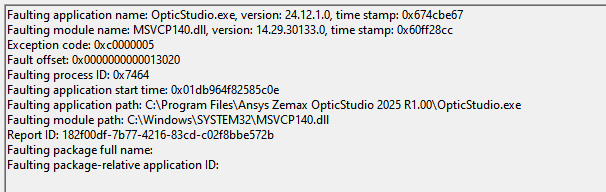
Running event viewer shows the following cause:
Running Windows 10 (Build 19045.5608). No errors generated during install.
Any recommendations would be appreciated.
-
March 17, 2025 at 4:16 pm
Niki Papachristou
Forum ModeratorHi Tprice,
Thank you for reaching out to us and sorry to hear that you were not able to install ZOS student versios.
I downloaded and installed from my side the .exe file and seems to be working fine. Based on your screenshot though I believe that this might be a graphics card drivers issue, hence I would suggest to try and update it, and/or try temporarily disabling your AntiVirus software (if you have any) as those are the two most common causes.
Kind Regards,
Niki
-
March 17, 2025 at 5:02 pm
thomasdprice01
SubscriberHI Niki,
Thanks for your response;Â I've just updated my graphics card driver (nVidia GTX 980, now at 572.70) and temporarily disabled AV but the exception code remains the same (0xc0000005).Â
Tom
-
March 17, 2025 at 5:04 pm
Niki Papachristou
Forum ModeratorHi Tom,
Can you now try to uninstall and re-install ZOS to see if this solves it (still follow the instructions on the webpage step-by-step)?
Kind Regards,
Niki
-
March 22, 2025 at 12:33 pm
thomasdprice01
SubscriberHi Niki,Â
I did as you advised, but still no luck. I've since upgraded to Windows 11 and everything now works as expected. Thanks for your help!
Tom
-
March 27, 2025 at 7:48 pm
Niki Papachristou
Forum ModeratorHi Thomas,Â
Thank you for your feedback here, happy to hear that you were anle to install ZOS, even without my help! Good luck with your designs!
Niki
-
- You must be logged in to reply to this topic.
-
6765
-
1906
-
1485
-
1330
-
1097
© 2026 Copyright ANSYS, Inc. All rights reserved.