

TAGGED: ansys-workbench, ansyswb-module
-
-
October 12, 2020 at 7:04 am
lordofthethings
SubscriberHello,
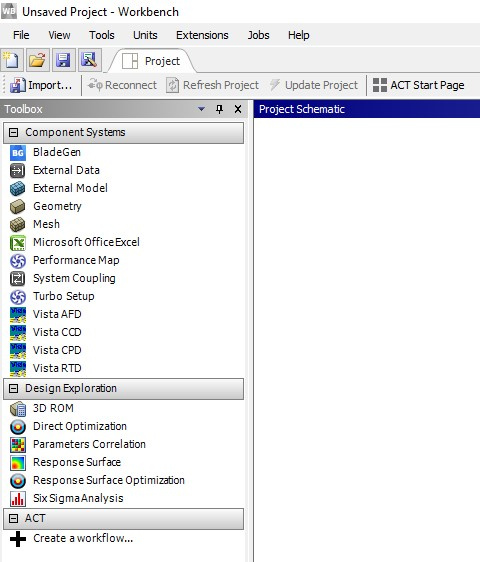
I am facing a strange thing. I have Ansys 2020 R1 installed in my PC. When I open Ansys Workbench, it loads without any of the structural/fluid modules on the left side (although I have the licenses for them) :
October 12, 2020 at 2:36 pmAniket
Forum Moderatortry resetting the appdata folder helps?nIf you are using Windows, close Workbench, open up file explorer and reset your appdata:nfor that go to the following path in file explorer.n%appdata%\ansysnand rename the folder of the version you are using, e.g. v191 to v191.oldn-AniketnHow to access Ansys help linksnGuidelines for Posting on Ansys Learning ForumnOctober 14, 2020 at 9:22 amSubscriberHi Aniket,nI tried what you suggested. Ansys still opened without the modules. Although this time at the start it asked me if I want to participate in helping improve Ansys - something that one usually encounters when we start Ansys for the first time after installing it. Apart from that, no change.nn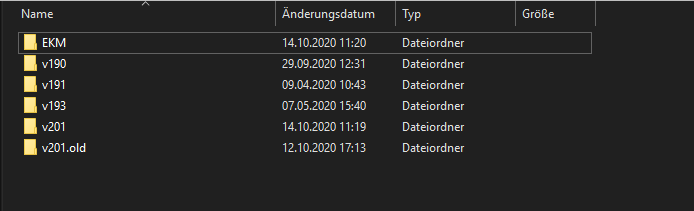 n
October 14, 2020 at 9:55 amForum Moderatorok, go to Workbench>View>Toolbox customization and see if all the required systems are checked:n
n
October 14, 2020 at 9:55 amForum Moderatorok, go to Workbench>View>Toolbox customization and see if all the required systems are checked:n Also, let me know which license you are using. Do you have enough licenses for other systems?n-AniketnHow to access Ansys help linksnGuidelines for Posting on Ansys Learning Forumn
October 18, 2020 at 6:40 pm
Also, let me know which license you are using. Do you have enough licenses for other systems?n-AniketnHow to access Ansys help linksnGuidelines for Posting on Ansys Learning Forumn
October 18, 2020 at 6:40 pmShehzad
SubscriberI am also facing problem can anyone help me in solving this problem. I have empty toolbox. Here you can see n n
November 10, 2020 at 10:41 am
n
November 10, 2020 at 10:41 amjhan456
SubscriberI am having this issue as well. I've tried everything mentioned above without success. I'm using Ansys 2020 and am connected to my school's license. nNovember 10, 2020 at 6:19 pmANSYS_MMadore
Forum ModeratorIf you use the Client ANSLIC_ADMIN Utility, go to View Status/Diagnostic Options -> Display the License Status. Can you share the output?.How are you connected to the school, via a VPN or are you on the network?.ThanksnMattnNovember 11, 2020 at 9:31 amSubscriberHi Matt, nI'm connected to my school via their VPN. nI've attached the output from the display license status to this post. nArrayMany thanks Matt, hope this helps.November 11, 2020 at 2:30 pmForum ModeratorArray Can you please ensure you can telnet to port 2325 of the license server? If this fails, you will need to work with IT to enable this communication across the VPN. nPlease try this command:ntelnet ansys-lic.see.ed.ac.uk 2325nnTelnet is not installed by default on Windows; if you try to run it you will get the message 'Telnet' is not recognized as an operable program or batch file. To install Telnet:nClick Start.nSelect Control Panel.nChoose Programs and Features.nClick Turn Windows features on or off.nSelect the Telnet Client option.nClick OK.nnThanks,nMattnNovember 11, 2020 at 3:29 pmSubscriberHi Matt, nMany thanks for that. I have ran the provided telnet command and I can see that the port is open. nThat should mean that I shouldn't have any issues connecting to the server right? So still unsure what the issue may be.nCheers,November 12, 2020 at 1:02 pmForum ModeratorArray Can you open a Windows command prompt and enter set (without the quotes) and return the full output?nNovember 12, 2020 at 5:11 pmSubscriberHi Matt, nHere's the output from the set command:nMicrosoft Windows [Version 10.0.18362.1139]n(c) 2019 Microsoft Corporation. All rights reserved.nnC:\WINDOWS\system32>setnADSK_3DSMAX_x64_2018=C:\Program Files\Autodesk\3ds Max 2018ALLUSERSPROFILE=C:\ProgramDatanANSYS202_DIR=C:\Program Files\ANSYS Inc\v202\ANSYSnANSYSLIC_DIR=C:\Program Files\ANSYS Inc\Shared Files\LicensingnANSYSLI_ELASTIC=1nANSYSLI_LCP=0nANSYS_SYSDIR=winx64nANS_OLD_ATTACH=1nAPPDATA=C:\Users\s1234567\AppData\RoamingnAWP_LOCALE202=en-usnAWP_ROOT202=C:\Program Files\ANSYS Inc\v202nCADOE_LIBDIR202=C:\Program Files\ANSYS Inc\v202\CommonFiles\Language\en-usnCommonProgramFiles=C:\Program Files\Common FilesnCommonProgramFiles(x86)=C:\Program Files (x86)\Common FilesnCommonProgramW6432=C:\Program Files\Common FilesnCOMPUTERNAME=ENG-5982nComSpec=C:\WINDOWS\system32\cmd.exenDriverData=C:\Windows\System32\Drivers\DriverDatanFLEXLM_TIMEOUT=150000000nGTK_BASEPATH=C:\Program Files (x86)\GtkSharp\2.12HOMEDRIVE=M:nHOMEPATH=HOMESHARE=\\eigg.sms.ed.ac.uk\home\s1234567nICEMCFD_ROOT202=C:\Program Files\ANSYS Inc\v202\icemcfdnICEMCFD_SYSDIR=win64_amdnLOCALAPPDATA=C:\Users\s1234567\AppData\LocalnLOGONSERVER=\\BRORAnLSTC_LICENSE=ANSYSnNUMBER_OF_PROCESSORS=4nOneDrive=C:\Users\s1234567\OneDrive - University of EdinburghnOneDriveCommercial=C:\Users\s1234567\OneDrive - University of EdinburghnOS=Windows_NTnPath=C:\Program Files (x86)\Common Files\Oracle\Java\javapath;C:\WINDOWS\system32;C:\WINDOWS;C:\WINDOWS\System32\Wbem;C:\WINDOWS\System32\WindowsPowerShell\v1.0\;C:\WINDOWS\System32\OpenSSH\;C:\Program Files\MATLAB\R2019a\runtime\win64;C:\Program Files\MATLAB\R2019a\bin;C:\Program Files (x86)\GtkSharp\2.12\bin;C:\Program Files\Common Files\Autodesk Shared\;C:\Program Files (x86)\Autodesk\Backburner\;C:\Program Files\PuTTY\;C:\Program Files\dotnet\;C:\Users\s1234567\AppData\Local\Programs\Python\Python38-32\Scripts\;C:\Users\s1234567\AppData\Local\Programs\Python\Python38-32\;C:\Users\s1234567\AppData\Local\Microsoft\WindowsApps;C:\Users\s1234567\AppData\Local\Microsoft\WindowsApps;C:\Users\s1234567\AppData\Local\Programs\Microsoft VS Code\bin;C:\Users\s1234567\.dotnet\toolsnPATHEXT=.COM;.EXE;.BAT;.CMD;.VBS;.VBE;.JS;.JSE;.WSF;.WSH;.MSCnPROCESSOR_ARCHITECTURE=AMD64nPROCESSOR_IDENTIFIER=Intel64 Family 6 Model 78 Stepping 3, GenuineIntelnPROCESSOR_LEVEL=6nPROCESSOR_REVISION=4e03nProgramData=C:\ProgramDatanProgramFiles=C:\Program FilesnProgramFiles(x86)=C:\Program Files (x86)nProgramW6432=C:\Program FilesnPROMPT=$P$GnPSModulePath=C:\Program Files\WindowsPowerShell\Modules;C:\WINDOWS\system32\WindowsPowerShell\v1.0\ModulesnPUBLIC=C:\Users\PublicnP_SCHEMA=C:\Program Files\ANSYS Inc\v202\AISOL\CADIntegration\Parasolid\PSchemanSCPLMD_LICENSE_FILE=C:\Program Files (x86)\Common Files\Honeywell\OLGAS\license.datnSystemDrive=C:nSystemRoot=C:\WINDOWSnTEMP=C:\Users\s1234567\AppData\Local\TempnTMP=C:\Users\s1234567\AppData\Local\TempnUATDATA=C:\Windows\CCM\UATData\D9F8C395-CAB8-491d-B8AC-179A1FE1BE77nUSERDNSDOMAIN=ED.AC.UKnUSERDOMAIN=EDnUSERDOMAIN_ROAMINGPROFILE=EDnUSERNAME=s1234567nUSERPROFILE=C:\Users\s1234567nwindir=C:\WINDOWSnnnThanks in advance nNovember 12, 2020 at 5:15 pmForum ModeratorPlease remove the ANSYSLI_ELASTIC environment variable.nnThank you,nMattnNovember 20, 2020 at 12:35 pmSubscriberHi Matt, nRemoving the environment variable solved the problem. Massive thanks for your help. nViewing 13 reply threads- The topic ‘Workbench loading without modules’ is closed to new replies.
Innovation Space Trending discussions
 Top Contributors
-
peteroznewman
 4868
4868 -
scabo
 1587
1587 -
Dennis Chen
 1386
1386 -
javat33489
 1242
1242 -
Shyam Prasad V Atri
1021
Top Rated Tags
© 2026 Copyright ANSYS, Inc. All rights reserved.
Ansys does not support the usage of unauthorized Ansys software. Please visit www.ansys.com to obtain an official distribution.
-


The Ansys Learning Forum is a public forum. You are prohibited from providing (i) information that is confidential to You, your employer, or any third party, (ii) Personal Data or individually identifiable health information, (iii) any information that is U.S. Government Classified, Controlled Unclassified Information, International Traffic in Arms Regulators (ITAR) or Export Administration Regulators (EAR) controlled or otherwise have been determined by the United States Government or by a foreign government to require protection against unauthorized disclosure for reasons of national security, or (iv) topics or information restricted by the People's Republic of China data protection and privacy laws.

 You are navigating away from the AIS Discovery experience

