Ansys Assistant will be unavailable on the Learning Forum starting January 30. An upgraded version is coming soon. We apologize for any inconvenience and appreciate your patience. Stay tuned for updates.
General Mechanical

General Mechanical

Topics related to Mechanical Enterprise, Motion, Additive Print and more.

why distributed parallel computing using RSM is slower than smp?

    • learner
      Subscriber

      I constructed the distribute memory processing environment using RSM, i,e with cluster containing 5 nodes with 6 cores on each.


      And compared the elapsed time between in DMP and SMP(local pc with 6 cores).


      Then, DMP's elapsed time is longer than SMP's, thus DMP is slower than SMP.


      What is the problem?


      Please guide me, thanks

    • peteroznewman
      Subscriber

      What is the interconnect technology between your 5 nodes?   If it is Ethernet, that is a very slow interconnect compared with other technologies.  Do all 5 nodes have the same clock speed and RAM available?  Do all five nodes use SSD for storage and not slower HDD storage?


      You are comparing DMP on 5 nodes x 6 cores with SMP on a single computer at 6 cores. Why don't you run Distributed on the single computer at 6 cores to more directly compare to the 5 nodes? I have found that Distributed generally solved in less time than SMP.


      I was fortunate to have a budget that allowed me to purchase a computer with two processors with 8 cores each for a total of 16 cores. Since the two processors are on the same motherboard, I have a high speed interconnect between them. All the processors are running at the same clock speed. I have a large SSD to store models that I am solving, which is a faster storage technology than HDD.


      Four years ago, I did some benchmarking using nine of my models and found that Structural models don't scale very well with number of cores. That means going from 2 to 4 cores reduced the time to 65% (not 50%) of the 2 core time.  Using 8 cores reduced the time to 50% (not 25%) of the 2 core time and using 16 cores reduced the time to 45% (not 12.5%) of the 2 core time.  The number in parenthesis is the expected reduction if the solver scaled perfectly with cores. You can see the diminishing returns. I have even seen the elapsed time increase when going from 14 cores to 16 cores. The numbers I report are average for the nine models. Some models scaled better and others scaled worse. You might try the same experiment with elapsed time vs number of cores on a Distributed solve.

    • learner
      Subscriber

      Thanks peter,


      I configured with the same 5 PCs(ssds, but connected with Ethernet).


      Even In a local computer(SMP), also when using only 2 cores is faster than whn using 6 cores totally, so i think this project is too small to do parallel computing.


      It finishs in about 2 seconds.


      I want to experience of advantage of distributed computing, would you provide me with a large workbenchv sample project for mechanical static analysis? Thanks again.

    • peteroznewman
      Subscriber

      Yes, your model is much too small. Are you on a Student License with the 32,000 node limit?  If so, you can't make large models that take a long time to solve, so you need to force the solution to solve many times by requesting 100 steps in the Analysis Setting.

    • learner
      Subscriber

      Hi peter,


      I evaluated the speed when using windows HPC cluser and when using local with project increased the number of steps in Analysis setting.


      But when using windows HPC cluster which consists of 2 nodes, it was much slow than local mode(1 node).


      My ethernet is 1Gbps.


      I can't figure out the reason. 


      I will be appreciate for you help me more, thanks

    • peteroznewman
      Subscriber

       On second thought, I don't think forcing multiple analysis steps is going to show a difference as the number of cores is increased.  I think you need a larger model.


      Please use File > Archive to create a .wbpz file and attach that to your reply so I can see the size of your model.


      Which license do you have, the limited Student license or an unlimited license?

    • learner
      Subscriber

      I have an unlimied license and attatched my project

    • peteroznewman
      Subscriber

      There is some good information in the Solution Output.


       *** WARNING ***                         CP =       9.953   TIME= 11:46:10
       It has been detected that the communication speed for Distibuted ANSYS 
       between processor 0 and processor 12 is only 79.428862 MB/sec. In     
       order to achieve optimal performance it is recommended that the        
       minimal interconnect speed between any set of processors be at least   
       1000 MB/sec. 


      Gigabit Ethernet has a theoretical speed of 1000 Mbps ~ 100 MB/sec, which is more than 100 times too slow.


      Communication speed from master to core     1 = 10120.69 MB/sec
      Communication speed from master to core     6 =    92.18 MB/sec
      Communication speed from master to core    12 =    79.43 MB/sec
      Communication speed from master to core    18 =    91.89 MB/sec
      Communication speed from master to core    24 =    81.43 MB/sec


      The speed that data flows between cores on the same node is about 10,000 MB/sec.
      That is why you are much better off having all the cores in the same box.
      They communicate over a much higher speed bus than Gigabit Ethernet.


      Here is a paper on Infiniband, which offers interconnect speeds up to 30 Gbps.


      Here is a 4-port 100 GbE Ethernet switch. You would also need a 100 GbE NIC in each computer and the right kind of cable.
      If you upgrade four computers with the 100 GbE NIC and cable and plug them into the switch, you will have spent $6,800.
      I know you said you had five computers, but you can see below that you don't need all those cores for a Mechanical job.


      Five years ago, when I was considering what to get in an HPC computer/cluster for ANSYS, I considered putting together four 4-core computers on an Infiniband network. It would have cost less than a single computer with dual 8-core processors, but the communication speed is much higher between the cores in a single computer and I also got a single large pool of memory which was much more flexible.


    • peteroznewman
      Subscriber

      FOUR WAYS TO SOLVE


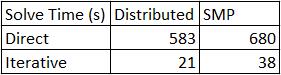
      On some models, like the one you provided, there are four ways to solve it.


      • It is almost always true that Distributed will take less time than SMP.

      • This model solved much faster on Iterative but some models will solve faster on Direct. If many solves will be done in a design study, it is worth solving it once each way (Iterative and Direct) to determine how to set it for the rest of the study.

      • Other models have content that prevents the Iterative solver from being used and will automatically switch to Direct. Every model can use Direct.


      ELAPSED TIME VS. NUMBER OF CORES


      It would be great if the elapsed time was cut in half when the number of cores doubled. That almost happens when you go from 1 core to 2 and from 2 cores to 4, but it starts to go off that trend when the cores increase to 8, 16, 32, etc.


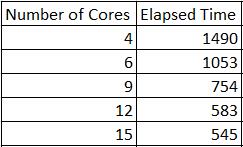
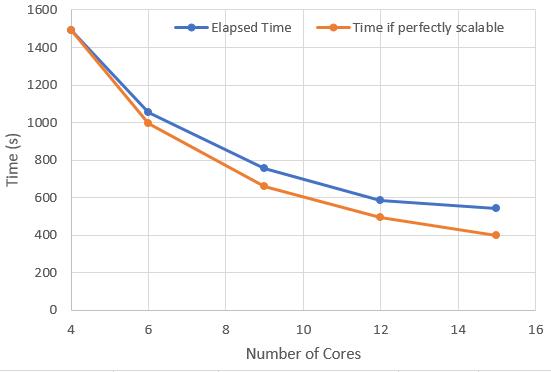
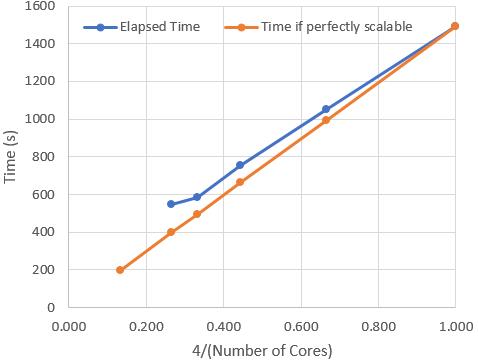
      I reduced the element size to 0.25 m to get a much bigger model and solved that model using the Direct solver (Distributed), five times, using the following number of cores and recorded the Elapsed Time in seconds.


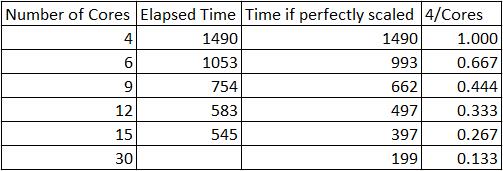
      Here is the data in a graph. The blue line is the actual time, the orange line is the perfectly scalable line. You can see that the blue line is flattening out and that 30 cores is not going to reduce the time by much.


      If the x-axis is plotted as 4/(Number of Cores) then a straight line will be made for the perfectly scalable time.


    • learner
      Subscriber

      Thank you peter for your kind information.


      I will check out more in my project.

Viewing 9 reply threads
  • The topic ‘why distributed parallel computing using RSM is slower than smp?’ is closed to new replies.
[bingo_chatbox]