Ansys Assistant will be unavailable on the Learning Forum starting January 30. An upgraded version is coming soon. We apologize for any inconvenience and appreciate your patience. Stay tuned for updates.
3D Design

3D Design

Topics related to Ansys Discovery and Ansys SpaceClaim.

Web Checkout License Error

    • Tim Dukes
      Subscriber

      Hi Support, 

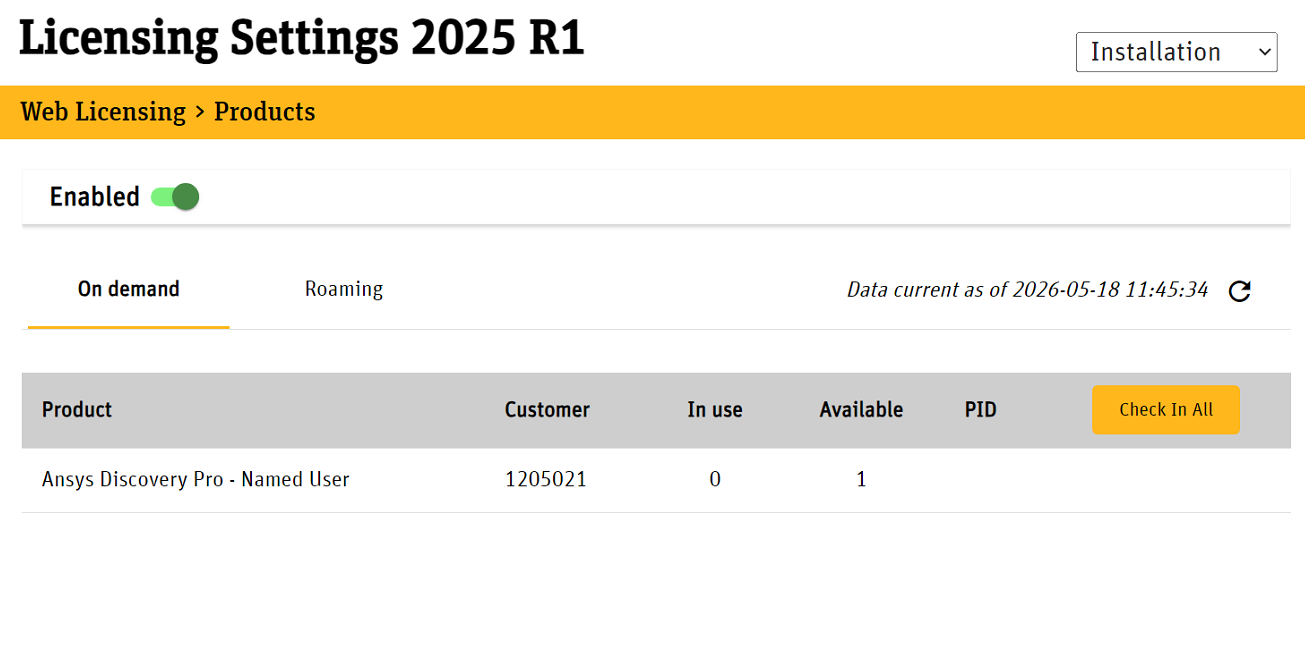
      We have a user struggling to open there SpaceClaim software. They are on a Named User of Ansy Discovery Pro. They can log in and activate the license fine through the licensing settings utility and this all looks as it should see image below. 

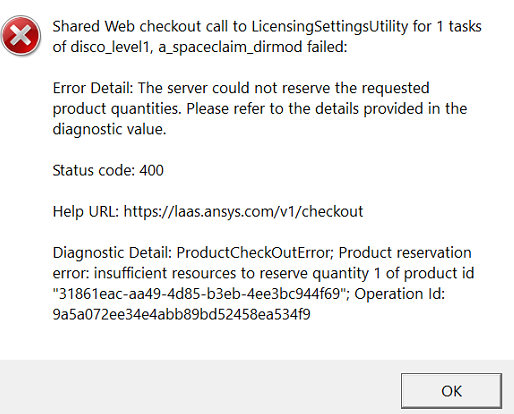
      The when opening the software the following error appears. 

      There is clearly suffucient resources available. 

      As a test I have logged into the same machine with my account and this loads up the software fine so it seems to be an account issue. 

      We have cleared the token and cache files located in the below numerous times which makes no difference.

      %userprofile%/.ansys/ansysid

      Please reach out to me via here or email as need this resolved ASAP.

      Tim Dukes

    • Rajeshwari Jadhav
      Forum Moderator

      Hi Tim,

      On client end, clear the .ansys folder to .ansys.old (%temp%), close all browsers related to Ansys and close Ansys Licensing Settings and licensing portal too.

      Use the LSU account login and LSU account logout CLI command to check and remove the account.

      For example, for v242 version for shared web licensing the follow the below command.


      Additionally try to set variable by adding the following variable to their system/user environment variable.

      variable name: ANSYS_LICENSING_WEB_ACCOUNTS

      Variable value: aac1                //acc1 represents the account no. of your shared web licenses.


      //by adding below variable, the licensing settings (ansyslmd.ini) file will be ignored and environment variable will be given preference.

      Variable name: ANS_FLEXLM_DISABLE_DEFLICPATH  

      Variable value:1 

      Hope this helps the user

Viewing 1 reply thread
  • You must be logged in to reply to this topic.
[bingo_chatbox]