TAGGED: fluent
-
-
April 6, 2026 at 3:39 pm
cesarj.95plus
SubscriberDear support, I am strugging to follow the following workflow:
- Define named surfaces with shared topology in spaceclaim
- Mesh the geometry in Fluent meshing
- Set the slidding grid in Fluent solver
Do you know any good tutorial with spaceclaim + fluent (mesh and solver?)
-
April 6, 2026 at 3:40 pm
cesarj.95plus
SubscriberI leave here my progress up to now:
As you can see, I have named the internal and external edges and used shared topology so Fluent meshing admits the geometry:
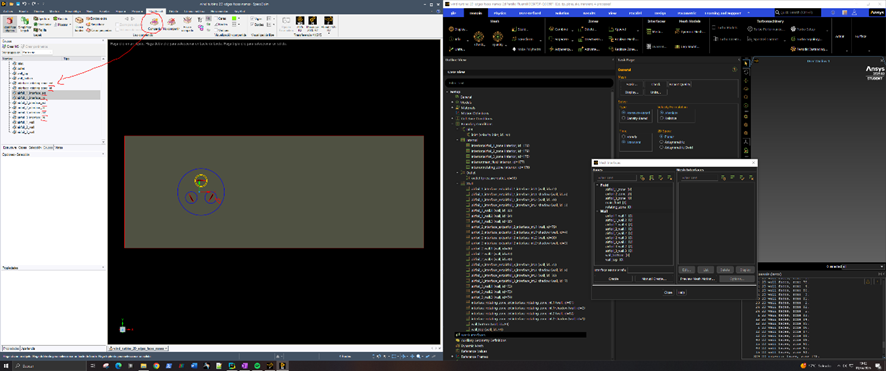
However these edges don't appear for the mesh inteface creation even though the appear as a "wall" boundary condition I tried to preview the mesh motion but even if the mesh is sliding, there are 2 points that travel with the mesh (which are construction vertex in the CAD): Â
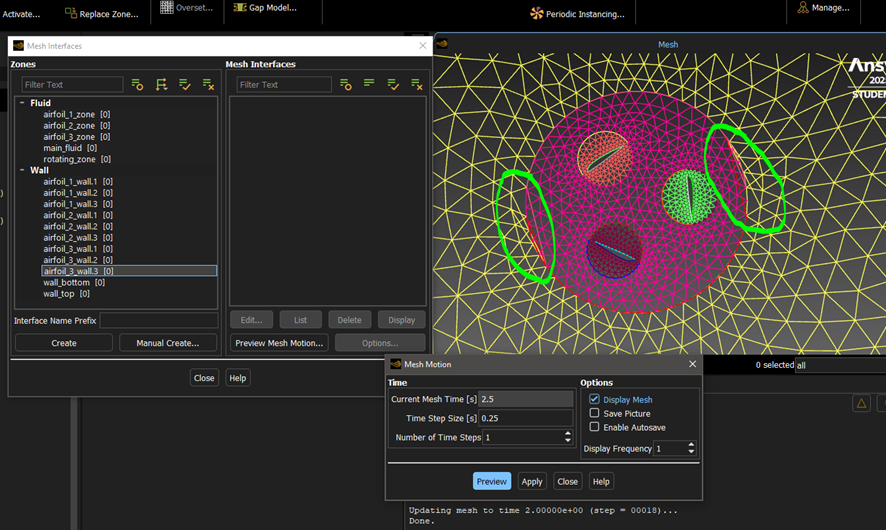
I am a bit confused with the grouping that spaceclaim does because even if I set everything into a single named selection, it appears as a deconstructed entity in Fluent, the shared topology edges don't appear anymore for mesh interfaces elections and there isn't a clear way to set the right connectivity.

-
April 7, 2026 at 10:33 am
Rob
Forum ModeratorShare Topology will connect the two sides of the non-conformal, so you're then likely to twist the mesh. I can't see the first image but assume you have wall & shadow pairs? This is one of the few times you don't use Share Topo, but it's fixable in Fluent if it's too big a task to go back to geometry.
Either set up all of the motion as frame motion and then convert to moving mesh.
OR
Have a look in the TUI for
/mesh/modify-zones/slit-...  Â
Then give Fluent the surface ID of one of the wall or shadow faces. I can't remember the rest offhand and can't launch Fluent whilst I'm updating my laptop. From there you can manually create the sliding interface zones.Â
-
- You must be logged in to reply to this topic.
-
5969
-
1906
-
1420
-
1307
-
1021
© 2026 Copyright ANSYS, Inc. All rights reserved.









