Ansys Assistant will be unavailable on the Learning Forum starting January 30. An upgraded version is coming soon. We apologize for any inconvenience and appreciate your patience. Stay tuned for updates.
General Mechanical

General Mechanical

Topics related to Mechanical Enterprise, Motion, Additive Print and more.

Use scripting API to set source and analysis time steps for Imported Displacemen

    • mscal
      Subscriber

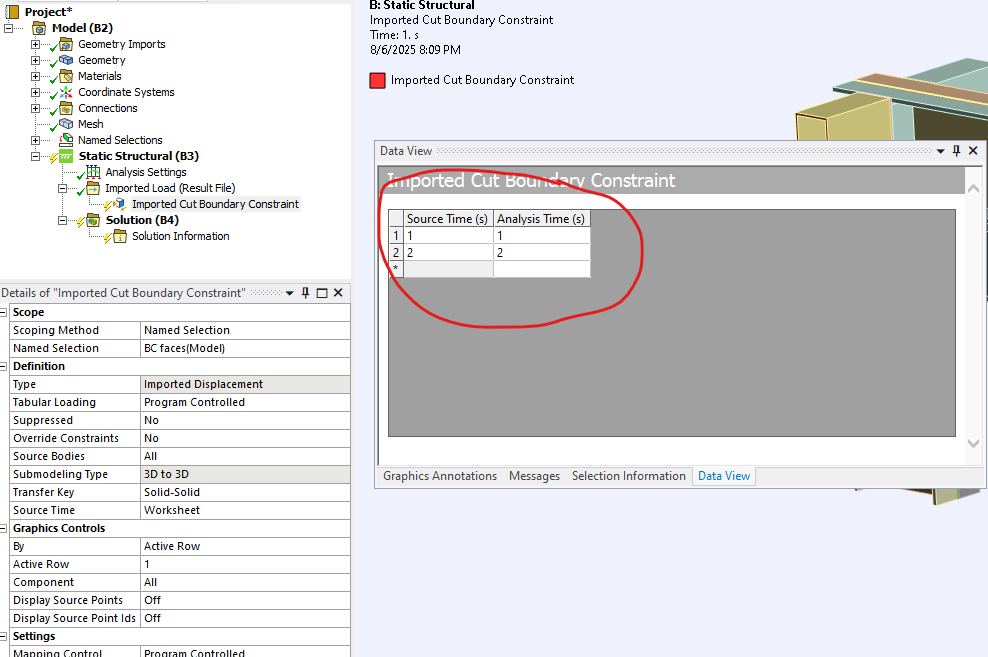
      Essentially, I am trying to automate the creation and definition of a Cut Boundary Constraint for a submodel.  This is using the ironPython in the console embedded in Mechanical.  With the Macro Recorder I have figured most of it out.  However, I cannot figure out how to access this worksheet that comes for specifying the "Source TIme" property.   Neither the Ansys.ACT.Automation.Mechanical.ImportedLoads.ImportedLoadGroup object, or Ansys.ACT.Automation.Mechanical.ImportedLoads.ImportedDisplacement object, have an input/output property that I am used to filling our tabular loads.  

      Can anyone assist?  Here is what I have so far:

      analysis = Model.Analyses[0]

      analysis.AnalysisSettings.NumberOfSteps = 2
      analysis.AnalysisSettings.LargeDeflection = False

      iload = analysis.AddImportedLoadResultFile()
      iload.ResultFile = r'path\to\source\file.rst'
      icut = iload.AddImportedCutBoundaryConstraint()
      # Set scoping method to Named Selection
      icut.PropertyByName('GeometryDefineBy').InternalValue = 1  
      # Set to BC faces
      icut.PropertyByName('ComponentSelection').InternalValue = NamedSelection.ObjectID # Assume I have defined a Named Selection

       

    • Matthew Middleton
      Ansys Employee

      table = icut.GetTableByName("Data View")
      #table.Columns    # lists column header names, which are row dictionary keys
      row1 = table.Item[0]
      #row1.Item is dictionary with keys as shown from table.Columns
      # table changes will not be seen in the table unless click away and on imported load again, or use ExtAPI.DataModel.Tree.Refresh()
      row1.Item['Source Time'] = 1    Setting to zero will set to 'End Time' when using internal transferred loads (Not External Data system)
      row1.Item['Analysis Time'] = 1.2
      # Can also access with two indices: table[row][column]
      # to add a row:
      #row2 = Ansys.ACT.Automation.Mechanical.WorksheetRow()
      # set dictionary entries like row1 above
      #table.Add(row2)
      # table.Add(None)   # If you want to fill in the columns afterward
      ExtAPI.DataModel.Tree.Refresh()
      iload.ImportLoad() 

    • mscal
      Subscriber

      It works, thank you.  Is this method/property GetTableByName, and the resulting interface to the table, documented anywhere?

    • Matthew Middleton
      Ansys Employee

      https://ansyshelp.ansys.com/account/secured?returnurl=/Views/Secured/corp/v252/en/act_script/MechAPIsImportLoad.html

Viewing 3 reply threads
  • You must be logged in to reply to this topic.
[bingo_chatbox]








