Ansys Assistant will be unavailable on the Learning Forum starting January 30. An upgraded version is coming soon. We apologize for any inconvenience and appreciate your patience. Stay tuned for updates.
General Mechanical

General Mechanical

Topics related to Mechanical Enterprise, Motion, Additive Print and more.

Unable to use design points with Harmonic Response in Workbench

    • martinazzo
      Subscriber

      I am trying to do a parametric study that includes a Harmonic Response analysis after a Modal analysis. When I try to alter parameters and run a deisgn point, I get the following error: "Unable to Start the Mechanical editor": 

      This error only happens when the Harmonic Response block is added to the model, if I try to update a parameter and run a DP having only a Modal analysis block, everything works normally. 

      I am also unable to delete the Harmonic Analysis block from workbench after this happens, when I try to delete it the following message shows:
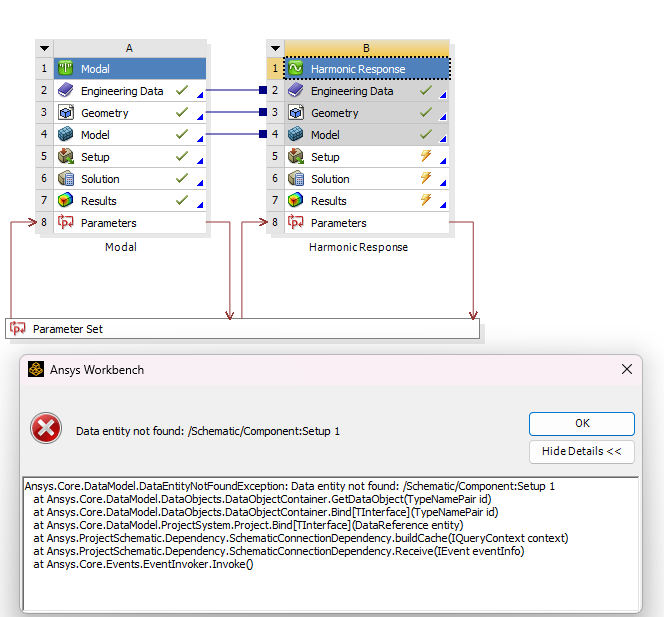
       

      However, I can delete it from inside mechanical. Also, if instead of running the design point from workbench (in the Parameters tab) I set it as current, open the editor manually and solve from there, everything works fine, the Harmonic Response is able to solve normally, so the problem seems to be in using the parameters in conjunction with the harmonic response analysis.

      I am using a geometry imported from Solidworks and using Ansys 2024 R2, no problems with licenses as I can open and run the editor normally if I do it manually.  

      I have tried to run the same simulation file in other machines and the same errors happen. I have tried re-installing ansys (making sure to do so as administrator), tried to change the the v242 folder to v242.old and still the same thing happens. 

      I also tried to create an entirely new workbench file, with a new geometry (a solid block, for testing) using the modal and the harmonic response analysis, without changing any configurations from default, and still, the same error happens, but I had previously done this kind of analysis without a problem in older versions of ansys.

      Can anyone help me find what is causing this? Thank you!

    • Gary_S
      Ansys Employee


      Open the Modal Analysis
      File > Export > Mechancal Database .mechdat
      Create a New Project
      Drag / Drop the .mechdat file into the Project schematic.
      Promote Parameters as needed. Copy in DP Parameter input values from the old Project, etc. 
      Save the New project. 


    • martinazzo
      Subscriber

      Hi Gary, I tried exporting the .mechdat file into a new project as you suggested, but nothing changed in the outcome, I still get the same errors. 

      Do you have any insights as to what might be causing this?

    • Gary_S
      Ansys Employee

      The issue might be related to license level.
      Can you tell me the license level you are using? You can see it in the banner, or File > Licensing >  License Options

      ====

      There was a defect only seen in Linux, it probably does not apply here.
      In the Modal Harmonic, is the “On Demand Expansion” Option set to Yes ?
      If so try set to No.


    • martinazzo
      Subscriber

      I have had this issue using both Premium and Enterprise license levels, always using Windows 11.

      "On Demand Expansion" is set to No. 

    • Gary_S
      Ansys Employee

      Lets rule out licensing

      Exit Ansys apps.
       In %TEMP%\.ansys, delete all the files. (note name is (dot)ansys) 
      Start Ansys and reproduce the failure.
       In %TEMP%\.ansys, examine the log files with any text editor. 
      Are there any indications of license checkout failure ?


    • martinazzo
      Subscriber


      Deleted files and reproduced the failure as suggested, log files indicate the license checkout was successful, but I still get the same error when trying to run the simulation from workbench


    • Gary_S
      Ansys Employee

      Are you using the latest Service Pack for 2024R2 (I believe it is SP4)
      Are you by chance using Windows 11 24H2 ?

    • martinazzo
      Subscriber

      I am using Windows 11 Pro 23H2.

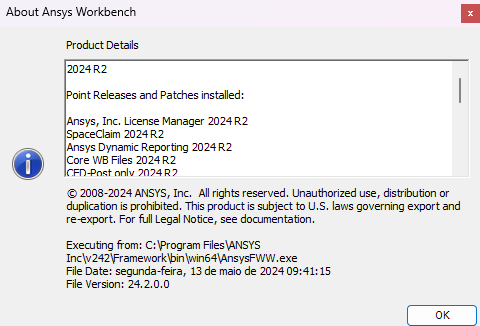
      I could not find which Service Pack version is installed, but I believe it's not the latest since the File Date indicated in the "About Ansys Workbench" is 13 of may of 2024:


    • Gary_S
      Ansys Employee

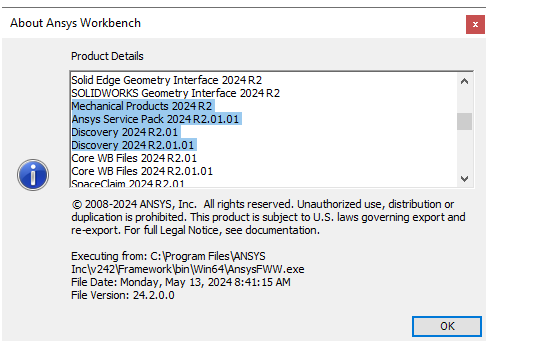
      Scroll down a bit and you will see any SPs. My example below is SP2.

Viewing 9 reply threads
  • You must be logged in to reply to this topic.
[bingo_chatbox]