Ansys Products

Ansys Products

Discuss installation & licensing of our Ansys Teaching and Research products.

Unable to start mechanical editor in Ansys 19.1 [SOLVED]

    • markh
      Subscriber

      Hello Community,


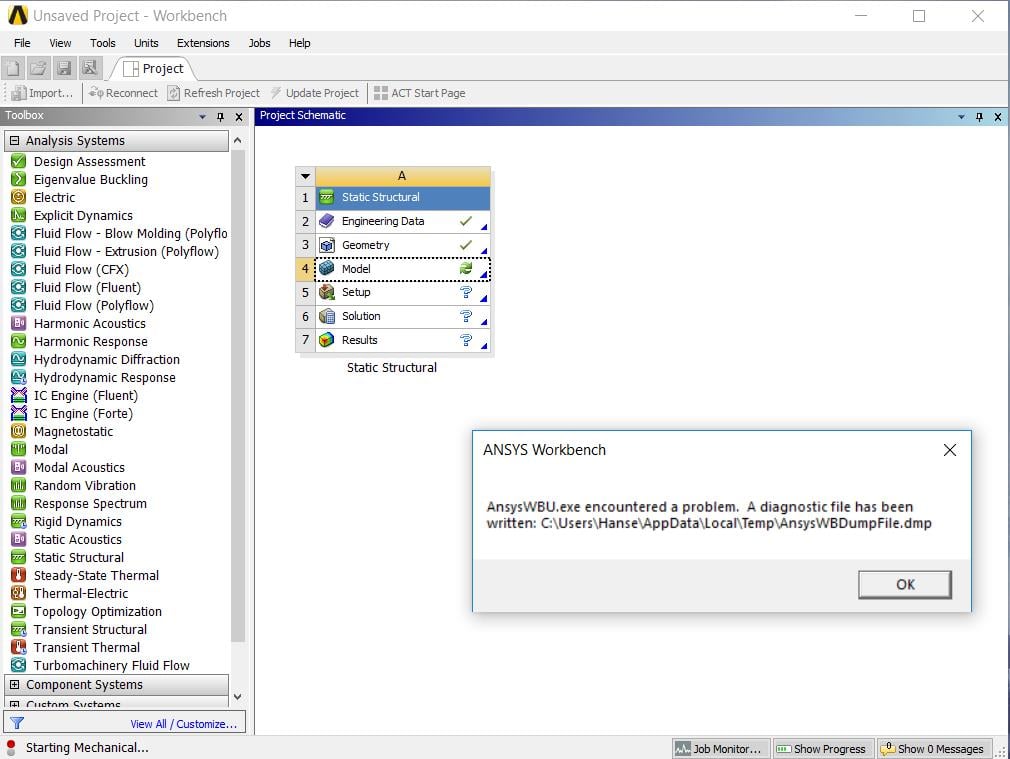
      I recently installed Ansys 19.1 on my personal computer primarily for FEA simulations using the static-structural toolbox. I run into an error when I try to open the model to mesh the part. After I import the geometry and click on model I get an error saying "unable to start the mechanical editor". I know anti-virus software has caused issues before, so I do not have that installed currently. I have read that possibly re-installing Ansys will fix it or going into the %AppData% folder and renaming v191 to "v191_old" will do the trick. I am hoping someone can give me some insight on the best way to fix this. Thanks.


      I have attached a screenshot of the error I am getting.


      Regards,


      Mark

    • George Karnos
      Ansys Employee

      Hello Mark,


      You can try renaming the %APPDATA%Ansysv191 to v191.old and try to start it again.

      Try checking the following:


      Go To:


      %TEMP%WorkbenchLogs


      Check the latest CoreEvents*.log and UIEvents*.log files.


      They may give information as to why Mechanical will not start.


      If you like, please post them here so we can check them.


      Regards,


      George


    • markh
      Subscriber

      Hi George,


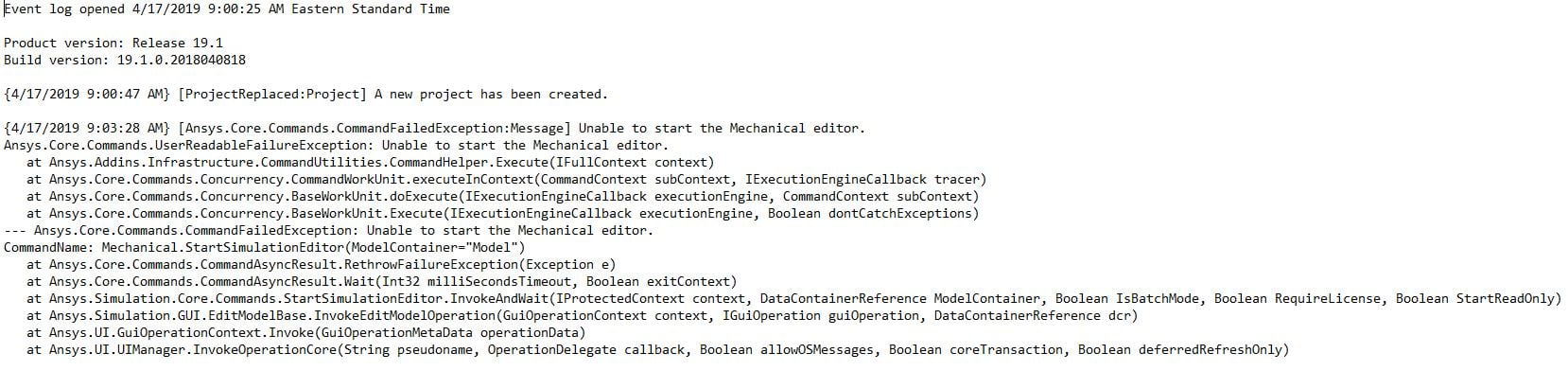
      I tried renaming v191 to v191.old and got another error. This time it wrote a .dmp file that I cannot open. I took a screenshot of the Log files and it looks like it might have something to do with licensing? I'm a college student and I use a VPN to connect to my schools license servers, so I'm unsure if that's what it is. Do you have any other suggestions on how to fix this? Thank you for your help.


      Regards,


      Mark


    • JakeC
      Ansys Employee

      Hi Markh,


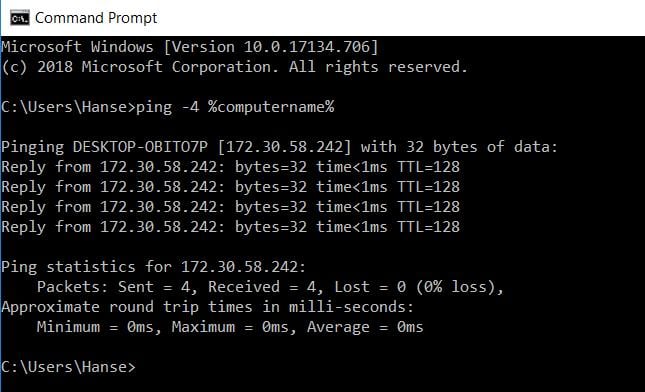
      When connected to the school's vpn, please open a command prompt and type the following:


      ping -4 %computername%


      And post a screenshot of the result.


      Thank you,


      Jake


    • markh
      Subscriber

      Hi Jake,


      Here are the results from the command prompt line. 


    • JakeC
      Ansys Employee

      Hi Markh,


      This was when you were connected to the VPN correct?


      If so, could you also post the result (while connected to the vpn) of:


      ipconfig /all


      Thank you,


      Jake

    • markh
      Subscriber

      Hi Jake,


      Yes, that was when I am connected to the VPN. This is what ipconfig /all said:


    • JakeC
      Ansys Employee

      Please open notepad as administrator.


      Then edit the following file:


      c:windowssystem32driversetchosts


      At the bottom of that file add:


      141.219.228.168 DESKTOP-OBITO7P 


      (please I am not able to tell if the host name is correct on that line (with the O and or 0), so please adjust it to be your correct hostname)


      Then retry the application.


      Thank you,


      Jake


    • markh
      Subscriber

      Hi Jake,


      I tried that and am unsure if it worked, however I talked with my schools IT and we found the cause of the error. I didn't install Ansys with administrative privileges, so workbench couldn't open up the mechanical editor library. By re-installing the software with administrative privileges it seems to have fixed the issue. Thank you for all your help and timely responses. I greatly appreciate it. 


      -Mark 

    • JakeC
      Ansys Employee

      Hi Mark,


      That is great news.  Thanks for the update.


      If you could, please mark this thread as solved.


      Thank you,


      Jake

    • Roxy
      Subscriber

      Hi All,


      I'm experiencing the same issue. I tried different things suggested in this thread and haven't been able to solve my issue completely yet. I hope someone would still respond to this thread.


      I reinstalled it as admin, it didn't really fixed the issue. So I changed %APPDATA%Ansysv191 to v191.old as suggested. It worked. BUT, the next time I start something new I won't be able to start the Mechanical Editor again. The window will pop up but it would be "not responding" and I have to end task in task manager. When I look into the APPDATA folder, there will be a new v191 folder. If I changed the folder nameto v191.old, it works again. Also, when I try to open another project, it might or might not work depends on whether a new v191 folder was created... (Haven't quite figure out the condition to create v191 folder yet...)


      Does it mean I have to manually changing the folder name every time I start something new if there's a v191 folder created? (Also, deleting the folder doesn't seem to work. It seem to only work when you rename it even if you have to merge with the v191.old already created previously...)


      Is there a permanent way to fix this? Thank you!


      Roxy

    • JakeC
      Ansys Employee

      Hi Roxy,


      I'm not sure why your app data is being corrupted.


      Perhaps Antivirus is trying to access it as it is being altered by the ansys products.


      I would suggest excluding the the %APPDATA%Ansys directory from the Antivirus.


      Or if your application is crashing it could corrupt the preferences stored in that directory.


      The v191 directory is created automatically anytime workbench is started if it doesn't exist.


      Hopefully that helps.


      Thank you,


      Jake

    • patelsachinkumar6494
      Subscriber

      HI ALL,


      I HAVE INSTALLED DISCOVERY AIM 2019 R3.  I HAVE A PROBLEM IN MECHANICAL EDITOR. WHEN I TRY TO EDIT MODEL AFTER IMPORTING GEOMETRY FROM SPACE CLAM IT OPENS GRAY WINDOW ONLY IT TAKES INFINITE TIME TO OPEN .


      REGARDS,


      sachinpatel


      MECHANICAL EDITOR WINDOWSY.

    • tsiriaks
      Ansys Employee

      Manually register the DLLs listed below by starting a Command Prompt (DOS) with "run as administrator" , then typing:


      regsvr32.exe ole32.dll


      regsvr32.exe atl.dll


      regsvr32.exe oleaut32.dll


      regsvr32.exe scrrun.dll


      regsvr32.exe jscript.dll


      regsvr32.exe vbscript.dll


      make sure they all say succeed


      Now open regular CMD Prompt, and type the following command


      move "%appdata%ansys" "%appdata%ansys.old"

    • benoit.marinus
      Subscriber
      Hello,nI have similar errors when trying to launch Ansys Mechanical on HP BL460c blades with TigerVNC grapchics. With a 2020R2 version or a fresh 2021R1, I have the same behavior.nMy module file is:n#%Module 1.0n#n# Ansys module for use with 'environment-modules' package:n#nprepend-path           PATH                   /share/apps/ansys/2021R1FluidStructures/v211/ansys/binnprepend-path           PATH                   /share/apps/ansys/2021R1FluidStructures/v211/Framework/bin/Linux64nprepend-path           PATH                   /share/apps/ansys/2021R1FluidStructuresbin/v211/Framework/bin/Linux64/Mesanprepend-path           PATH                   /share/apps/ansys_inc/shared_files/licensing/lic_adminnsetenv                 LIBGL_ALWAYS_INDIRECT  1nsetenv                 LIBGL_ALWAYS_SOFTWARE  1nsetenv                 ANSYSLMD_LICENSE_FILE  1055@10.67.71.101nsetenv                 ANSYSLIC_SYSDIR        linx64nsetenv                 ANSYS211_DIR           /share/apps/ansys/2021R1FluidStructures/v211/ansysnsetenv                 ANSYSLIC_DIR           /share/apps/ansys_inc/shared_files/licensingn n n nThe Workbench log reads:nProduct version: 2020 R2nBuild version: 20.2.0.2020052616n n{3/19/2021 1:53:48 PM} [ProjectReplaced:Project] A new project has been created.n n{3/19/2021 1:55:21 PM} [ProjectReplaced:Project] The project has been opened from /home/bmarinus/test.wbpj.n n{3/19/2021 1:57:08 PM} [ProjectSaved:Project] The current project has been saved: /home/bmarinus/test.wbpj.n n{3/19/2021 2:02:22 PM} [Ansys.Core.Commands.CommandFailedException:Message] Unable to start the Mechanical editor.nAnsys.Core.Commands.UserReadableFailureException: Unable to start the Mechanical editor.n at Ansys.Addins.Infrastructure.CommandUtilities.CommandHelper.Execute (Ansys.Core.Commands.IFullContext context) [0x00051] in <566de995729147f5991df0998917c2e4>:0n at Ansys.Core.Commands.Concurrency.CommandWorkUnit.executeInContext (Ansys.Core.Commands.CommandContext subContext, Ansys.Core.Commands.Concurrency.IExecutionEngineCallback tracer) [0x00075] in :0n--- Ansys.Core.Commands.CommandFailedException: Unable to start the Mechanical editor.nCommandName: Mechanical.EditSetup(Container=Setup, StartAsReadOnly=True)n at Ansys.Core.Commands.CommandAsyncResult.RethrowFailureException (System.Exception e) [0x0000c] in :0n at Ansys.Core.Commands.CommandAsyncResult.Wait (System.Int32 milliSecondsTimeout, System.Boolean exitContext) [0x000ae] in :0n at Ansys.Core.Commands.CommandAsyncResult.Wait () [0x00000] in :0n at Ansys.Simulation.Core.Commands.EditSetup.InvokeAndWait (Ansys.Core.Commands.IProtectedContext context, Ansys.Core.DataModel.ProjectSystem.DataContainerReference Container, System.Boolean Interactive, System.Boolean Hidden, System.Boolean StartAsReadOnly) [0x0003c] in :0n at Ansys.Simulation.GUI.EditSetupInReadOnlyMode.InvokeCommand (Ansys.UI.GuiOperationContext context, Ansys.Core.DataModel.ProjectSystem.DataContainerReference containerReference) [0x00006] in :0n at Ansys.Simulation.GUI.EditSetupBase.EditSetupOperation (Ansys.UI.GuiOperationContext context, Ansys.Core.DataModel.ProjectSystem.DataContainerReference setupContainer, Ansys.UI.Interfaces.IGuiOperation operation) [0x0024a] in :0n at Ansys.Simulation.GUI.EditSetupBase.Invoke (Ansys.UI.GuiOperationContext context) [0x00015] in :0n at Ansys.UI.GuiOperationContext.Invoke (Ansys.UI.GuiOperationMetaData operationData) [0x00007] in :0n at Ansys.UI.UIManager+c__AnonStorey0.<>m__0 () [0x00037] in :0n at Ansys.UI.UIManager.InvokeOperationCore (System.String pseudoname, Ansys.UI.Views.View+OperationDelegate callback, System.Boolean allowOSMessages, System.Boolean coreTransaction, System.Boolean deferredRefreshOnly) [0x001ea] in :0nn
Viewing 14 reply threads
  • The topic ‘Unable to start mechanical editor in Ansys 19.1 [SOLVED]’ is closed to new replies.