TAGGED: udf-fluent
-
-
March 2, 2021 at 2:08 pm
Mawen
SubscriberHellonnWhen using the Fluent UDF Macro DEFINE_GRID_MOTION I loop through all surfaces nodes. nIn what order are they looped? from left to right? What is the initial one?.Many thanks!n -
March 2, 2021 at 2:40 pm
YasserSelima
SubscriberBecause the loop is parallelised, they are not recalled in order. Not even by the same Node. nTo identify them, you have one of two options ... nThe current location, before moving them nUse F_UDMI and store an id for each face n -
March 2, 2021 at 2:54 pm
Mawen
SubscriberHi Yasser, thanks for the quick reply!n -
March 2, 2021 at 2:55 pm
YasserSelima
Subscriberyou are welcome!n -
March 5, 2021 at 12:57 pm
Mawen
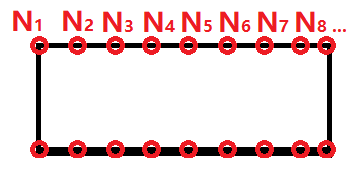
SubscriberHi Yasser,nA follow up question. For my problem I need to call two horizontal neighboring nodes, from your answer I understand the loop over surface nodes does not guarantee that.nSo it not necessarily run from N i to N i+1 ? nDo you know the range of variable v of the node loop? [0, N-1]? with N being total number of nodes?.I am just reading the manual for 'F_UDMI' but not sure I fully understand it.nhttps://www.afs.enea.it/project/neptunius/docs/fluent/html/udf/node103.htmnnDo you think this will work? Many thanks in Advance!!nLets say I have a horizontal beam cut out of the domain and mesh nodes on its surface.nTo identify the horizontal neighboring nodes I would loop over each node before moving them and store within a Store(N,3) matrixnStore[0]= Node ID; // CAN THIS BE DONE WITH F_UDMI?nStore[1]= NODE_X(v);nStore[2]= NODE_Y(v);nvoid function organize //organizes the store matrix according to Store[1] = Node_X position from small to largennFinally, I can call the nodes in order based on their location in the matrix and store ID value.nn
n
-
March 5, 2021 at 1:40 pm
YasserSelima
SubscriberI think you can do this, just a modification to the sequence. You don't need to store any thing but the variable you are sorting withnYou do not need to know the range of variables ... X position is enough . Store this in F_UDMI 0nin F_UDMI 1, store integers from 0 to N-1nCall the sorting function by HOST or by NODE 0 only .. You need to sort F_UDMI 1 only according to F_UDMI 0 ... i.e, the lower x in F_UDMI 0 should correspond to 0 in F_UDMI 1 ... the largest x, should have N-1 in F_UDMI 1nNow you are ready to move the nodes, But instead of looping over faces, F_UDMI 1 is the index. Loop over 0 to N-1 and recall each face. You can read the y-position if you need it in the calculation, and enter the new position of the face.nDon't forget to declare 2 F_UDMI before compiling. nSearch GitHub for C++ sorting functions, you might find something ready. n -
March 5, 2021 at 1:43 pm
YasserSelima
SubscriberF_UDMI is a location in the memory that store variable on each face. Exactly like Fluent stores the pressure and Temperature and other variables ... The position is stored in one of them, but we don't know which one ... so, we are restoring it again in F_UDMI 0 to help us in the sorting process. And we are storing our new cell id in F_UDMI 1n -
March 7, 2021 at 3:52 pm
Mawen
SubscriberMany thanks again YasserSelima!nA couple of questions:nWhy use F_UDMI and not just a normal array?nDo I understand correctly that to save 3 values in the F_UDMI (v, X cord, Y cord )I have to set value 3 in the GUI? I include Y coord in the sort function so I only call x neighboring on the same side of the beam. nWhat datatype is v? in the define_grid_motion function there is: Node *v; Can I simply replace it with a integer number from 0 to N-1?nn -
March 7, 2021 at 4:33 pm
Mawen
SubscriberI currently don't understand how I can save v, as what data type and resulting from that how to loop over the nodes from any stored variable.n -
March 7, 2021 at 4:52 pm
YasserSelima
SubscriberUsing an array works, but you need to define it as a global variable, so the values are saved and available in the next time-step. The tricky part here is that you need to declare a length similar to your thread length (Number of faces in the thread). Otherwise, the code will crash. The advantage of F_UDMI is that Fluent declare it for every face. So, you don't worry about declaring the right length.nYes. You can declare upto 500 face memory. If you need to save 3 variables for every face, declare 3 memories. They are numbered 0,1,2 and you can rename them only once before calculations. nNo, Node is an object .. not an integer. it has an ID which is integer, but you can't replace it with the ID.nnIf you are good in using Matlab, I remember I watched a video on youtube that generated the define_grid_motion UDF from matlab. It won't be straight forward as the video was missing some critical details. But it might be helpful. Here are two videos, and you might find more.nnnnn -

March 7, 2021 at 6:28 pm
YasserSelima
SubscriberI currently don't understand how I can save v, as what data type and resulting from that how to loop over the nodes from any stored variable./forum/discussion/comment/109657#Comment_109657
You will not be saving v. it is an object, you can save numbers.nSave integer corresponding to the face order after sorting. Now when you loop, read this integer and you know where is the face. The idea behind this is that they are not called in order, nor by the same node.nExample ... when looping, the Node takes face X. Then it reads F_UDMI for this face, it finds 10. Now it should apply the equation to position Node 10. The order now doesn't matter as you have the order stored the UDMIn -
March 8, 2021 at 6:21 pm
Mawen
SubscriberMany thanks again YasserSelima!!nnI did watch the matlab videos a while back, they are an excellent solution. nI just rewatched and found something I didnt know before is that I can get the node ID with NODE_ID(v), which is an integer value.I will give it a another try and share any result I get later. Many thanks again! n -
March 8, 2021 at 6:47 pm
YasserSelima
SubscriberBefore using the Node-id , check that all nodes read the same id. I remember in earlier case, each computing node was reading different cell-idnnjust print a message inside the loopn#if RP_NODEnMessage(Node %d , node id %d, myid, NODE_ID(v));n#endifnnAnd check the id's .. do they make sense?n -
March 12, 2021 at 11:52 am
Mawen
SubscriberHi YasserSelimanMany thanks again for your very helpful comments! I think I solved my problem. nInstead of recording the node position and sorting them I calculate an integer value n = NODE_X/len *N, with len the total length of the beam and N is the amount of nodes along horizontal edge .nWhen creating the mesh I can define the space between nodes dx and can relate the nodes via dx*n.nThe code is much shorter without all the sorting and its easier to parallelize because all information are within the called node.nHere I use the N_UDMI as you mentioned.nThanks agai -
March 12, 2021 at 1:02 pm
YasserSelima
SubscriberGood! Thanks for sharing the solution!n
-
Viewing 14 reply threads
- The topic ‘UDF: define grid motion – loop over surface nodes in what order?’ is closed to new replies.
Innovation Space
Trending discussions
Top Contributors
-
4673
-
1565
-
1386
-
1236
-
1021
Top Rated Tags
© 2025 Copyright ANSYS, Inc. All rights reserved.
Ansys does not support the usage of unauthorized Ansys software. Please visit www.ansys.com to obtain an official distribution.