TAGGED: icem-cfd
-
-
February 16, 2023 at 5:28 am
dhs22
SubscriberHi Everyone,
I am trying to export multi-block structured grids of an airfoil in CGNS format in ICEM CFD. When I export the grid as CGNS and try to import it in other code, it appears as an unstructured grid.
I followed these steps after blocking and defining the mesh parameters:
=> Convert to Multiblock Grid
=> Set up solver as CGNS
=> Defined BCs
=> Saved and exported as CGNS HDF.
Could anyone kindly help me telling how to solve this problem?
Regards.
-
February 17, 2023 at 8:32 am
Keyur Kanade
Ansys EmployeeThe steps look ok. Please check other code how it interprets this.
You can see more information at
Please go through help manual for more details
Regards,
Keyur
How to access Ansys Online Help Document
Guidelines on the Student Community
Fluids Engineering Courses | Ansys Innovation Courses
-
March 20, 2023 at 8:47 pm
dhs22
SubscriberHi Keyur,
Thanks!
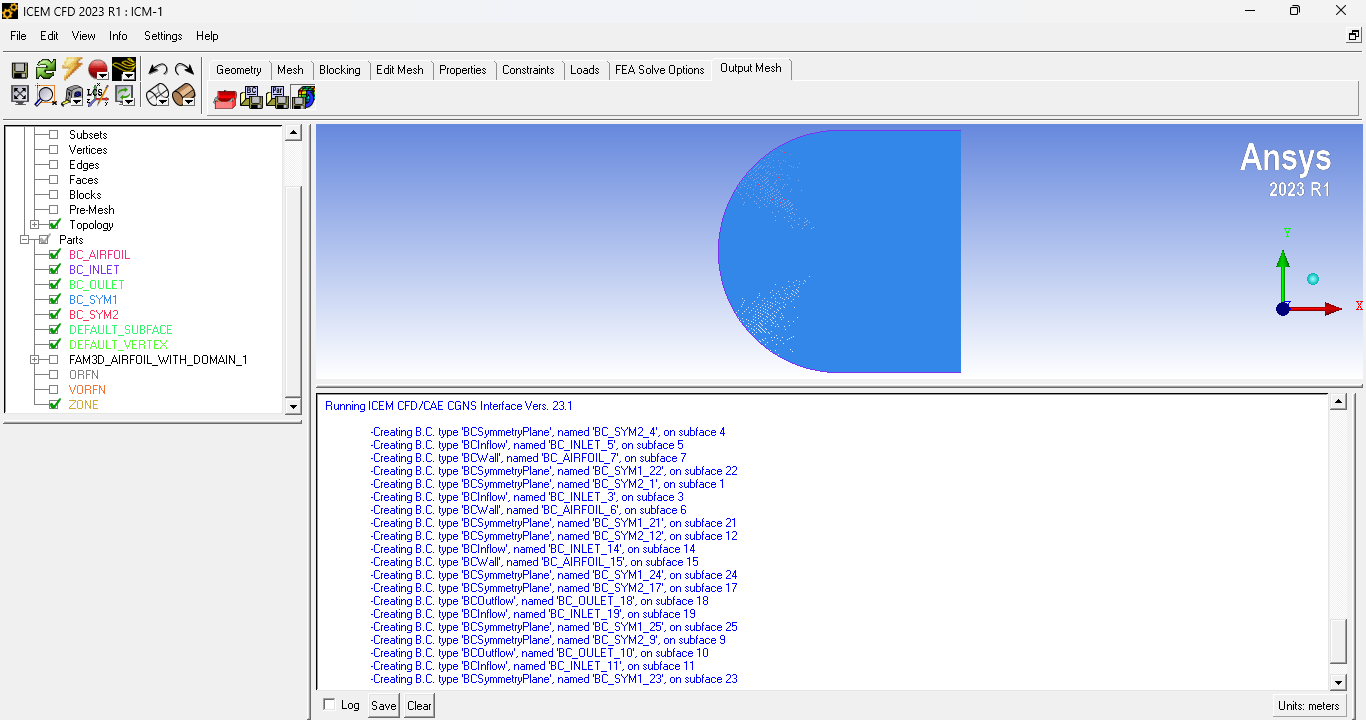
I have another troubling situation. I created a 5-block-structured grid. As this is multiblock, the boundaries are also split into blocks (subfaces). As you can see in the attached figure, for example, 'BC_AIRFOIL_7', on subface 7; 'BC_AIRFOIL_6', on subface 6; 'BC_AIRFOIL_15', on subface 15:: I want to keep all the boundaries associated with the AIRFOIL under the same name, 'BC_AIRFOIL', without any other extensions based on surface. Could you please tell me whether there is any way to give the split boundaries a single name or merge the subfaces for the boundaries?
Thank you in advance!
Regards,
Daluar
-
March 21, 2023 at 6:33 am
Keyur Kanade
Ansys EmployeeI think you can merge them in solver.
Please go through help manual for more details
Regards,
Keyur
How to access Ansys Online Help Document
Guidelines on the Student Community
Fluids Engineering Courses | Ansys Innovation Courses
-
- The topic ‘Trouble with Exporting Structured Grids in CGNS format in ICEM CFD’ is closed to new replies.

-
6450
-
1906
-
1457
-
1308
-
1022
© 2026 Copyright ANSYS, Inc. All rights reserved.