-
-
February 6, 2022 at 2:27 pm
ari9748
SubscriberHello everyone, hope you all are doing fine. I need some help regarding a problem I am facing. I wished to import a 2D mesh from GMSH(.msh file format) and run the simulation in Fluent. But when I try to edit in the setup section it runs into an error and which is follows:
Quote:
(DP 0) Update of the Setup component in Fluent failed: Exception of type 'Ansys.Fluent.Cortex.CortexNotAvailableException' was thrown.
I also noticed that by default the simulation is considering the dimension as 3D and I don't have any option to change it. Can anyone throw some ideas why am I running into this kind of problem?
P.S- I am using Ansys Fluent 19.2 release.

February 7, 2022 at 5:45 amKeyur Kanade
Ansys EmployeeIf it is 2D, make sure that your geometry and mesh is in XY plane.
Also use latest version 2022R1. Fluent 19.2 is very old build.
You can open Fluent in standalone mode in 2D.
Please go through help manual for more details
Regards Keyur
How to access Ansys Online Help Document
Guidelines on the Student Community
February 7, 2022 at 9:06 amari9748
SubscriberThank you for your generous response. Right now I am trying it with 19.2 version and would try with the latest version later. As you adviced I ran the fluent in pareallel standalone mode --->2D----> File----->Read mesh but encountering some problem still which is as follows:
Building...
mesh
==============================================================================
Node 0: Process 36428: Received signal SIGSEGV.
==============================================================================
Node 1: Process 43864: Received signal SIGSEGV.
==============================================================================
Node 2: Process 5736: Received signal SIGSEGV.
==============================================================================
Node 3: Process 50588: Received signal SIGSEGV.
==============================================================================
MPI Application rank 0 exited before MPI_Finalize() with status 2
Done.
The fl process could not be started.
Can you please provide some suggestion how I can troubleshoot this problem?
February 7, 2022 at 2:17 pmKeyur Kanade
Ansys EmployeePlease check if geometry and mesh are in XY plane.
February 7, 2022 at 4:38 pmari9748
SubscriberI have double checked. It is in x-y plane and a 2 D model for sure. Also in 2022 R1 version it gives the same problem.
February 7, 2022 at 4:45 pmRob
Forum ModeratorCan you confirm it's a 2d mesh and not a 3d mesh that's one cell thick? Will it read into Fluent Meshing?
February 7, 2022 at 5:06 pmari9748
SubscriberI have double checked. It is in x-y plane and a 2 D model for sure. Also in 2022 R1 version it gives the same problem.
February 7, 2022 at 5:07 pmRob
Forum ModeratorAnd in Fluent Meshing?
February 7, 2022 at 6:08 pmari9748
SubscriberYes I have tried. Now I tried with a simple geometry i.e a rectangle and when fed into fluent meshing it is showing:
Warning: no nodes readanalyzing boundary connectivity...done.
>
Meshing>
But here in GMSH the statistics is showing this:
I have also uploaded the .msh file.
Till now not reached to any satisfactory state.
February 8, 2022 at 11:00 amRob
Forum ModeratorStaff aren't permitted to open or download any files or attachments - it's covered in /forum/discussion/23093/why-ansys-employees-dont-download-attachments
I had a quick look at GMSH and the text I saw suggested it was 3D only, happy to be proved wrong on that but please double check.
February 8, 2022 at 3:25 pmari9748
SubscriberI have even tried other file format like (.nsh) Nastran Bulk data but same issue. Is there any other alternative to that?
February 8, 2022 at 4:04 pmRob
Forum ModeratorCan you read the geometry (ie what was read into GMSH) into SpaceClaim?
February 9, 2022 at 8:15 amari9748
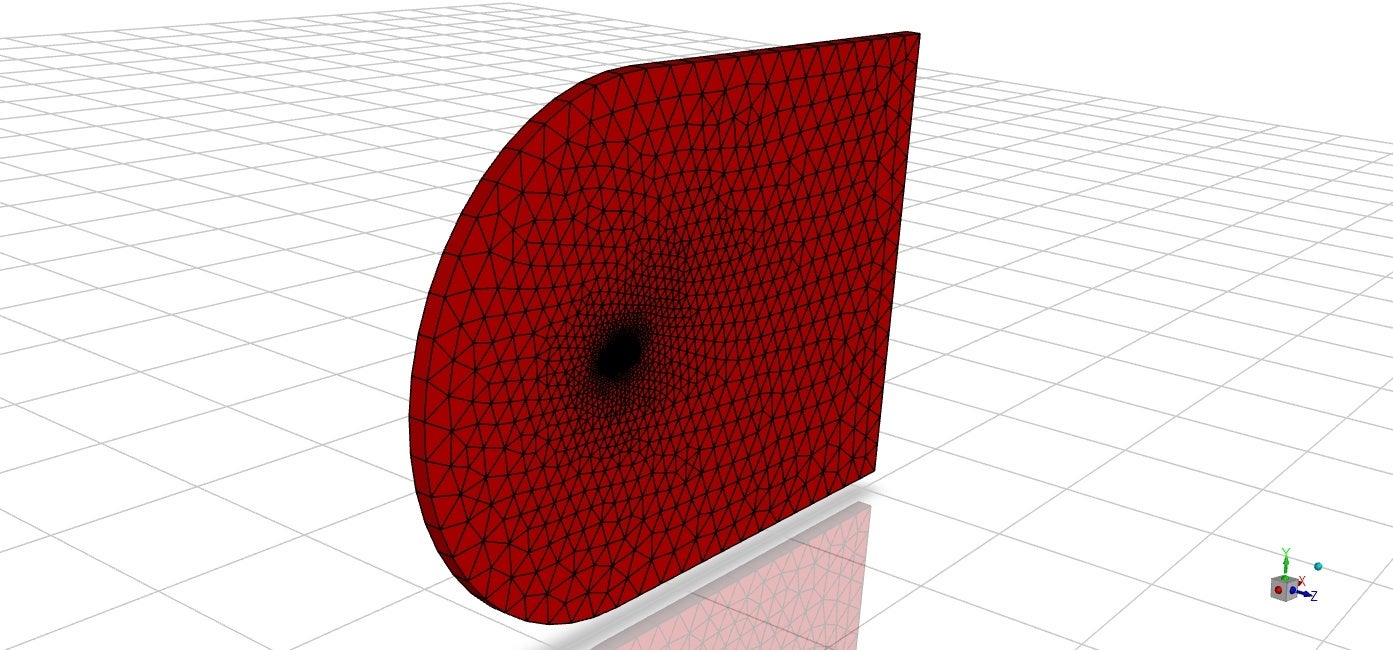
SubscriberHi Rob, thanks for your response again. Actually, I am trying to keep my mesh intact i.e what I obtained from GMSH. So, after lot of research I have found a way, firstly I exported the mesh from GMSH to Openfoam and then openFoam to Fluent as .msh file. I was finally successful in reading the same mesh file(i.e obtained from openfoam) in Fluent 2D as well as 3D. Now, what I saw the domain is having a single cell thickness and I am wondering will it be possible to run a 2D simulation in that regard? If so can you please suggest me a b.c for the front and back face(in openfoam it was kept as empty patch) whereas I am trying pressure far-field b.c for inlet and outlet. I have attached the pic how the mesh looks like.

February 9, 2022 at 10:15 amRob
Forum ModeratorOK, that sounds like the GMSH export isn't respecting the Fluent mesh requirements. Given it's one cell thick it's 2.5d and isn't quite 2d but doesn't show as 3d. I'll flag to DEV in case we need to update any readers.
Moving back to your model, in 3d. Make the z boundaries symmetry and set the perimeter faces to suit the model. Assuming it's an airfoil (from the domain shape) pressure far field is a good starting point. Walls for the bit in the middle.
February 9, 2022 at 10:27 amRob
Forum ModeratorAnd a very quick response - we think GMSH isn't exporting a true 2d mesh. CFX also uses a 1 cell thick 2d approximation so the terms may have been muddled in GMSH. Fluent's 2d approach is true 2d in that there is no z coordinate.
February 18, 2022 at 8:06 pmari9748
SubscriberThank you Rob. My issue is now solved. I have followed the GMSH---> Openfoam---> Fluent procedure and it worked well for my case.
March 12, 2022 at 11:45 amQingFeng
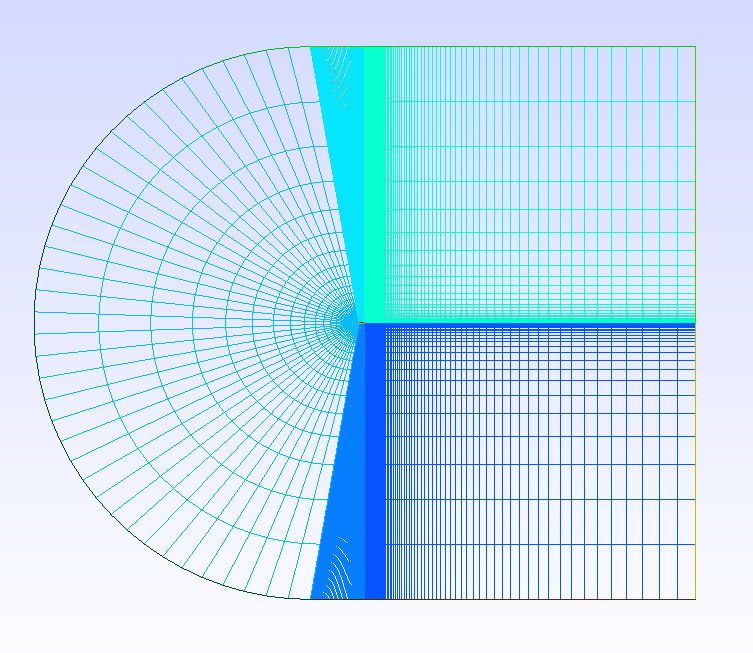
SubscriberHello ari, I also met with the same problem of transferring Gmsh mesh file into Fluent case, but after drawing a C-grid type mesh for an airfoil by Gmsh, when I try to transfer it into foam format in a tutorial airfoil2D case, the transformation failed. But in Gmsh the mesh looks fine. I checked the volume, surfaces, and the physical boundaries, they are set correctly. Do you know how to deal with this kind of problem? Thank you!

March 14, 2022 at 2:42 pmRob
Forum ModeratorThat mesh doesn't look good - the jump in cell size is horrendous.
Viewing 17 reply threads- The topic ‘Trouble importing mesh from GMSH’ is closed to new replies.
Innovation SpaceTrending discussionsTop Contributors-
5884
-
1906
-
1420
-
1306
-
1021
Top Rated Tags© 2026 Copyright ANSYS, Inc. All rights reserved.
Ansys does not support the usage of unauthorized Ansys software. Please visit www.ansys.com to obtain an official distribution.
-
Ansys Assistant will be unavailable on the Learning Forum starting January 30. An upgraded version is coming soon. We apologize for any inconvenience and appreciate your patience. Stay tuned for updates.