

-
-
August 31, 2021 at 3:35 am
Sam1
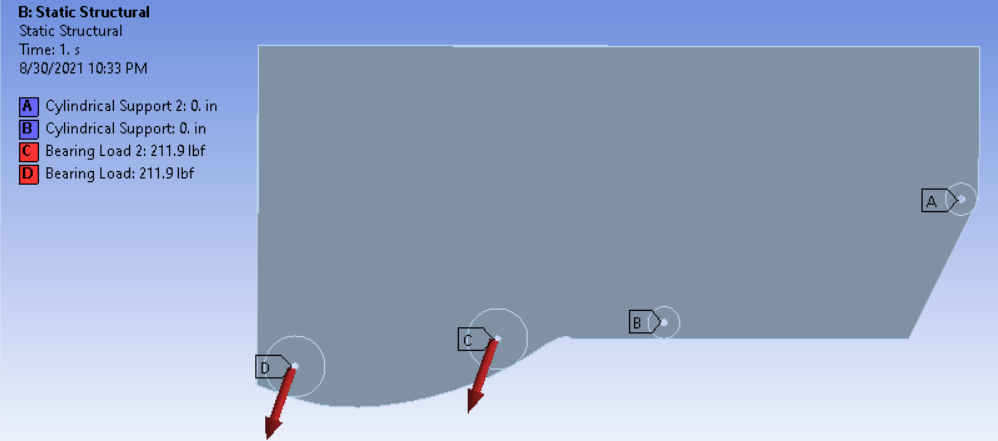
SubscriberI am running topology optimization on a structure previously analyzed in static structural and the setup is shown below. The cylindrical supports are fixed in the radial and axial directions.
September 13, 2021 at 5:30 pmGovindan Nagappan
Ansys EmployeeIn details of the result(topology density), check the "retained threshold" property.
For details, check :
Topology Density (ansys.com)
from help: Retained Threshold: This property is controlled by a slider that represents the range from minimum to maximum for the result. The default value is0.5. The supported range is0.01to0.99(greater than zero and less than 1).
Once you evaluate the result, use the slider to view the optimized topology in the graphics view. The application computes and displays the values for the Original Volume, Final Volume, Percent Volume of Original, Original Mass, Final Mass, and Percent Mass of Original properties.
-
October 18, 2023 at 7:24 pm
Marcos Garcia
SubscriberHello,
I dont have Retained Threshold on my Ansys Mechanical R2023 R2. How could i make it appear?

Regards
September 13, 2021 at 6:15 pmSubscriberDoes the retained percentage in the initial setup mean anything for this? I tried to shift the retained threshold as you mentioned and that marginally improves the remaining structure. This leaves a few more small pieces floating in space, but not too much detail. I think the optimization is still removing too much material and the default results in only the regions of exclusion.
Viewing 2 reply threads- The topic ‘Topology Optimization removes almost all material’ is closed to new replies.
Innovation Space Trending discussions
 Top Contributors
-
peteroznewman
 6695
6695 -
scabo
 1906
1906 -
Dennis Chen
 1469
1469 -
javat33489
 1313
1313 -
Shyam Prasad V Atri
1022
Top Rated Tags
© 2026 Copyright ANSYS, Inc. All rights reserved.
Ansys does not support the usage of unauthorized Ansys software. Please visit www.ansys.com to obtain an official distribution.
-


The Ansys Learning Forum is a public forum. You are prohibited from providing (i) information that is confidential to You, your employer, or any third party, (ii) Personal Data or individually identifiable health information, (iii) any information that is U.S. Government Classified, Controlled Unclassified Information, International Traffic in Arms Regulators (ITAR) or Export Administration Regulators (EAR) controlled or otherwise have been determined by the United States Government or by a foreign government to require protection against unauthorized disclosure for reasons of national security, or (iv) topics or information restricted by the People's Republic of China data protection and privacy laws.

 You are navigating away from the AIS Discovery experience