Ansys Assistant will be unavailable on the Learning Forum starting January 30. An upgraded version is coming soon. We apologize for any inconvenience and appreciate your patience. Stay tuned for updates.
3D Design

3D Design

Topics related to Ansys Discovery and Ansys SpaceClaim.

Top View Direction Z(SpaceClaim Default)

TAGGED: 

    • Don Lewis
      Subscriber

      If Z is the spaceclaim default; Why does every new installation switch to Y?

    • Devendra Badgujar
      Forum Moderator

      Hi Don Lewis

      Let me check and get back to you on this.

    • Devendra Badgujar
      Forum Moderator

      Hi Don Lewis

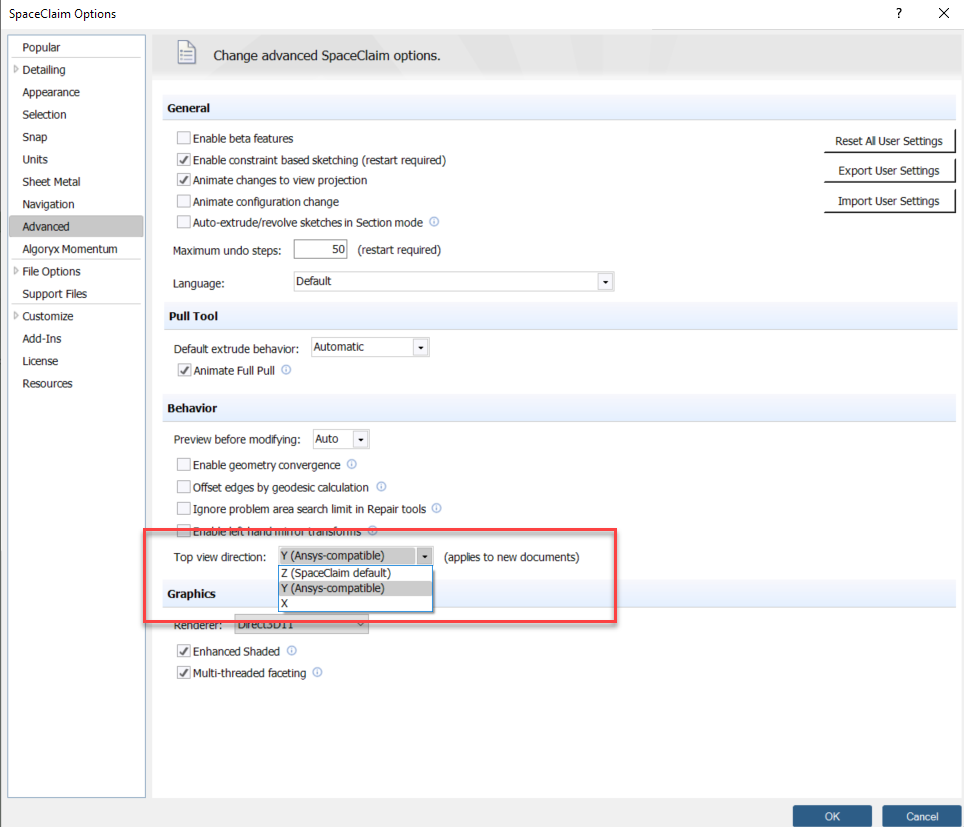
      If you go to File > SpaceClaim Options > Advanced, you can change the Top View Direction. (this will apply to all new documents, not the current SpaceClaim design).

      See attached screenshot for the option I am referring to.

      Top view direction: Allows you to change the top view to Z, Y, or X. This setting is saved with the document and only applies to new documents. You may want to change this setting when you import drawings from other CAD applications that use a different upward direction.

      This option is automatically set to Y when you run SpaceClaim with an Ansys license, giving your design the same orientation in SpaceClaim and Ansys. Choose X when you need to comply with manufacturing conventions.

      Regards.
    • Don Lewis
      Subscriber

      The question wasn't how, but why do I have to.

    • Devendra Badgujar
      Forum Moderator

      Hi Don Lewis

      Ansys by default sets this option to Y in SpaceClaim for every new installation. This is done to give the design the same orientation in SpaceClaim and Ansys. 

      Regards.

Viewing 4 reply threads
  • The topic ‘Top View Direction Z(SpaceClaim Default)’ is closed to new replies.
[bingo_chatbox]








