

-
-
February 15, 2022 at 3:43 am
JerryChu
SubscriberHi~
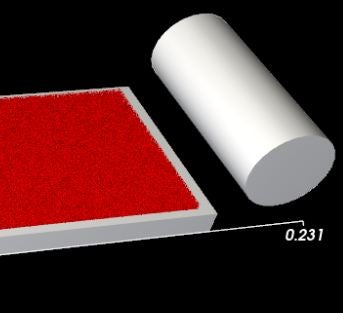
I want to use the Ansys rocky to set the roller rotation and linear translation, but after setting the rotation center of the initial roller position, when the roller starts to move, the rotation will become a rotation around this rotation center and cannot be linearly translated. May I ask which side do I need to set to achieve roller rotation and linear translation?
Thanks!
March 17, 2022 at 8:51 pmRK
Ansys EmployeeHello,
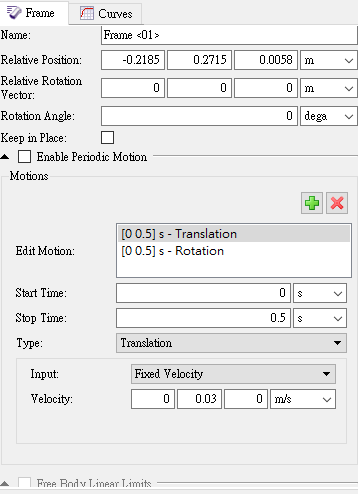
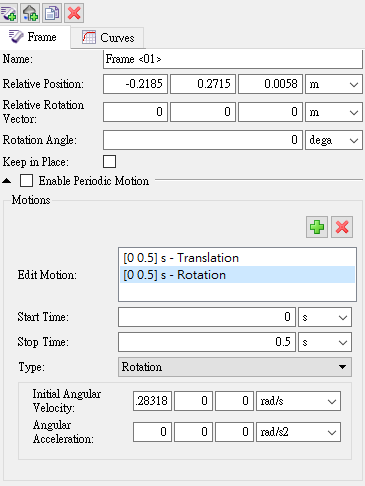
To apply more than one movement to a single geometry, add multiple motions to a single Motion Frame, or create a nested (child) Motion Frame and then apply the child frame to the geometry.
Alternately, you can refer them to this article in the Rocky help manual - 3.3.3.4. Apply a Motion Frame to an Imported Geometry
April 1, 2022 at 1:38 amSubscriberHello May I ask if adding multiple motions to a single Motion Frame is as shown in the picture below? Because I made such a setting to bring the Motion Frame into the roller, after the roller moves, it will start to rotate around the rotation center of the initial roller position (-0.2185,0.2715,0.0058) and cannot be linearly translated. Even if the Relative Position is set to the origin (0,0,0), the roller will still rotate around the origin. Is there any setting I need to modify?
Thank you.
Viewing 2 reply threads- The topic ‘To simulate the roller translation and rotation using Ansys rocky’ is closed to new replies.
Innovation Space Trending discussions
 Top Contributors
-
peteroznewman
 5834
5834 -
scabo
 1906
1906 -
Dennis Chen
 1420
1420 -
javat33489
 1305
1305 -
Shyam Prasad V Atri
1021
Top Rated Tags
© 2026 Copyright ANSYS, Inc. All rights reserved.
Ansys does not support the usage of unauthorized Ansys software. Please visit www.ansys.com to obtain an official distribution.
-


The Ansys Learning Forum is a public forum. You are prohibited from providing (i) information that is confidential to You, your employer, or any third party, (ii) Personal Data or individually identifiable health information, (iii) any information that is U.S. Government Classified, Controlled Unclassified Information, International Traffic in Arms Regulators (ITAR) or Export Administration Regulators (EAR) controlled or otherwise have been determined by the United States Government or by a foreign government to require protection against unauthorized disclosure for reasons of national security, or (iv) topics or information restricted by the People's Republic of China data protection and privacy laws.

 You are navigating away from the AIS Discovery experience