-
-
May 30, 2023 at 10:20 am
David Lee
SubscriberDear Sir/Madam,
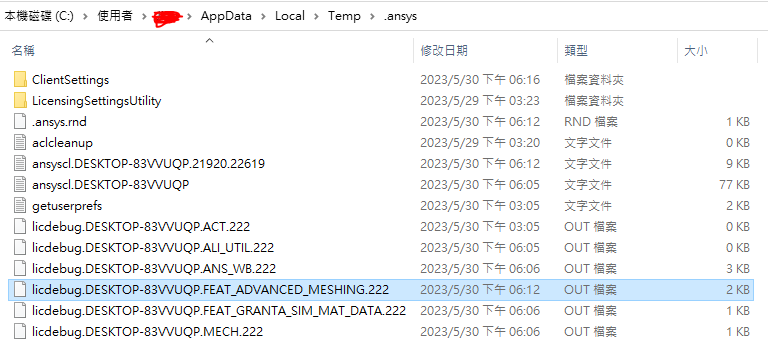
Upon reinstalling to the newer version of ANSYS (from 19.2 -> 22 R2) I ended up obtaining the error message as suggested in the title of this post. I have tried cleaning up any residual files from the previous version and had my devil dance with the Client Licensing Settings, still obtained no resolution. Could anyone help me run any diagnosis to identify where exactly is the problem?


-
June 1, 2023 at 9:06 pm
VJ
Ansys EmployeeHi David, are you pointed to a license server correctly?
If you open the licdebug for ADVANCED_MESHING.222 in Notepad and scroll down, what error message do you see?
Can you try going to %appdata% and renaming the Ansys folder to Ansys.old.
Now try relaunching the application..
-
June 9, 2023 at 11:45 am
MangeshANSYS
Ansys EmployeeFirst, please contact the license server administrator and have them verify if a license that supports Ansys 2022 R2 is available on the license server or not. secondly check the error seen inside the licdebug file highlighted in your screen shot. share any error codes seen in error messages
-
Viewing 2 reply threads
- The topic ‘“The Meshing editor does not have a valid license. …”’ is closed to new replies.

Innovation Space
Trending discussions
Top Contributors
-
5869
-
1906
-
1420
-
1306
-
1021
Top Rated Tags
© 2026 Copyright ANSYS, Inc. All rights reserved.
Ansys does not support the usage of unauthorized Ansys software. Please visit www.ansys.com to obtain an official distribution.