

-
-
May 10, 2021 at 9:16 am
oscarhg08
SubscriberMay 13, 2021 at 1:18 pmANSYS_MMadore
Forum ModeratorCould you please open a Windows Command Prompt and type "set" and return the full output?
Has this ever worked for you and just stopped? If so, please try renaming your %APPDATA%\Ansys\v211 directory to v211.old to see if that makes any difference.
May 13, 2021 at 2:01 pmSubscriberALLUSERSPROFILE=C:\ProgramData
ANSYS211_DIR=C:\Program Files\ANSYS Inc\v211\ANSYS
ANSYSEM_ROOT211=C:\Program Files\AnsysEM\AnsysEM21.1\Win64
ANSYSLIC_DIR=C:\Program Files\ANSYS Inc\Shared Files\Licensing
ANSYS_SYSDIR=winx64
ANS_OLD_ATTACH=1
APPDATA=C:\Users\OSCAR-HG\AppData\Roaming
AWP_LOCALE211=en-us
AWP_ROOT211=C:\Program Files\ANSYS Inc\v211
CADOE_LIBDIR211=C:\Program Files\ANSYS Inc\v211\CommonFiles\Language\en-us
CommonProgramFiles=C:\Program Files\Common Files
CommonProgramFiles(x86)=C:\Program Files (x86)\Common Files
CommonProgramW6432=C:\Program Files\Common Files
COMPUTERNAME=OSCARLAPTOP
ComSpec=C:\Windows\system32\cmd.exe
CPLEX_STUDIO_BINARIES1210=C:\Program Files\IBM\ILOG\CPLEX_Enterprise_Server1210\CPLEX_Studio\opl\bin\x64_win64;C:\Program Files\IBM\ILOG\CPLEX_Enterprise_Server1210\CPLEX_Studio\opl\oplide\;C:\Program Files\IBM\ILOG\CPLEX_Enterprise_Server1210\CPLEX_Studio\cplex\bin\x64_win64;C:\Program Files\IBM\ILOG\CPLEX_Enterprise_Server1210\CPLEX_Studio\cpoptimizer\bin\x64_win64
CPLEX_STUDIO_DIR1210=C:\Program Files\IBM\ILOG\CPLEX_Enterprise_Server1210\CPLEX_Studio
DriverData=C:\Windows\System32\Drivers\DriverData
HOMEDRIVE=C:
HOMEPATH=\Users\OSCAR-HG
LOCALAPPDATA=C:\Users\OSCAR-HG\AppData\Local
LOGONSERVER=\\OSCARLAPTOP
LSTC_LICENSE=ANSYS
NUMBER_OF_PROCESSORS=8
OneDrive=C:\Users\OSCAR-HG\OneDrive
OneDriveConsumer=C:\Users\OSCAR-HG\OneDrive
OS=Windows_NT
Path=C:\Program Files (x86)\NVIDIA Corporation\PhysX\Common;C:\Program Files\Intel\iCLS Client\;C:\Windows\system32;C:\Windows;C:\Windows\System32\Wbem;C:\Windows\System32\WindowsPowerShell\v1.0\;C:\Program Files\Intel\WiFi\bin\;C:\Program Files\Common Files\Intel\WirelessCommon\;C:\WINDOWS\system32;C:\WINDOWS;C:\WINDOWS\System32\Wbem;C:\WINDOWS\System32\WindowsPowerShell\v1.0\;C:\WINDOWS\System32\OpenSSH\;C:\Program Files\Microsoft SQL Server\Client SDK\ODBC\110\Tools\Binn\;C:\Program Files (x86)\Microsoft SQL Server\120\Tools\Binn\;C:\Program Files\Microsoft SQL Server\120\Tools\Binn\;C:\Program Files\Microsoft SQL Server\120\DTS\Binn\;C:\Program Files (x86)\Windows Kits\8.1\Windows Performance Toolkit\;D:\Archivos del programa\MATLAB\R2017a\runtime\win64;D:\Archivos del programa\MATLAB\R2017a\bin;D:\Program Files\MATLAB\R2017a\runtime\win64;D:\Program Files\MATLAB\R2017a\bin;C:\Program Files (x86)\Intel\Intel(R) Management Engine Components\DAL;C:\Program Files\Intel\Intel(R) Management Engine Components\DAL;C:\Program Files\NVIDIA Corporation\NVIDIA NvDLISR;C:\Windows\system32;C:\Windows;C:\Windows\System32\Wbem;C:\Windows\System32\WindowsPowerShell\v1.0\;C:\Windows\System32\OpenSSH\;C:\Program Files\MATLAB\R2020b\runtime\win64;C:\Program Files\MATLAB\R2020b\bin;C:\Users\OSCAR-HG\AppData\Local\Microsoft\WindowsApps;
PATHEXT=.COM;.EXE;.BAT;.CMD;.VBS;.VBE;.JS;.JSE;.WSF;.WSH;.MSC
PROCESSOR_ARCHITECTURE=AMD64
PROCESSOR_IDENTIFIER=Intel64 Family 6 Model 94 Stepping 3, GenuineIntel
PROCESSOR_LEVEL=6
PROCESSOR_REVISION=5e03
ProgramData=C:\ProgramData
ProgramFiles=C:\Program Files
ProgramFiles(x86)=C:\Program Files (x86)
ProgramW6432=C:\Program Files
PROMPT=$P$G
PSModulePath=C:\Program Files\WindowsPowerShell\Modules;C:\Windows\system32\WindowsPowerShell\v1.0\Modules;C:\Program Files (x86)\Microsoft SQL Server\120\Tools\PowerShell\Modules\
PUBLIC=C:\Users\Public
P_SCHEMA=C:\Program Files\ANSYS Inc\v211\AISOL\CADIntegration\Parasolid\PSchema
SESSIONNAME=Console
SIMPLORER_HOME=C:\Program Files\AnsysEM\AnsysEM21.1\Win64
SIWAVE_INSTALL_DIR=C:\Program Files\AnsysEM\AnsysEM21.1\Win64
SW_SIM_HYDRA=C:\Program Files\Common Files\SolidWorks Shared\Simulation Worker Agent\
SW_SIM_MPIT=INTELMPI
SW_SIM_TEMP=C:\ProgramData\SOLIDWORKS\SW_net_sim_temp\
SystemDrive=C:
SystemRoot=C:\Windows
TEMP=C:\Users\OSCAR-HG\AppData\Local\Temp
TMP=C:\Users\OSCAR-HG\AppData\Local\Temp
USERDOMAIN=OSCARLAPTOP
USERDOMAIN_ROAMINGPROFILE=OSCARLAPTOP
USERNAME=OSCAR-HG
USERPROFILE=C:\Users\OSCAR-HG
windir=C:\Windows
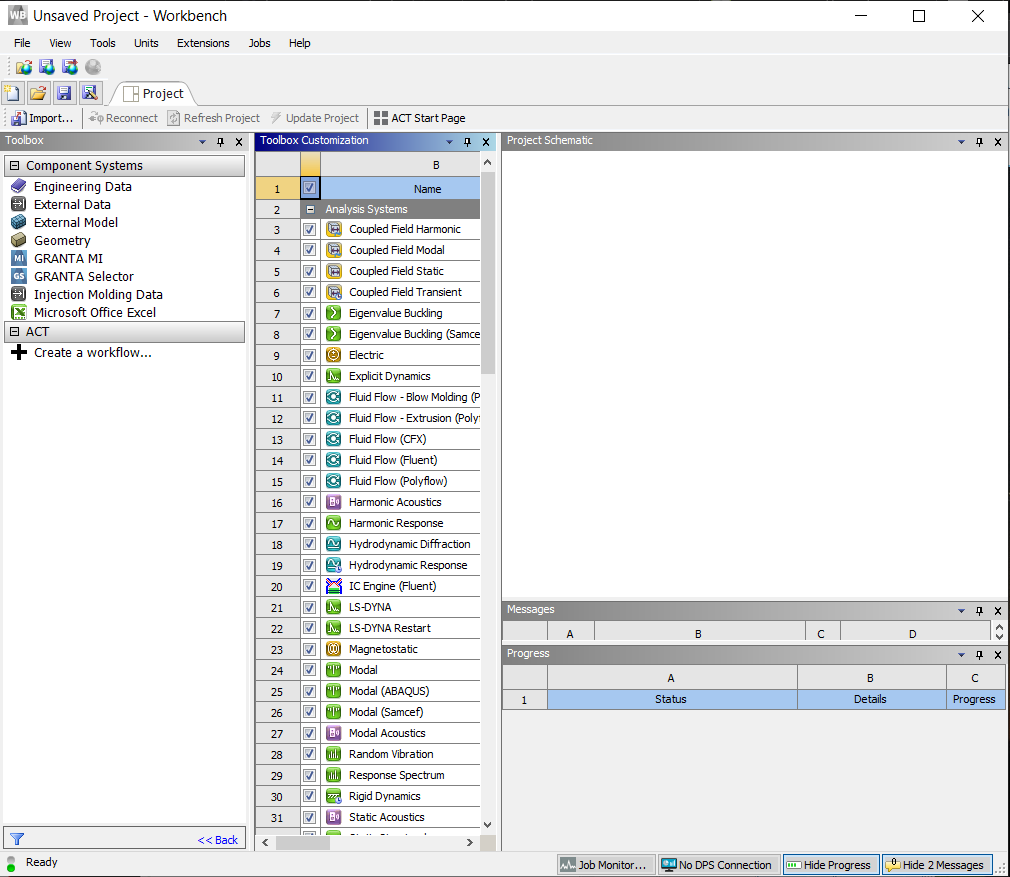
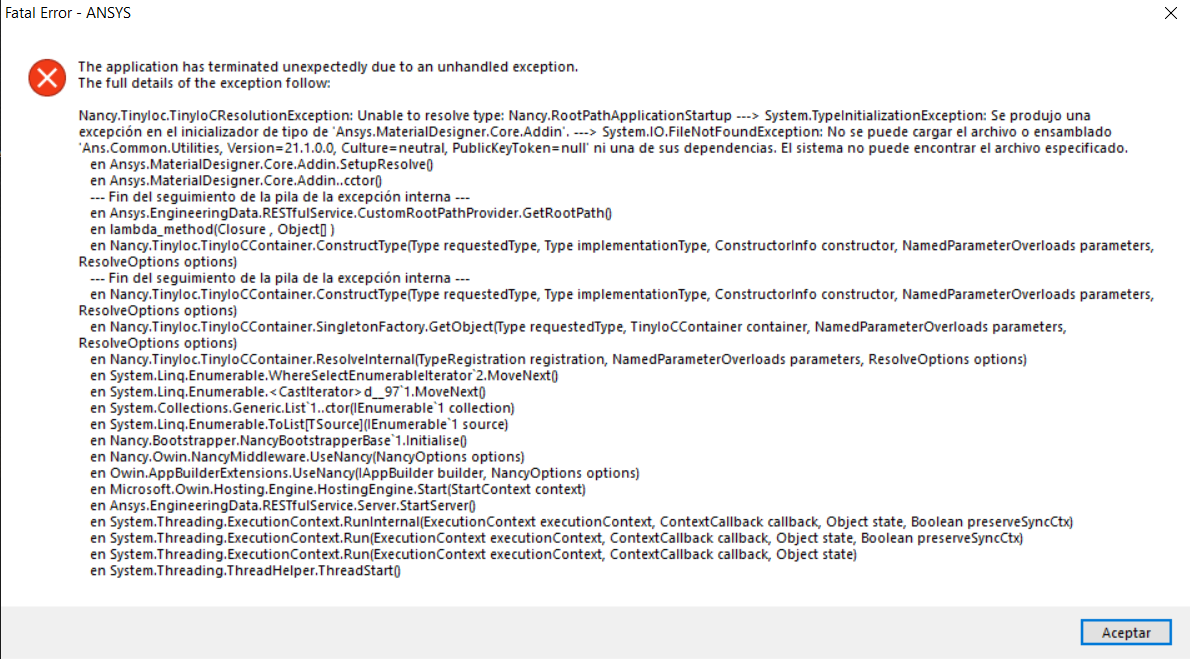
I had my Academic license, then I received the key for the ansys manager I upload it and work but then I update my ansys fluid and structures because I need the module ICEPACK and when I tryed to open the workbench it just don't worked now I tryied and it always says it looks like the server is busy try again later, and the error appears every time I try, also If I try to add let's say any tool to the toolbox when I check the module in View all/options of the toolbox it does not work and it just appear :
May 13, 2021 at 2:29 pmForum ModeratorCould you please try uninstalling the Student version and full version and then delete the C:\Program Files\Ansys Inc directory and %APPDATA%\Ansys directory. Then reinstall the Fluids and Structures package.
May 13, 2021 at 2:31 pmSubscriberDo I need also to uninstall also the license manager?
May 13, 2021 at 2:31 pmSubscriberHow do I delete that directory %APPDATA%\Ansys.
May 13, 2021 at 2:38 pmForum ModeratorIt will be C:\Users\OSCAR-HG\AppData\Roaming\Ansys, you can delete that directory. Please do uninstall the license manager as well, so there is a clean slate to start. You can find instructions here: https://ansyshelp.ansys.com/account/secured?returnurl=/Views/Secured/corp/v211/en/installation/win_uninstalllic.html
May 13, 2021 at 9:14 pmSubscriber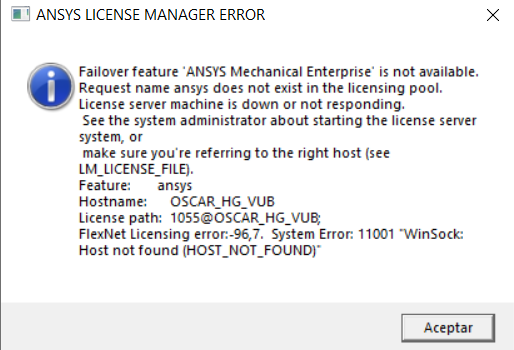 it happens again
May 14, 2021 at 11:54 amForum ModeratorIf your license is installed on the same machine, you should be specifying OSCARLAPTOP as the hostname based on the details you have provided. Is OSCAR_HG_VUB some other machine, as that host is not known to the client you're on, OSCARLAPTOP.
Viewing 8 reply threads- The topic ‘The application has terminated unexpectedly due to an unhandled exception (launch error)’ is closed to new replies.
Innovation Space Trending discussions
 Top Contributors
-
peteroznewman
 5159
5159 -
scabo
 1836
1836 -
Dennis Chen
 1387
1387 -
javat33489
 1249
1249 -
Shyam Prasad V Atri
1021
Top Rated Tags
© 2026 Copyright ANSYS, Inc. All rights reserved.
Ansys does not support the usage of unauthorized Ansys software. Please visit www.ansys.com to obtain an official distribution.
-


The Ansys Learning Forum is a public forum. You are prohibited from providing (i) information that is confidential to You, your employer, or any third party, (ii) Personal Data or individually identifiable health information, (iii) any information that is U.S. Government Classified, Controlled Unclassified Information, International Traffic in Arms Regulators (ITAR) or Export Administration Regulators (EAR) controlled or otherwise have been determined by the United States Government or by a foreign government to require protection against unauthorized disclosure for reasons of national security, or (iv) topics or information restricted by the People's Republic of China data protection and privacy laws.

 You are navigating away from the AIS Discovery experience