

TAGGED: sweep-mesh
-
-
August 6, 2020 at 11:56 am
ApurbaDeka
SubscriberHello All,
I have this simple CAD part ( parallelepiped). I am trying to sweep it with automatic thin/manual thin taking element as solid shell. I am not able to, Ansys gives me the error message as shown in the figure. But I think the part satisfies the source and target but still not able to mesh, I do not know why ! Can anyone help me?
August 6, 2020 at 1:18 pmKeyur Kanade
Ansys EmployeeCan you please try multizone option. nPlease check geometry in SpaceClaim. nSelect geometry in structure tree --> Use right click --> Select Check Geometry. nThe geometry should be error free to proceed. nIf geometry has any errors, please modify/recreate geometry at those places. nRegards,nKeyurnGuidelines for Posting on Ansys Learning ForumnHow to access ANSYS help linksnnAugust 6, 2020 at 2:45 pmSubscriberHi ! I checked the geometry as you said but no any problem found.n I think, multizone will create mesh with solid element. I am interested in solid shell element which can be called only in automatic thin/manual thin sweep option. Please correct me if I am wrong.nnRegards,nApurbanAugust 7, 2020 at 5:42 amAniket Chavan
Forum ModeratorYes, you are correct, only thin sweep creates solsh elements. Have you defined sources correctly in manual thin method? Also, the model looks a bit thick to me for thin meshing:n-AniketnHow to access Ansys Online Help DocumentnAugust 7, 2020 at 7:16 amSubscriberHi Aniket! Yes, I tried all possible source selection. I am attaching the CAD file. I let you try to do thin sweep. Please let me know what do you think? Model dimension as follows:nlength: 800 mm and thickness: 60 mm. nI think it qualifies for the solsh element. I will go through the link you sent. Thanks!nnAugust 7, 2020 at 10:48 amSubscriberHello !nThe problem is resolved thanks to your link ! It was failing the third requirement of thin model sweeping - The model must have an obvious "side" that is perpendicular to the source and target; all of the side areas must connect directly from source to target. nIn the model if you notice, the angle between the largest and smallest faces are 90.1 degree in one side and 89.9 degree in other side. So when I create a new body with 90 degree it works.nI have another doubt regarding mesh size in the same problem. If I use mesh size less than equal to 27,8 mm my mesh fails and if I use mesh size more than equal to 27,9 Ansys creates mesh with solsh element. Is the mesh size relate to the thickness and the lenghth of the model? Here thickness :60 mm and length:800 mmnArrayArraynAugust 7, 2020 at 4:22 pmForum ModeratorAnsys staff cannot download images or other files on the student portal, so if you want to reach a larger audience to get answers from, please insert the images inline. Also, yes it will depend on the thickness which size should be used. nSo just checking does increasing sweep num divs help:n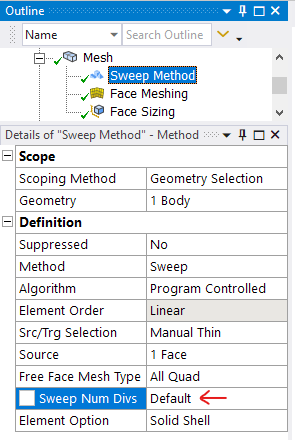 n
August 9, 2020 at 2:40 pmSubscriberHello Aniket ! Thanks for the reply. I changed the sweep number division upto 20 ( through gradual increasing and checking) but it does not help. It seems like for a particular thickness, the mesh size is limited to a particular size. nViewing 7 reply threads
n
August 9, 2020 at 2:40 pmSubscriberHello Aniket ! Thanks for the reply. I changed the sweep number division upto 20 ( through gradual increasing and checking) but it does not help. It seems like for a particular thickness, the mesh size is limited to a particular size. nViewing 7 reply threads- The topic ‘Sweep meshing with solid shell element’ is closed to new replies.
Innovation Space Trending discussions
 Top Contributors
-
peteroznewman
 5159
5159 -
scabo
 1836
1836 -
Dennis Chen
 1387
1387 -
javat33489
 1249
1249 -
Shyam Prasad V Atri
1021
Top Rated Tags
© 2026 Copyright ANSYS, Inc. All rights reserved.
Ansys does not support the usage of unauthorized Ansys software. Please visit www.ansys.com to obtain an official distribution.
-


The Ansys Learning Forum is a public forum. You are prohibited from providing (i) information that is confidential to You, your employer, or any third party, (ii) Personal Data or individually identifiable health information, (iii) any information that is U.S. Government Classified, Controlled Unclassified Information, International Traffic in Arms Regulators (ITAR) or Export Administration Regulators (EAR) controlled or otherwise have been determined by the United States Government or by a foreign government to require protection against unauthorized disclosure for reasons of national security, or (iv) topics or information restricted by the People's Republic of China data protection and privacy laws.

 You are navigating away from the AIS Discovery experience