-
-
April 6, 2020 at 4:41 pm
jg19abu
SubscriberHi everyone,
This specific case is regarding a winglet design but it's not the first time that happens. The process was the following:
- It was designed in Catia V5
- Then imported to Spaceclaim 19.2 to clean it up and create the domain
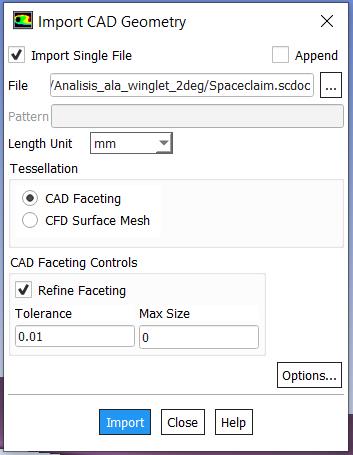
- Finally, using "file>import>CAD", the ".sdoc" from spaceclaim was imported to Fluent Meshing 19.2
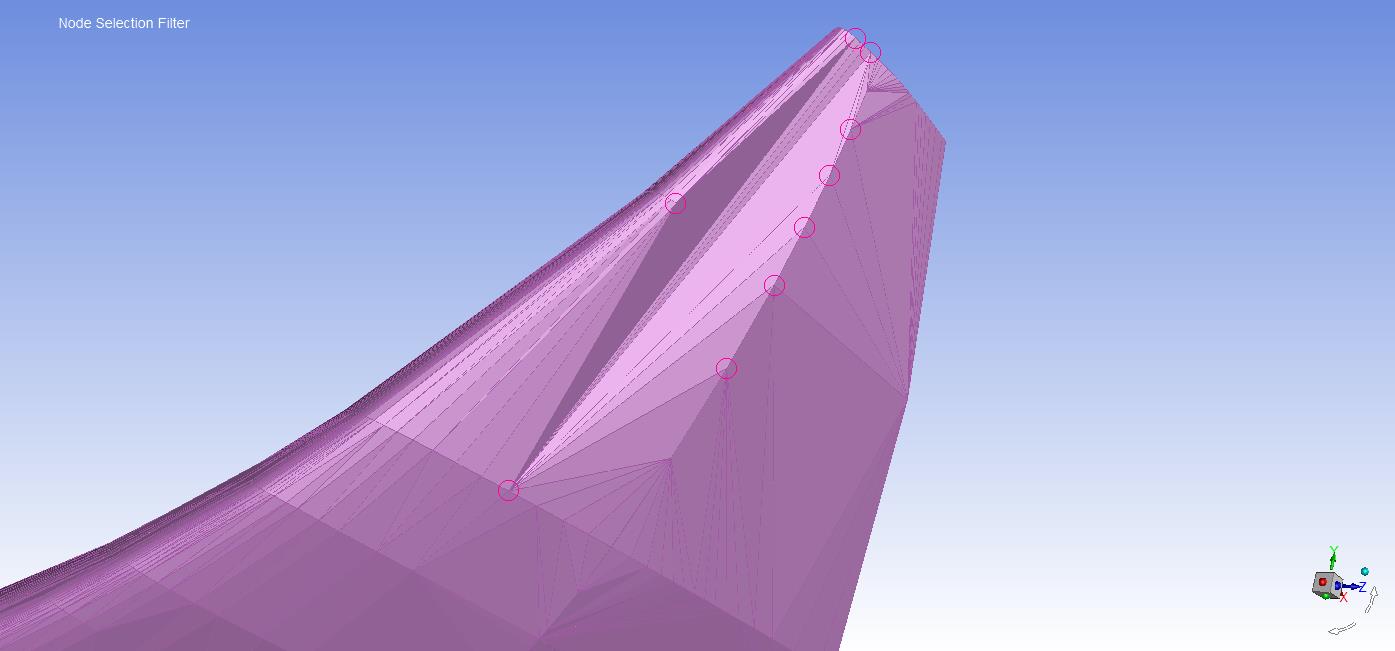
The geometry imported from Catia to Spaceclaim was perfectly similar, but when imported to Fluent it suffers a severe deformation. My question is, how can it be avoided and why does it happen. An image is attached below to figure out the problem better.
Thank you.
-
April 7, 2020 at 4:30 am
Keyur Kanade
Ansys Employeeplease check tolerance while importing fluent meshing.Â
also you can use other route.Â
export .tgf file from spaceclaim. you can change options as well.Â
Regards,
Keyur
Â
If this helps, please mark this post as 'Is Solution' to help others.
Guidelines on the Student Community
How to access ANSYS help links
Â
-
April 7, 2020 at 10:43 am
-
- The topic ‘Surface deformation when importing CAD geometry to Fluent Meshing’ is closed to new replies.

-
6084
-
1906
-
1436
-
1308
-
1021
© 2026 Copyright ANSYS, Inc. All rights reserved.