Ansys Assistant will be unavailable on the Learning Forum starting January 30. An upgraded version is coming soon. We apologize for any inconvenience and appreciate your patience. Stay tuned for updates.
Announcement
The Next Generation of Ansys Innovation Space is Here.
This AI-powered platform delivers a smarter, faster, and more personalized experience for learning, support, and community engagement.
You will be automatically redirected to the Next Gen Ansys Innovation Space (https://innovation.ansys.com) shortly.
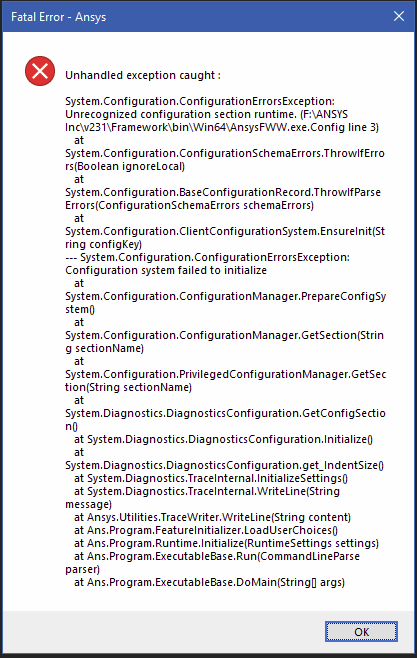
Launching Workbench immdeatly causes many unhandled exception errors:
Running as administrator has no effect.
Reinstalling has no effect.
Windows 10 and GPU drivers are fully up to date.
There is nothing about this in the official FAQ.
February 21, 2023 at 2:24 pm
George Karnos
Ansys Employee
First, rename %APPDATA%\Ansys\v231 to v231.old Try relaunching Workbench by right-click->run as administrator Also, we have seen some issues when installed on a different drive other than c:\ Does it work if you uninstall and reinstall on c:\
Viewing 1 reply thread
The topic ‘Student License: Cannot Launch Workbench’ is closed to new replies.
The Ansys Learning Forum is a public forum. You are prohibited from providing (i) information that is confidential to You, your employer, or any third party, (ii) Personal Data or individually identifiable health information, (iii) any information that is U.S. Government Classified, Controlled Unclassified Information, International Traffic in Arms Regulators (ITAR) or Export Administration Regulators (EAR) controlled or otherwise have been determined by the United States Government or by a foreign government to require protection against unauthorized disclosure for reasons of national security, or (iv) topics or information restricted by the People's Republic of China data protection and privacy laws.
Please Login to Report Topic
Please Login to Share Feed
Edit Discussion
You are navigating away from the AIS Discovery experience
The Ansys Learning Forum is a public forum. You are prohibited from providing (i) information that is confidential to You, your employer, or any third party, (ii) Personal Data or individually identifiable health information, (iii) any information that is U.S. Government Classified, Controlled Unclassified Information, International Traffic in Arms Regulators (ITAR) or Export Administration Regulators (EAR) controlled or otherwise have been determined by the United States Government or by a foreign government to require protection against unauthorized disclosure for reasons of national security, or (iv) topics or information restricted by the People's Republic of China data protection and privacy laws.


















 You are navigating away from the AIS Discovery experience