TAGGED: spaceclaim
-
-
March 10, 2021 at 9:31 am
tim.dukes
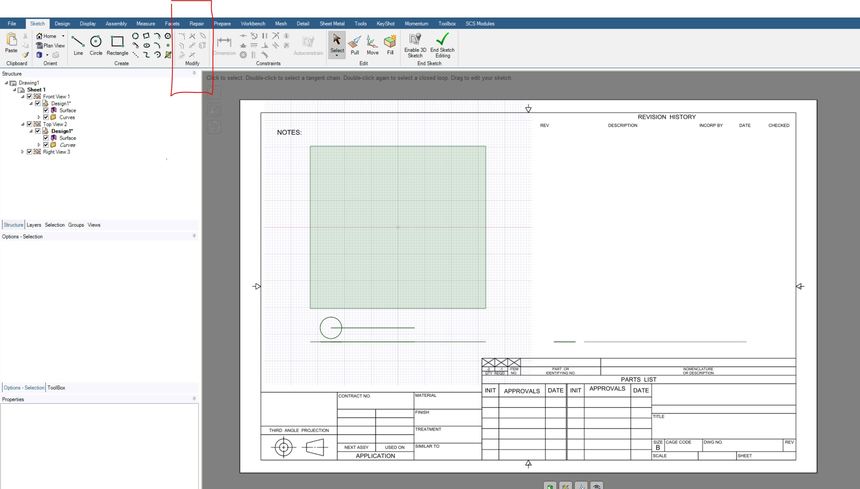
SubscriberIn previous releases you could edit sketches that are on a drawing sheet. Sometimes customers like to directly sketch on a drawing sheet. Sometimes it is necessary because you can't dimension a particular thing. All the edit commands are now disabled. You can use the trim shortcut which is T but I think these tools should still be enabled as they are still useful in a 2D mode. Â
-
March 10, 2021 at 9:54 am
Charudatta Bandgar
SubscriberHello Tim Dukes
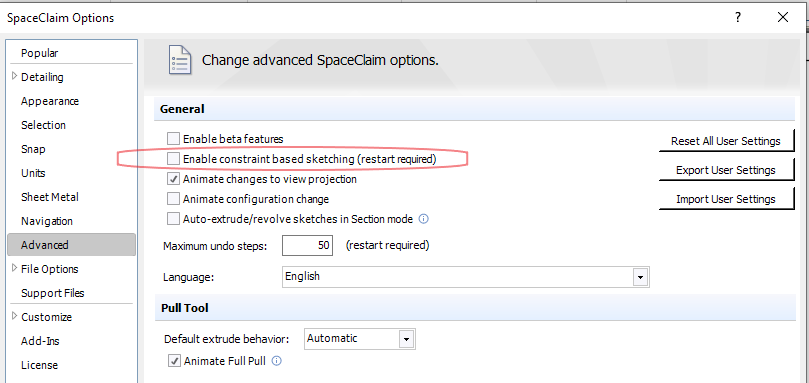
This is because you are in constraint-based sketching mode, where this is not possible yet. Please go to SpaceClaim options>advanced> and untick the box 'Enable constraint-based sketching (restart required)' and restart SpaceClaim, this will revert to the older sketching mode, where the edit commands are available.
Regards.
-
March 10, 2021 at 10:04 am
tim.dukes
SubscriberThanks for the reply Charudatta .
I understand this is the case but I think these tools should be available with both sketch based constraints enabled and not enabled and I can't really understand why they aren't.
Hopefully you can pass this onto development and they can be activated in future releases.
-
March 10, 2021 at 10:07 am
Charudatta Bandgar
SubscriberYes, Tim Dukes . That is correct. Since constraint-based sketching is in development, these capabilities will be added in subsequent releases.
Regards.
-
-
- The topic ‘SpaceClaim – Drawing Sheet – Trim and modify commands disabled’ is closed to new replies.

-
5844
-
1906
-
1420
-
1305
-
1021
© 2026 Copyright ANSYS, Inc. All rights reserved.