Ansys Assistant will be unavailable on the Learning Forum starting January 30. An upgraded version is coming soon. We apologize for any inconvenience and appreciate your patience. Stay tuned for updates.
3D Design

3D Design

Topics related to Ansys Discovery and Ansys SpaceClaim.

SolidWorks CAD Configuration error

    • tomcojocar
      Subscriber

       When CAD Configuration Manager is run, it says 


      Prerequisites ..... Configure Success


      SW  Workbench PlugIn ..... Configure Failed -- Registration Error


      In the corresponding log file the only part that seems to be out of order is 


      <>


      SW Registration ExitCode 3  -- expecting 0


      ___________________________________________________________________________


      ReadPackageInstallData succeeded.


      SpaceClaimEngineering Not Detected


    • Karthik Remella
      Administrator

      Hello,


      Which version of ANSYS is this - R19.2? Also, is this an Academic license?


      Have you tried to import the SolidWorks file directly into SpaceClaim?


      Thank you.


      Best Regards,


      Karthik

    • tomcojocar
      Subscriber

      This is AIM 19.1, a student license.

    • Karthik Remella
      Administrator

      Hello,


      SolidWorks plugin is not included as a part of the student license. Student license will accept neutral CAD formats.


      A workaround is to open the SW geometry directly in SpaceClaim. Another way would be to use SW to convert the CAD file to neutral file formats and import in SpaceClaim.


      I hope this helps.


      Best Regards,


      Karthik

    • Sandeep Medikonda
      Ansys Employee

      In addition to what Karthik has said, You might find this information from the help useful.


      Regards,
      Sandeep

    • tomcojocar
      Subscriber


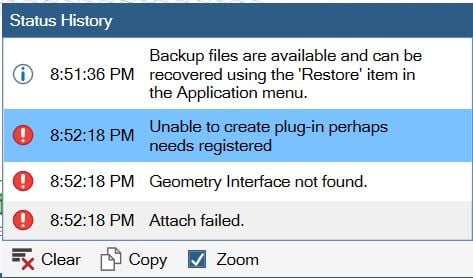
      When I try to open the SW file directly in SC, it gives this error.


    • peteroznewman
      Subscriber

      In SolidWorks, File, Save As Parasolid.


      Either in SpaceClaim, File, Open.


      Or in DesignModeler, File, Import External Geometry File.

    • ukijo
      Subscriber

      If you possess the student version and you want to import a Solidwrorks part/assembly into ANSYS, you just have to save your solidworks part/assembly as a .igs extension and then import it into spaceclaim.


      when your part is imported inside spaceclaim save it as a spaceclaim file. Return to workbench and then you import the spaceclaim you just saved, that should work. 

    • peteroznewman
      Subscriber

      While an .igs file will work most of the time, a Parasolid file has a more reliable transfer of complex geometry.


      If you use SpaceClaim, you don't even need to save as Parasolid, it will open the SolidWorks file directly.

Viewing 8 reply threads
  • The topic ‘SolidWorks CAD Configuration error’ is closed to new replies.
[bingo_chatbox]