-
-
March 12, 2022 at 12:57 pm
ysngrg
SubscriberHello All,
I have a simulation, about rubbery material. I'm using solid187 elements, and I want to use mixed formulation KEYOPT(6)=1.
However, I could not change element keyopt options in workbench, I have just only one part, I wrote a command under geometry branch,
KEYOPT,1,6,1
But, I could not change, keyopt options,how can I do?
Thx
March 12, 2022 at 3:35 pmpeteroznewman
SubscriberPut the command object under the Solid body in the Geometry branch of the outline. Use the following text:
KEYOPT,MATID,6,1
March 12, 2022 at 5:32 pmysngrg
SubscriberThx for your answer Peter I tried but I think It did not work, How can I check does it work?
I have an information in the solution output, like that;
ELEMENT TYPE1 IS SOLID187. IT IS NOT ASSOCIATED WITH FULLY INCOMPRESSIBLE
HYPERELASTIC MATERIALS. NO SUGGESTION IS AVAILABLE AND NO RESETTING IS NEEDED.
March 12, 2022 at 10:58 pmpeteroznewman
SubscriberHave you assigned a hyperelastic material model to that solid?
March 14, 2022 at 12:00 pmysngrg
SubscriberYes, I assigned hyperelastic material model, Peter
March 20, 2022 at 10:01 pmysngrg
SubscriberAny idea about that?
APDL change KEYOPT options when I assigned hyperelastic material model?
If it can change, why I dont have volume convergence? When I assigned steel instead of rubber, I had a volume convergence values in the solution output.
March 20, 2022 at 10:36 pmpeteroznewman
SubscriberIn Mechanical, click on the Geometry branch of the Outline. In the Details window is Element Control. Set that to Manual.
How have you setup the Step Controls? Have you set the Initial Substeps to 100, the Minimum Substeps to 100 and the Maximum Substeps to 1000?
What does the N-R Force Residual Plot look like under the Solution Information folder?
Look at the Solver Output under Solution Information. That is where it tells you what Keyops are being used.
How did you support the model? Fixed Support can cause problems.
It is easy to converge with a Linear material, it is not easy to converge with a Nonlinear material.
March 21, 2022 at 11:40 amysngrg
SubscriberDear Peter, I am very gratefull for your support.
I will try to explain my problem clearly.
I have a body which is axisymetric, and this body has hyberelastic material. I do not have any convergency problem but I want to use "PLANE 183 elements with KEYOPT(6)=1 which is hybrid element".
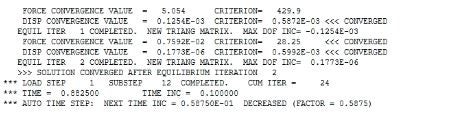
When I added command on rubber material there is no difference, I could not understand KEYOPT option was worked or was not work. But when I check solution output, I did not see any convergence value for mixed type elements. I added image.
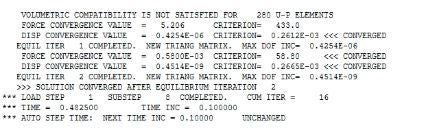
So when I asigned steel instead of rubber like material, I saw volume convergence value for mixed type elements. After that, I can understand KEYOPT(6)=1 is worked. I added image.
So, what should I do? How can I use mixed type elements for axisymetric bodies.
Thank you for your support.

March 21, 2022 at 11:57 ampeteroznewman
SubscriberMy experience was having models that would not converge without the mixed u-P element and would converge with it.
If you have no convergence problem, why do you care if the mixed u-P element formulation was used?
March 21, 2022 at 12:00 pmysngrg
SubscriberAs I know, for rubbery materials, mixed u-p elements better than linear u elements. I want to try and compare results. However, ANSYS is not giving permision for use u-P element with PLANE 183
March 21, 2022 at 12:03 pmpeteroznewman
SubscriberYes it's better when models converge than when they don't.
If by better, you mean more accurate, you can increase the accuracy by performing a mesh refinement study and by reducing the convergence tolerances.
Viewing 10 reply threads- The topic ‘SOLID187 KEYOPT Changing Error’ is closed to new replies.
Innovation SpaceTrending discussionsTop Contributors-
5874
-
1906
-
1420
-
1306
-
1021
Top Rated Tags© 2026 Copyright ANSYS, Inc. All rights reserved.
Ansys does not support the usage of unauthorized Ansys software. Please visit www.ansys.com to obtain an official distribution.
-
Ansys Assistant will be unavailable on the Learning Forum starting January 30. An upgraded version is coming soon. We apologize for any inconvenience and appreciate your patience. Stay tuned for updates.








