-
-
May 30, 2020 at 9:42 am
Losiola
SubscriberHello Evryone
HOpe you are all doing good
Â
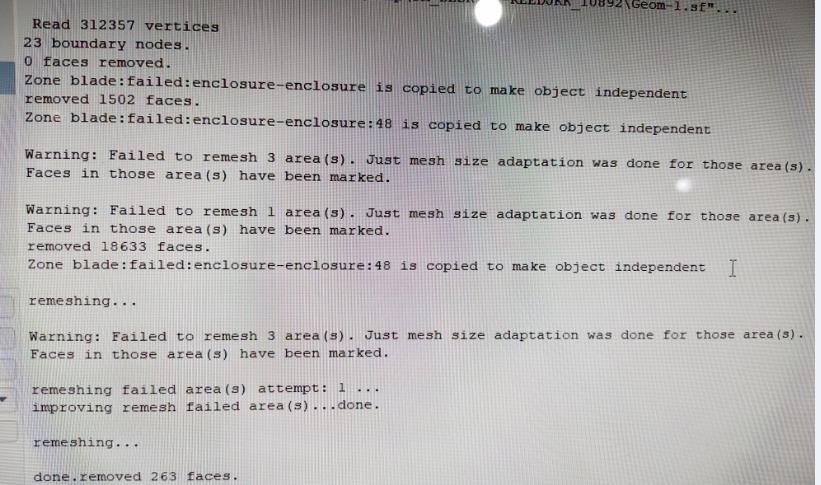
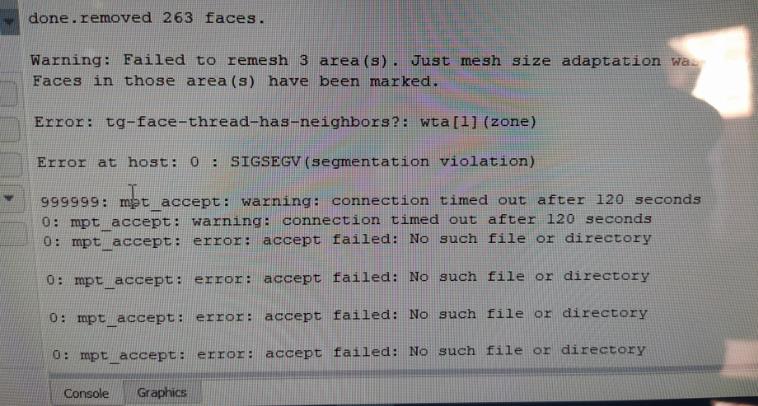
I have a problem with fluent meshing where i am trying to mesh a wind turbine blade so for the first step (surface mesh ) evrything works good but unfortunatlly for the filling it gets me this error :
Â
Please note that i get this errot for certain settings in the mesh (certain sizes) but for some other sizing values it doesn't show this error
Can anyone please help me? Also if anyone can help me mesh a wind turbine blade i'll be so Thankfull
Â
Kind regards
-
May 30, 2020 at 11:57 am
Karthik Remella
AdministratorHow do those sizes (which work) compare with the overall size of the blade (perhaps, blade thickness)? Are you prescribing them such that you have a sufficient number of elements? Also, is your blade curved? If so, are you using curvature or proximity settings?
Thanks
Karthik
-
May 31, 2020 at 4:17 pm
Losiola
SubscriberHi ,
My blade is a 2.04m it has 3types of airfoils shapes and also twisted . the cord of the airfoils(blade section) starts from 0.240 m at about 10% span with 16° angle and gets to 0.01m profile cord at the tip of the blade with 0° twist angle .
Thickness : on the tip side like from 70%-100% span wise , the trailing edge thikness is very small about 0.1mm or less
for the sizing: i currently used for local sizing :curvature with 1mm-3mm on the blade surface with 10° angle and the same minimum setting and angle for the surface siziing Min=1mm and 10° angle ....>these settings gave good mesh on the surface and lots of elements on the blade surface too .
but when i change the minimum value of curvature and surface sizing to 0.5mm it guives me that error ?.
Do you have any idea about what's the problem ?
Â
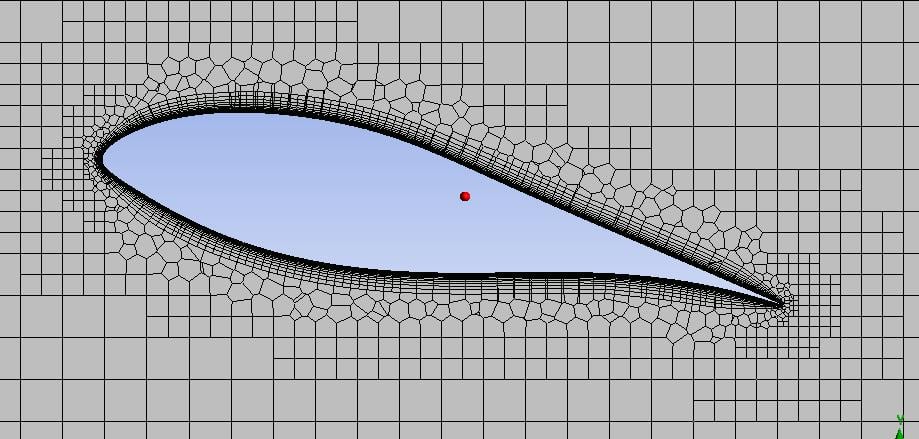
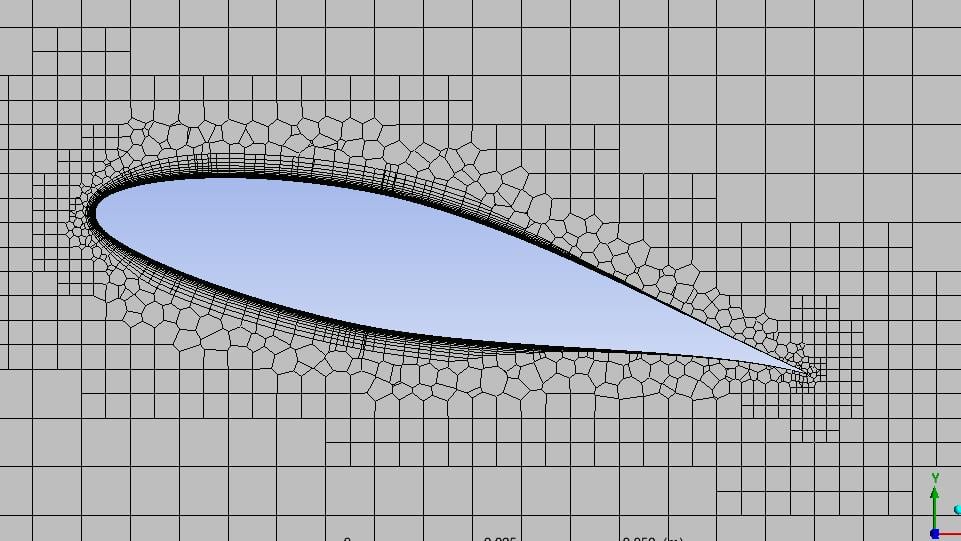
Also i forgot to mention one more issue last Time , iN the mesh that worked there are zones were the BL mesh collapsed as you can see the difference in the pics . How Can i Fix This Problem ? (Please Note that i used the waterTight Workflow)
Many Thanks
Â
Â
-
June 1, 2020 at 11:01 am
Karthik Remella
AdministratorYeah, this is not good at all. Have you tried to provide a local refinement around the airfoil? Perhaps, a Body of Influence around the airfoil might help.Â
If I'm to take a guess, you might be seeing a sudden jump from your inflation layers to the rest of the mesh and it could potentially be the issue.
Also, what settings are you using to create the Boundary Layer Mesh? Could you please try the 1st layer thickness?
Regarding the error message: Could you please try to leave the angle to default and change only the local size to 0.5 mm and try?Â
Also, I'm assuming that there are no errors in the geometry. I'm sure you have done this, but for completeness - I'd still say it out here - Could you please open the geometry in SpaceClaim, right-click on the part, and perform 'Check-Geometry' on your part. There should not be any errors.
Thank you.
Karthik
-
June 1, 2020 at 11:52 am
Losiola
SubscriberHi,
For the Geometry check i did it there is no errors i also cleaned the Geometry .
for the Boundary layer i use Last-ration with first cell hight 0.01mm and 20 layersÂ
for the Boi i used one i selected size of 8mm and another bigger one with size of 16 mm and i got total elements of about 4.5M elements
Thanks
Â
-
June 1, 2020 at 1:00 pm
Karthik Remella
AdministratorThank you for the update. Could you try my other suggestion about using the default curvature angle (but with a different local size)?
Thanks.
-
June 2, 2020 at 5:15 am
Keyur Kanade
Ansys Employeei guess, you have not selected those boundary zones / labels for prism generation.Â
please cross check boundary layer step in workflow.Â
if required, delete old boundary layer controls and create new one by selecting correct boundary zones.Â
Regards,
Keyur
Â
If this helps, please mark this post as 'Is Solution' to help others.
Guidelines on the Student Community
How to access ANSYS help links
Â
-
June 2, 2020 at 2:18 pm
Losiola
SubscriberHi Kremella,
I ve did that also for the default curvature angle and i still get the same issue.
Â
-
June 2, 2020 at 2:20 pm
Losiola
SubscriberHi Kkanade,
I am so positive i ve selected the correct label which is blade that i defined earlier in SCDMÂ otherwise i wouldnt get a boundary layer mesh from the first place
Â
Regards
-
June 3, 2020 at 5:04 am
Keyur Kanade
Ansys Employeei suggest cross check the selected labels for boundary layer.Â
it must be missing atleast one label at the trailing edge.Â
Regards,
Keyur
Â
If this helps, please mark this post as 'Is Solution' to help others.
Guidelines on the Student Community
How to access ANSYS help links
Â
Â
-
June 3, 2020 at 5:29 am
Losiola
SubscriberHi kkanade
Â
I really did the checking and the labels are correct and there is no missing label.
Â
My sense is telling me it's failing because of the very sharp Trailing edge but i am not sue , is it possible that there is some parameter that controles this?
Â
Many thanks
-
June 3, 2020 at 11:44 am
Karthik Remella
AdministratorIf this is the case, could you try and make a small straight cut at the trailing edge so instead of a sharp corner, you have a small straight edge. Could you please test this and let us know?
Thanks.
Karthik
-
June 4, 2020 at 8:13 am
Losiola
SubscriberHi Karthik
I did as you told me i cut just little bit of the Trailing edge and....IT WORKEDÂ Thank you very much
Â
Thank you all for the Support
Regards
-
June 8, 2020 at 1:07 pm
Karthik Remella
AdministratorGood to know that it answered you question.Â
Good luck!Â
-
- The topic ‘SIGSEGV(segmentation violation ) Fluent Meshing’ is closed to new replies.
-
5094
-
1830
-
1387
-
1248
-
1021
© 2026 Copyright ANSYS, Inc. All rights reserved.