Ansys Assistant will be unavailable on the Learning Forum starting January 30. An upgraded version is coming soon. We apologize for any inconvenience and appreciate your patience. Stay tuned for updates.
Ansys Products

Ansys Products

Discuss installation & licensing of our Ansys Teaching and Research products.

SIGSEGV on all nodes in a parallel job

    • swheat
      Subscriber

      V192, RSM from Windows Client to Linux Cluster, a parallel job gets a SIGSEGV error on all processes.  Serial jobs behave the same.


      But, if we "update the simulation one iteration" and then submit the job to do the rest of the iterations, it all runs fine, whether parallel or not.


      The SIGSEGV seems to happen during initialization ... before the simulation gets going.


      The last thing in the .trn file before the faults is noting "Hybrid initialization is done"


      We captured stdout.live and it showed this at the end; and this is identical for when the job fails and when the job succeeds (starting at iteration 2).


      Running Solver : /opt/apps/ansys/v192/fluent/bin/fluent --albion --run --launcher_setting_file "fluentLauncher.txt" --fluent_options "  -gu -driver null -driver null  -workbench-session -i "SolutionPending.jou"  -mpi=intel -t4"


      /opt/apps/ansys/v192/fluent/fluent19.2.0/bin/fluent -r19.2.0 --albion --run --launcher_setting_file fluentLauncher.txt

    • JakeC
      Ansys Employee

      Hi Stephen,


      Were you able to try running the solver manually outside of RSM from the terminal on the cluster?


      Does this happen with all projects or just this one?


      Can you download and try running the following workbench project:


      https://drive.google.com/file/d/1-bcXljd-BYvnORbq3bYWhLnk_AptnSUf/view?usp=sharing


      Please be sure the following are on each compute node:


      Linux


      For ALL 64-bit Linux platforms, OpenMotif, and Mesa libraries should be installed. These libraries are typically installed during a normal Linux installation. You will also need the xpdf package to view the online help.


      ANSYS products require OpenMotif. After installing your Linux platform, review the tables below and install the appropriate version of OpenMotif. (You may need to use "rpm -iv -force" to install these.)


      Table 2.1: OpenMotif Versions for SUSE Linux Enterprise


      SUSE Linux Enterprise Release OpenMotif Version OpenMotif Zypper Package


      SUSE Linux Enterprise 12 SP 2 SLES 12 SP2: motif-2.3.4-4.15.x86_64 motif


      SUSE Linux Enterprise 12 SP 3 SLES 12 SP3: motif-2.3.4-4.15.x86_64 motif


      Table 2.2: OpenMotif Versions for Red Hat Enterprise Linux


      Red Hat Enterprise Linux Release OpenMotif Version


      Red Hat Enterprise Linux 6.x motif-2.3.4-1


      Red Hat Enterprise Linux 7.x motif-2.2.4-0


      For More information on OpenMotif libraries for your platform, see the Motif download site.


      Red Hat Enterprise Linux 6.9 and 7.3 through 7.5  —  You need to install the following libraries:


      libpng12


      libXp.x86_64


      xorg-x11-fonts-cyrillic.noarch


      xterm.x86_64


      openmotif.x86_64


      compat-libstdc++-33.x86_64


      compat-libstdc++-44.x86_64


      libstdc++.x86_64


      libstdc++.i686


      gcc-c++.x86_64


      compat-libstdc++-33.i686


      compat-libstdc++-44.i686


      libstdc++-devel.x86_64


      libstdc++-devel.i686


      compat-gcc-34.x86_64


      gtk2.i686


      libXxf86vm.i686


      libSM.i686


      libXt.i686


      xorg-x11-fonts-ISO8859-1-75dpi.noarch


      glibc-2.12-1.166.el6_7.1 (or greater)


      Red Hat no longer includes the 32-bit libraries in the base configuration so you must install those separately.


      For more information on Red Hat Enterprise Linux libraries, see the Red Hat Libraries site.


      CentOS 7.3 and 7.4  —  You need to install the following libraries:


      glibc.i686


      glib2.i686


      bzip2-lib-s.i686


      libpng.i686


      libtiff.i686


      libXft.i686


      libXxf86vm.i686


      sssd-client.i686


      libpng12


      libpng12.i686


      libXp


      libXp.i686


      libXp


      openmotif


      zlib


      Thank you,


      Jake

    • JakeC
      Ansys Employee

      Here are the docs for manually using fluent to run the job on a compute node:


      https://drive.google.com/open?id=1bThnS0TXJ6qnmFe_MXsFeUt6DuKCZb8w


      Thank you,


      Jake

    • swheat
      Subscriber

      Jake,


      I have not been able to figure out how to run a job locally; the users are kind of caught up in Workbench and don't know how to give me a journal file to just run.  My searches of the internet for an example journal file have been fruitless.  I'm not a fluent user, so I have no experience with how to configure a run.  Is there a link to a sample .jou file (and the rest of the needed files) that I could use to try this out?


      I saw the link for a download of a project, but I'm not sure what to do with that.  I've asked my user to download it and run from workbench; I don't know how to extract from that set of files what I need to run it manually.


      Stephen

    • JakeC
      Ansys Employee

      Hi Stephen,


      Ok, I have put together a package for you.


      https://drive.google.com/open?id=1Yi4nHugidwWKEujbtgPNwjbBcZZ-o5pG


      Untar it in a location that is shared across nodes.


      then to run it, cd to the directory where the .cas and .jou files are, and run:


      /ansys_inc/v193/fluent/bin/fluent 3d -g -t2 -i elbow1-rel-path-no-dat.jou 


      Adjust paths as necessary.


      That will run it on two cores on the machine you are logged into.


      Lets see if that works first.


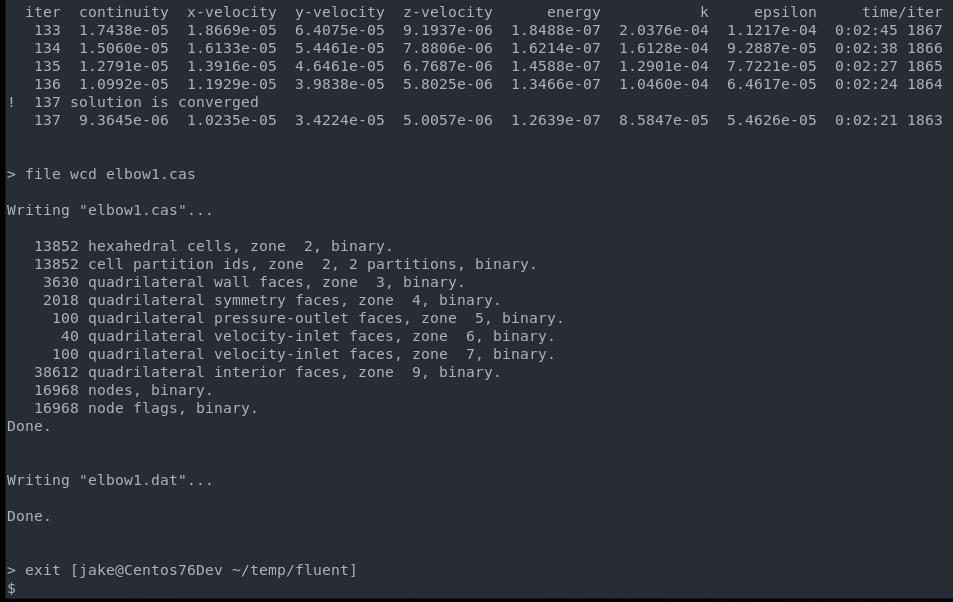
      If it completes without issue you should see something like:


      Thank you,
      Jake


    • swheat
      Subscriber

      Jake,


      On my login node, it worked fine.  I did it for both -t2 and -t16.  However, on one of my compute nodes, I got the output shown below.  I'd put this in a file, but I can't see how to attach a file to this.  Both nodes refer to the same NFS-mounted file systems for home directories and for the fluent executables.


      Regarding how many of the rpm's you said I need, the login node did not have all of them.  And the compute nodes had even less than that.  It would seem that my next step is to get at least the rpm's that the login node has over to the compute nodes.  It appears we're on the way to solution.  Let me know if you recommend any other step.  I should be able to at least test-load the rpms on the one node I am using before I change my node images for every compute node.  I will likely get to that today.


      Thanks,


      Stephen


      /ansys_inc/v192/fluent/bin/fluent 3d -g -t2 -i elbow1-rel-path-no-dat.jou 


      /ansys_inc/v192/fluent/fluent19.2.0/bin/fluent -r19.2.0 3d -g -t2 -i elbow1-rel-path-no-dat.jou


      /ansys_inc/v192/fluent/fluent19.2.0/cortex/lnamd64/cortex.19.2.0 -f fluent -g -i elbow1-rel-path-no-dat.jou (fluent "3d -pshmem  -host -r19.2.0 -t2 -mpi=ibmmpi -path/ansys_inc/v192/fluent -ssh")


      /ansys_inc/v192/fluent/fluent19.2.0/bin/fluent -r19.2.0 3d -pshmem -host -t2 -mpi=ibmmpi -path/ansys_inc/v192/fluent -ssh -cx s1n1:432133954


      Starting /ansys_inc/v192/fluent/fluent19.2.0/lnamd64/3d_host/fluent.19.2.0 host -cx s1n1:432133954 "(list (rpsetvar (QUOTE parallel/function) "fluent 3d -flux -node -r19.2.0 -t2 -pshmem -mpi=ibmmpi -ssh") (rpsetvar (QUOTE parallel/rhost) "") (rpsetvar (QUOTE parallel/ruser) "") (rpsetvar (QUOTE parallel/nprocs_string) "2") (rpsetvar (QUOTE parallel/auto-spawn?) #t) (rpsetvar (QUOTE parallel/trace-level) 0) (rpsetvar (QUOTE parallel/remote-shell) 1) (rpsetvar (QUOTE parallel/path) "/ansys_inc/v192/fluent") (rpsetvar (QUOTE parallel/hostsfile) "") )"


                    Welcome to ANSYS Fluent Release 19.2


                    Copyright 1987-2018 ANSYS, Inc. All Rights Reserved.


                    Unauthorized use, distribution or duplication is prohibited.


                    This product is subject to U.S. laws governing export and re-export.


                    For full Legal Notice, see documentation.


      Build Time: Aug 08 2018 12:59:03 EDT  Build Id: 10236  


           This is an academic version of ANSYS FLUENT. Usage of this product


           license is limited to the terms and conditions specified in your ANSYS


           license form, additional terms section.


      Host spawning Node 0 on machine "s1n1" (unix).


      /ansys_inc/v192/fluent/fluent19.2.0/bin/fluent -r19.2.0 3d -flux -node -t2 -pshmem -mpi=ibmmpi -ssh -mport 192.168.1.111:192.168.1.1114230:0


      Starting /ansys_inc/v192/fluent/fluent19.2.0/multiport/mpi/lnamd64/ibmmpi/bin/mpirun -e MPI_IBV_NO_FORK_SAFE=1 -e MPI_USE_MALLOPT_MMAP_MAX=0 -np 2 /ansys_inc/v192/fluent/fluent19.2.0/lnamd64/3d_node/fluent_mpi.19.2.0 node -mpiw ibmmpi -pic shmem -mport 192.168.1.111:192.168.1.1114230:0


      ID    Hostname  Core  O.S.      PID          Vendor                      


      n0-1  s1n1      2/24  Linux-64  30181-30182  Intel(R) Xeon(R) E5-2643 v4 


      host  s1n1            Linux-64  30004        Intel(R) Xeon(R) E5-2643 v4 


      MPI Option Selected: ibmmpi


      Selected system interconnect: shared-memory


      Cleanup script file is /home/swheat/fluent/parallel/cleanup-fluent-s1n1-30004.sh


      terminate called after throwing an instance of 'std::runtime_error'


        what():  locale::facet::_S_create_c_locale name not valid


      ==============================================================================


      Stack backtrace generated for process id 29853 on signal 6 :


      1000000: fluent() [0x67f3b9]


      1000000: /usr/lib64/libc.so.6(+0x362f0) [0x7fa75da7b2f0]


      1000000: /usr/lib64/libc.so.6(gsignal+0x37) [0x7fa75da7b277]


      1000000: /usr/lib64/libc.so.6(abort+0x148) [0x7fa75da7c968]


      1000000: /ansys_inc/v192/fluent/fluent19.2.0/lnamd64/syslib/libstdc++.so.6(_ZN9__gnu_cxx27__verbose_terminate_handlerEv+0x15d) [0x7fa75e3ba2dd]


      1000000: /ansys_inc/v192/fluent/fluent19.2.0/lnamd64/syslib/libstdc++.so.6(+0x8e2b6) [0x7fa75e3b82b6]


      1000000: /ansys_inc/v192/fluent/fluent19.2.0/lnamd64/syslib/libstdc++.so.6(+0x8e301) [0x7fa75e3b8301]


      1000000: /ansys_inc/v192/fluent/fluent19.2.0/lnamd64/syslib/libstdc++.so.6(+0x8e518) [0x7fa75e3b8518]


      1000000: /ansys_inc/v192/fluent/fluent19.2.0/lnamd64/syslib/libstdc++.so.6(_ZSt21__throw_runtime_errorPKc+0x37) [0x7fa75e3e0c07]


      1000000: /ansys_inc/v192/fluent/fluent19.2.0/lnamd64/syslib/libstdc++.so.6(+0xb00f4) [0x7fa75e3da0f4]


      1000000: /ansys_inc/v192/fluent/fluent19.2.0/lnamd64/syslib/libstdc++.so.6(_ZNSt6locale5_ImplC2EPKcm+0x49) [0x7fa75e3cc269]


      1000000: /ansys_inc/v192/fluent/fluent19.2.0/lnamd64/syslib/libstdc++.so.6(_ZNSt6localeC1EPKc+0x88c) [0x7fa75e3cd4dc]


      1000000: /ansys_inc/v192/fluent/lib/lnamd64/libApipWrapper.so(+0xd8393) [0x7fa75e782393]


      1000000: /ansys_inc/v192/fluent/lib/lnamd64/libApipWrapper.so(_ZN5Ansys10ApipHelper13GetInstallDirEPKw+0x66f) [0x7fa75e7221bf]


      1000000: /ansys_inc/v192/fluent/lib/lnamd64/libApipWrapper.so(_ZN5Ansys17ApipConfiguration20initializeForVersionEPKw+0x1d) [0x7fa75e72f08d]


      Please include this information with any bug report you file on this issue!


      ==============================================================================


      No error handler available


      Error: Cortex received a fatal signal (unrecognized signal).


      Error Object: ()


      version> exit



    • JakeC
      Ansys Employee

      Hi Stephen,


      Yes, please get all of the required prerequisites installed on the compute nodes.


      Once that is done, please rerun the manual test on the compute nodes.


      Thank you,


      Jake

    • swheat
      Subscriber

      Jake,


      I have finally gotten back to work on this.  I did install the rpm's that my login node had.  It still did not work.  So, I installed the rest of the required rpms.  It still did not work.  I then tried running fluent as an interactive job on the compute node without first allocating the node via SLURM.  Then it did work.  Interactive via SLURM, does not work.  Normal interactive, it does work.  Long story short, I found that it was an environment variable.  While running in SLURM, I inherit the environment variable LANG=en_US.UTF-8.  Within an interactive SLURM job, if I "unset LANG", it works fine.


      It seems that my locale setup on the compute nodes may not be correct, or that fluent doesn't like LANG being set.


      I get a bit of an error on the compute node when executing the "locale" command.  I'm going to see if I can clean that up and see if that makes it all work.


      Have you seen this issue before?

    • swheat
      Subscriber

      Jake,


      I have fixed the node configurations to have the "locale" command work properly.


      That has resulted in the sample .jou file you gave me run correctly within the SLURM environment.


      My student will be trying the remote job submission again this evening.  If it works, I'll be closing this out.


      Before I got this fix in place, he did run the project you sent us and it ran remotely ok, not running into the SIGSEGV issue; just to be sure the problem still existed, he tried the original project and it still had the SIGSEGV error.  Maybe the sample project you sent didn't trigger the locale issue.  Or, maybe we're facing two problems.  At least the interactive job seems to be working just fine now.


      Thanks for all of the help!


      Stephen

    • swheat
      Subscriber

      Jake,


      Unfortunately, the original project does not work.  Is there some way we could transfer that to you for you to look at?


      The project you sent us works fine.  The .jou deck works fine.


      What next?

    • JakeC
      Ansys Employee

      Hi Stephen,


      At this point it sounds like things are working from a systems perspective.


      Please ask the student to create a post in the Fluids Physics section of the forum for help from an engineer.


      In the meantime I would suggest, starting with a very simple project from the student and make sure that works, then add each feature of the project that has the issue one at a time to see which features of the project may be causing the issue.


      Thank you,


      Jake

    • swheat
      Subscriber

      Jake,


      Thanks again for all of the help.  That sample .jou file was a life saver.


      Stephen

    • Arindam
      Subscriber

      Hi srwheat

      I am facing the same problem. I am trying to run fluent in a cluster through Slurm. When I launch the job, I get the following error. It is the same error you have faced. Can you please let me know how did you solve it? 


      Thanks


      Build Time: May 27 2022 08:43:47 EDT  Build Id: 10212  
       
      Connected License Server List: 1055@172.16.1.22
      Host spawning Node 0 on machine "n001.cluster.pssclabs.com" (unix).
      /opt/ansys_inc/v222/fluent/fluent22.2.0/bin/fluent -r22.2.0 3ddp -flux -node -alnamd64 -t4 -pshmem -mpi=openmpi -ssh -mport 172.16.32.1:172.16.32.1:40169:0
      Starting fixfiledes /opt/ansys_inc/v222/fluent/fluent22.2.0/multiport/mpi/lnamd64/openmpi/bin/mpirun --map-by numa --mca btl self,vader,tcp --mca pml ^ucx --mca btl_sm_use_knem 0 --prefix /opt/ansys_inc/v222/fluent/fluent22.2.0/multiport/mpi/lnamd64/openmpi -x LD_LIBRARY_PATH --np 4 --host n001.cluster.pssclabs.com:4 /opt/ansys_inc/v222/fluent/fluent22.2.0/lnamd64/3ddp_node/fluent_mpi.22.2.0 node -mpiw openmpi -pic shmem -mport 172.16.32.1:172.16.32.1:40169:0
       
      -------------------------------------------------------------------------------
      ID    Hostname              Core  O.S.      PID        Vendor                
      -------------------------------------------------------------------------------
      n0-3  n001.cluster.pssclab  4/64  Linux-64  5335-5338  AMD EPYC 7513 32-Core 
      host  n001.cluster.pssclab        Linux-64  5088       AMD EPYC 7513 32-Core 
       
      MPI Option Selected: openmpi
      Selected system interconnect: shared-memory
      -------------------------------------------------------------------------------
       
      Cleanup script file is /net/clusterhn.cluster.pssclabs.com/home/asingha/slurmtest/cleanup-fluent-n001.cluster.pssclabs.com-5088.sh
      terminate called after throwing an instance of 'std::runtime_error'
        what():  locale::facet::_S_create_c_locale name not valid
       
      ==============================================================================
      Stack backtrace generated for process id 4882 on signal 6 :
      1000000: fluent() [0x7a5969]
      1000000: /usr/lib/x86_64-linux-gnu/libc.so.6(+0x43090) [0x15302303f090]
      1000000: /usr/lib/x86_64-linux-gnu/libc.so.6(gsignal+0xcb) [0x15302303f00b]
      1000000: /usr/lib/x86_64-linux-gnu/libc.so.6(abort+0x12b) [0x15302301e859]
      1000000: /opt/ansys_inc/v222/fluent/fluent22.2.0/lnamd64/syslib/libstdc++.so.6(+0x8b833) [0x1530233e3833]
      1000000: /opt/ansys_inc/v222/fluent/fluent22.2.0/lnamd64/syslib/libstdc++.so.6(+0x919a6) [0x1530233e99a6]
      1000000: /opt/ansys_inc/v222/fluent/fluent22.2.0/lnamd64/syslib/libstdc++.so.6(+0x919e1) [0x1530233e99e1]
      1000000: /opt/ansys_inc/v222/fluent/fluent22.2.0/lnamd64/syslib/libstdc++.so.6(+0x91c13) [0x1530233e9c13]
      1000000: /opt/ansys_inc/v222/fluent/fluent22.2.0/lnamd64/syslib/libstdc++.so.6(+0x8d767) [0x1530233e5767]
      1000000: /opt/ansys_inc/v222/fluent/fluent22.2.0/lnamd64/syslib/libstdc++.so.6(+0xb2574) [0x15302340a574]
      1000000: /opt/ansys_inc/v222/fluent/fluent22.2.0/lnamd64/syslib/libstdc++.so.6(_ZNSt6locale5_ImplC2EPKcm+0x4c) [0x1530233fcf7c]
      1000000: /opt/ansys_inc/v222/fluent/fluent22.2.0/lnamd64/syslib/libstdc++.so.6(_ZNSt6localeC1EPKc+0x4b2) [0x1530233fde32]
      1000000: /opt/ansys_inc/v222/fluent/lib/lnamd64/libApipWrapper.so(+0xf0c73) [0x1530237cbc73]
      1000000: /opt/ansys_inc/v222/fluent/lib/lnamd64/libApipWrapper.so(_ZN5Ansys10ApipHelper13GetInstallDirEPKw+0x591) [0x153023762c41]
      1000000: /opt/ansys_inc/v222/fluent/lib/lnamd64/libApipWrapper.so(_ZN5Ansys17ApipConfiguration20initializeForVersionEPKw+0x1d) [0x15302377092d]
      Please include this information with any bug report you file on this issue!
      ==============================================================================
       
       
      No error handler available
       
      Error: Cortex received a fatal signal (unrecognized signal).
      Error Object: ()


Viewing 12 reply threads
  • The topic ‘SIGSEGV on all nodes in a parallel job’ is closed to new replies.
[bingo_chatbox]