

-
-
December 1, 2020 at 9:55 am
user deleted
SubscriberHello, everyone!
For shell elements we have two sides: top and bottom, and for these sides we can get stresses:
December 1, 2020 at 12:41 pmpeteroznewman
SubscribernThe place I always see this is when I insert a Contact definition. As soon as I pick a surface, it allows me to select Top and Bottom in the Details window. When you pick Top, that will have a solid blue or red color when viewing the surface from the Top side, and will be transparent when viewing the surface from the bottom side.nDecember 1, 2020 at 2:27 pmSubscriberthanks a lot for your advice!nI didn't think, that Contact definition face side is the same that i asked about. And as i understand now, we can find out it faster (without Contacts): just select required face - if it is green, it means that is top side; and if we just see green edges of face - it means that it is bottom side. Like this:n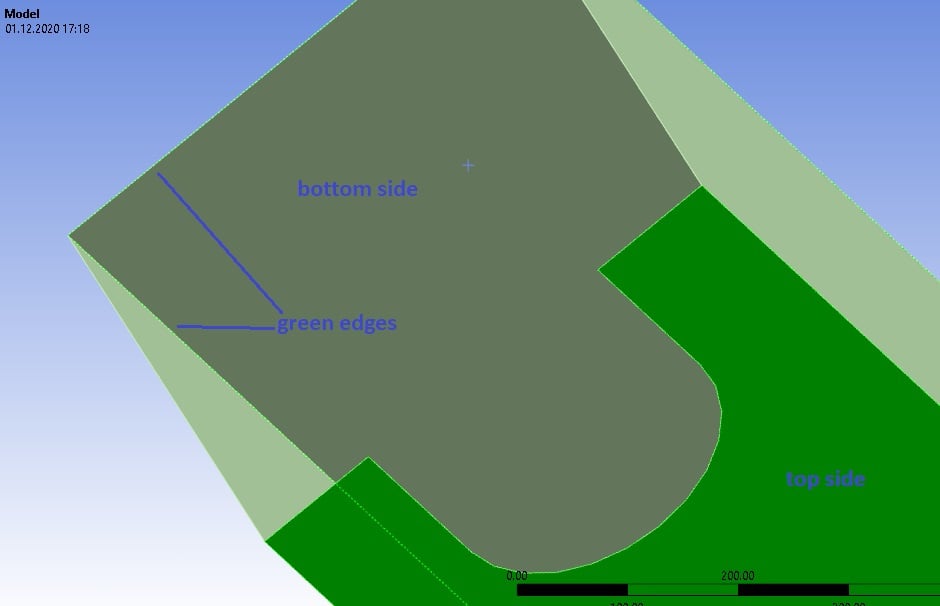 n
December 1, 2020 at 3:35 pmSubscribernThat makes sense, I didn't notice that before. Good to know!nViewing 3 reply threads
n
December 1, 2020 at 3:35 pmSubscribernThat makes sense, I didn't notice that before. Good to know!nViewing 3 reply threads- The topic ‘Side of the shell elements’ is closed to new replies.
Innovation Space Trending discussions
 Top Contributors
-
peteroznewman
 6520
6520 -
scabo
 1906
1906 -
Dennis Chen
 1463
1463 -
javat33489
 1311
1311 -
Shyam Prasad V Atri
1022
Top Rated Tags
© 2026 Copyright ANSYS, Inc. All rights reserved.
Ansys does not support the usage of unauthorized Ansys software. Please visit www.ansys.com to obtain an official distribution.
-


The Ansys Learning Forum is a public forum. You are prohibited from providing (i) information that is confidential to You, your employer, or any third party, (ii) Personal Data or individually identifiable health information, (iii) any information that is U.S. Government Classified, Controlled Unclassified Information, International Traffic in Arms Regulators (ITAR) or Export Administration Regulators (EAR) controlled or otherwise have been determined by the United States Government or by a foreign government to require protection against unauthorized disclosure for reasons of national security, or (iv) topics or information restricted by the People's Republic of China data protection and privacy laws.

 You are navigating away from the AIS Discovery experience