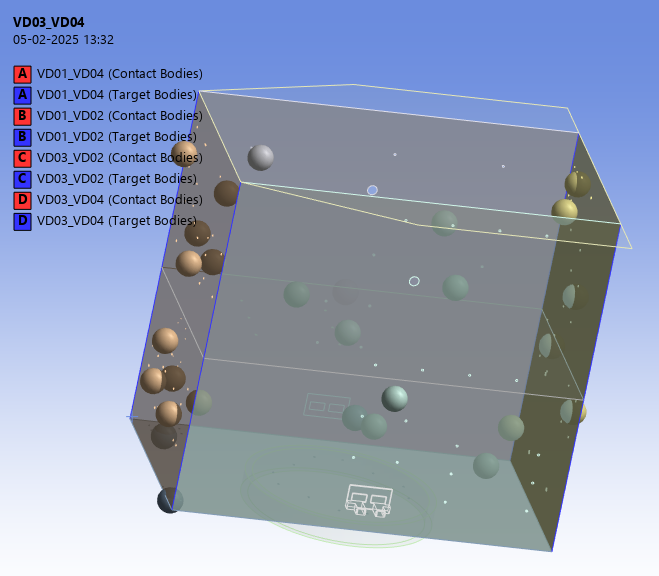
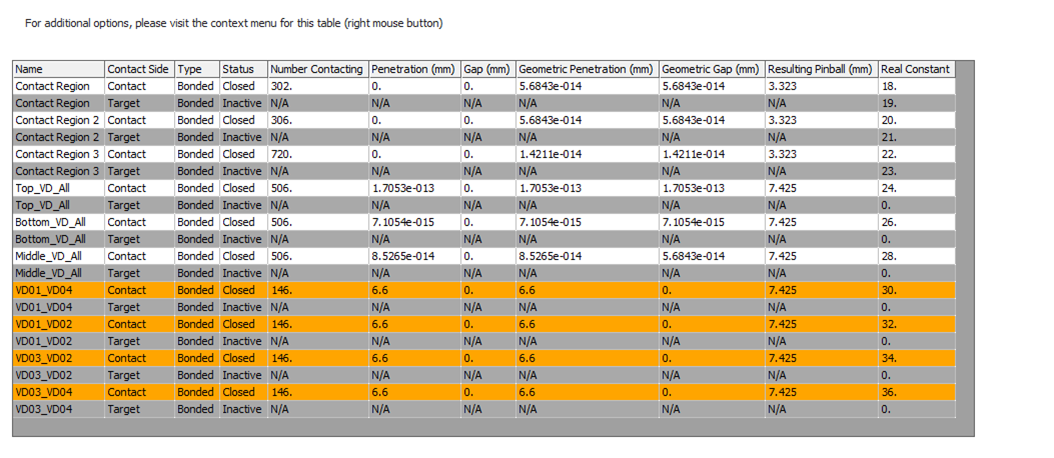
In the contact side, the 4 contact zone are showing high geometric penetration.
It is a shell based modelling with layered structure of honeycomb core and facing skin.
Contacts are shown in blue in above image.
How should i make the geometric penetration to zero? I have checked in model. No discrepancy penetration wise.
Following are the warning shown during analysis :
One or more MPC or Lagrange Multiplier formulation based contact regions or remote boundary conditions may have conflicts with other applied boundary conditions or other contact or symmetry regions. This may reduce solution accuracy. For MPC based remote points, setting the relaxation method may help eliminate overconstraint. Tip: You may graphically display FE Connections from the Solution Information Object for non-cyclic analysis. Refer to Troubleshooting in the Help System for more details.
•One or more Contact Regions have Contact Shell Face or Target Shell Face set to Program Controlled. This can adversely affect performance when writing the input file. Consider displaying element normals and selecting either Top or Bottom shell face.
See her for more info also:
Shell Contacts penetration Gap : reg


















 You are navigating away from the AIS Discovery experience