-
-
February 24, 2018 at 9:18 pm
ozkantekin90
SubscriberhelloÂ
I am trying to make a cutting analysis a simple analysis, whatever i select the values in animation i couldn't see plactic deformation, the cutting edge is just end its motion by the time contact the sheet metal i think i did miss something while i make mathematical model , Can somebody help me with this thaks
Â
özkan
-
February 25, 2018 at 2:08 am
peteroznewman
SubscriberHello özkan,
I can try to help. What material model did you use for the part you want to cut? You must include a material failure model. Most materials in the Explicit Dynamics library include that. It will be easy to help you if you save an Archive of your model. That means close Mechanical, and in Workbench, File, Archive... and save a .wbpz file. You can attach that file to your post if it is < 120 MB. If the archive is too large, right click on Model and select Clear Generated Data, which will clear the mesh. Save the project, then do File, Archive... again and the file size will be smaller.
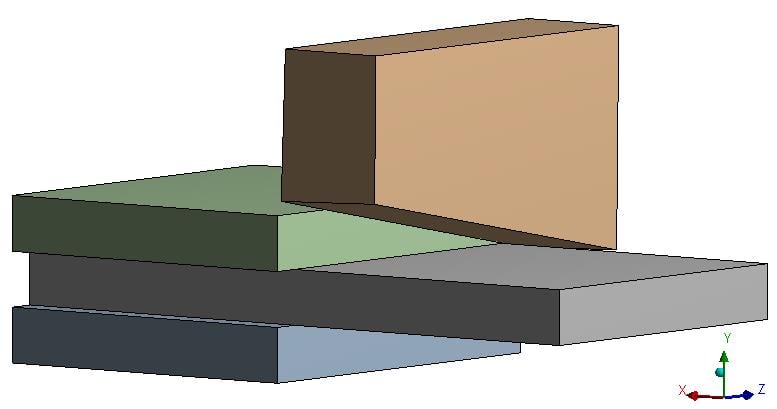
Attached is an ANSYS 18.2 archive of a very coarse and simple cutting model that runs in 15 minutes on my 4 core laptop.
https://youtu.be/iSuezFoH6lo
-
February 25, 2018 at 10:33 am
ozkantekin90
SubscriberHello PeterÂ
Thanks for your reply, I use Ansys 15.0 i think you can run it on your laptop. Also i will try to upgrade my sofware and open the project that you sent meÂ
-
February 25, 2018 at 11:06 am
peteroznewman
SubscriberYou can download either 19.0 or 18.2 and be able to open that archive.
Here is a version with a flatter cutter.
https://youtu.be/k1OfN6ej8ww
-
February 25, 2018 at 11:29 am
ozkantekin90
Subscriberhow can you determine the contact types actually i need to improve my analysis skills on Ansys especially explicit dynamics ?Â
-
February 25, 2018 at 11:55 am
peteroznewman
SubscriberThe model I attached only has Body Interaction and no additional Contact definitions.
-
February 25, 2018 at 1:07 pm
-
February 25, 2018 at 2:01 pm
peteroznewman
SubscriberYou have to click on the Solution, and Clear Generated Data, then Solve and wait. If you click on the Solution Information folder, you will see the progress. When it finishes, you will have results.
If I include results in the archive, the file size will be too large.
-
February 25, 2018 at 2:18 pm
peteroznewman
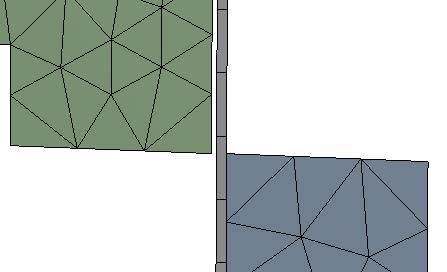
SubscriberI opened your model, the first observation is that you have only 1 element through the thickness of the plate you want to cut and there is a gap between the plate and the tool.
You can see that in my model, I have 20 elements through the thickness of the part that is being cut and the tool is touching the plate.
If your goal is to make an animation of the cutting, it will be best if you take this geometry and scale it up 1000 times. The reason for this is that the solver calculates a time step based on the dimension of the smallest element. If you check the size of my plate, it is 1000 mm thick! But it solves in about 15 minutes. If my plate was 1 mm thick like your model, it would take 15,000 minutes or 250 hours or 10.4 days to solve.
-
February 25, 2018 at 2:26 pm
ozkantekin90
Subscriberi see i still have a lot of thing that i need to learn, thanks for your valuable informations, Also i will not use contacts like yours, in this case do i need to clamp the sheet on two side of the sheet ? thank youÂ
-
February 25, 2018 at 2:37 pm
peteroznewman
SubscriberYes you have to have contact on both sides of the sheet, which you can see in my model. But I am not clamping. I picked the back edge of the plate and added a fixed support.
Also, instead of a displacement to move the tool, I used velocity with an equation that is number*time. That means that at t=0, v=0 and the velocity ramps up over time. Your ramped displacement creates a constant velocity so that the tool makes an impact with the plate which can cause the solution to fail due to energy error.
-
March 14, 2018 at 5:47 am
ozkantekin90
SubscriberHello PeterÂ
 Thanks for your help, Also i need to know how easy to cut a sheet as shearing (like scissoring) compared to usual cut as you have shown in the video above, how can i observe it on the ansys ?
-
March 14, 2018 at 11:04 am
-
April 16, 2020 at 1:55 am
SaharPzd
SubscriberHi Peteroznewman,
Â
  I am trying do a simulation with a similar concept where I am simulating a surgical staple being inserted into a block of bone. I used a lot of the techniques you mentioned above and I was able to simulate most of it except it seems like the staple does not cut into the bone but instead just deflects off of it. I had to create a new material on my own to simulate bone. The values I had were the tensile strength, yield strength, young's modulus, shear, poisson ratio, mass density, and compressive strength. Is there anything else I need to model failure?
-
- The topic ‘Sheet metal cutting analysis on Ansys Workbench’ is closed to new replies.

-
6379
-
1906
-
1457
-
1308
-
1022
© 2026 Copyright ANSYS, Inc. All rights reserved.