TAGGED: -adaptive-mesh, adapt, adaptive-mesh-method, adaptive-meshing
-
-
August 18, 2026 at 5:33 pm
cesarj.95plus
SubscriberDear support,
I am practicing with the adaptive mesh refinement over a simple 2D cylinder configuration. I would like to set the following refinement layers:
- lvl 0 refinement for cells with vorticity-mag< 0.1
- lvl 1 refinement for cells with 0.1<=vorticity-mag < 0.25
- lvl 2 refinement for cells with 0.25<=vorticity-mag < 2.0
- lvl 3 refinement for cells with 2.0<=vorticity-mag
I have created for this reasons 6 cell registers
- lvl_1_ref that marks the cells for refinement where vorticity-mag > 0.1
- lvl_1_coa that marks the cells for coarseing where vorticity-mag < 0.09
- lvl_2_ref that marks the cells for refinement where vorticity-mag > 0.25
- lvl_2_coa that marks the cells for coarseing where vorticity-mag < 0.24
- lvl_3_ref that marks the cells for refinement where vorticity-mag > 2.0
- lvl_3_coa that marks the cells for coarseing where vorticity-mag < 1.95
So if we start from a base grid, regions where vorticity-mag > 2.0 will be afected by lvl_1_ref, lvl_2_ref and lvl_3_ref and therefore a grid refinement level 3 is achived. For regions where vorticity-mag > 0.1, only lvl_1_ref will be applied and a grid refinement level 1 is achieved.
However I see than only with the lvl_1_ref and lvl_1_coa refinement and coarsening criterias, the levels 3 of grid refinement are achieved. Is there any better way to apply each cell refinement level to a specific value of vorticity?
-
August 27, 2026 at 6:36 pm
cesarj.95plus
SubscriberWell let's try again with more context:
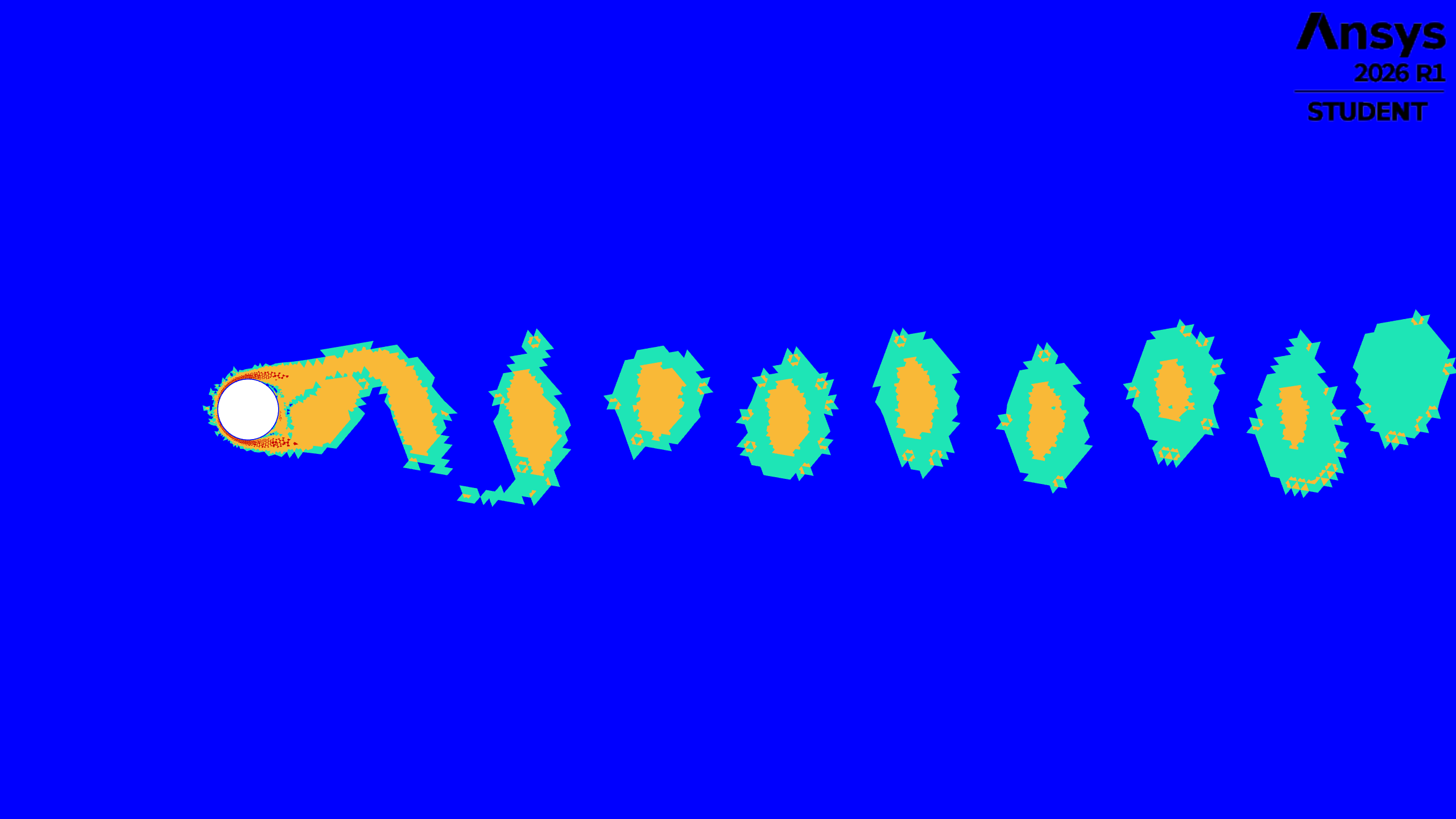
I am using automatic mesh refienemt with the refinement/coarsening criteria specified above. In the first time step I apply manually the refinements in order to have the desired mesh refinements at the start of the next iteration and concentrate the cells at the high vorticity regions. The image below shows the cell refinement level in the domain at time step 1 (blue = lvl 0, cyan = lvl 1, yellow = lvl 2 and red is lvl 3):
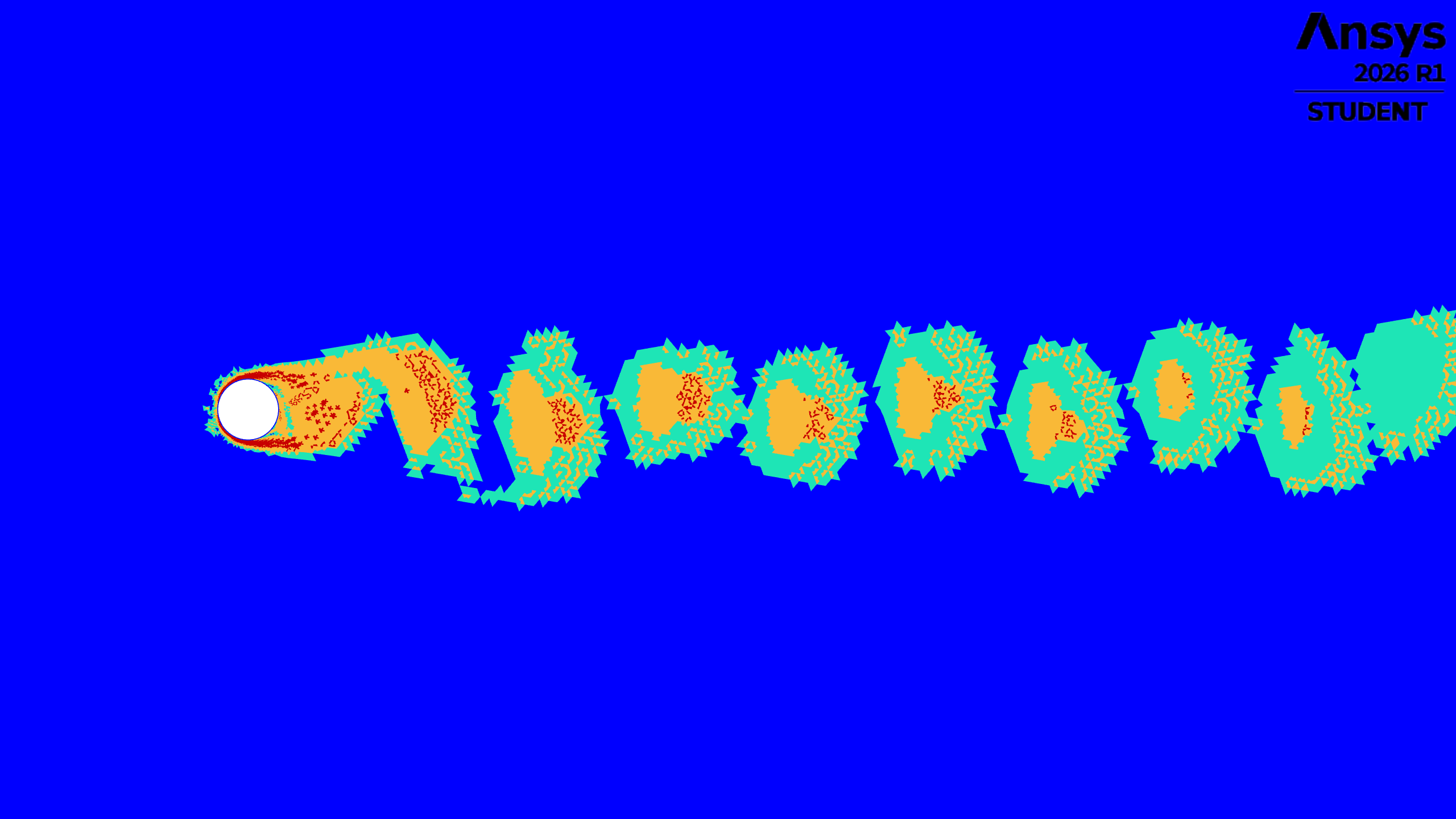
Now this is time step 25, as you can see the vortex core start to get closer and closer and the coarsening step isn't working
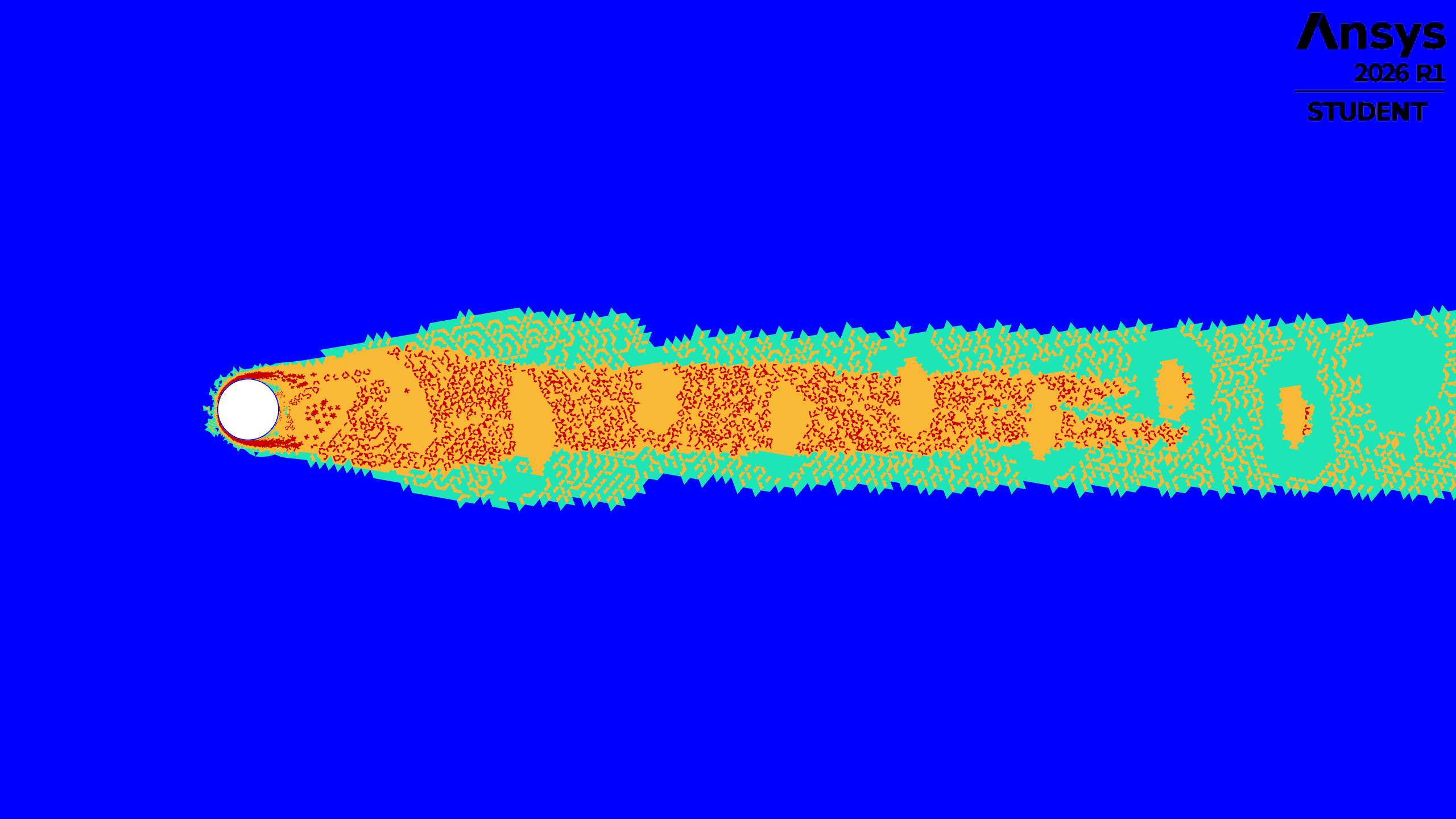
Beyond a certain time step (around 100 time steps) the mesh clusters merge and the mesh starts to be constant. The image below is time step 500. It is also relevant to mention that the mesh patterns from time step 1 are kept and you can clearly identify where the mesh was refined initially.
Can someone explain to me why this is happening in such a simple scenario?
-
August 28, 2026 at 1:26 pm
skulkarn
SubscriberHello,
Which type of mesh you are using? is it hex /tet or mixed?
-
August 28, 2026 at 1:54 pm
cesarj.95plus
SubscriberHello,
This is a 2D triangular mesh with quads at the inflation layer. But why is this relevant?
-
September 2, 2026 at 6:13 pm
cesarj.95plus
SubscriberHi I am bumping into this again,
How does the mesh affect to the refining/coarsening criteria?
-
September 4, 2026 at 9:20 am
skulkarn
SubscriberIn Ansys Fluent, adaptive mesh refinement (AMR) can be limited or stopped after a small number of refinement cycles by user-defined refinement-level limits, cell-size limits, or by mesh-type constraints; if any of these criteria are met after the first refinement, no further adaptation will occur. The behavior is not specific to tetrahedral meshes in what I can see, but to how AMR limits and constraints are configured for any supported cell type.
Maximum refinement level reached: Fluent AMR uses a maximum refinement level so that different regions cannot refine arbitrarily; once the local maximum level is attained in the adapted region during the first cycle, further cycles will not create smaller cells there.
Minimum cell size / mesh constraints: AMR is governed by constraints like minimum cell size to avoid excessive refinement. If the first refinement cycle brings cells down to (or very close to) this minimum, additional cycles are effectively blocked and the process appears to “stop.”
Refinement-level cap set by user: When using the Adapt tools, you can explicitly set a max level of refinement; if, for example, it is set to 1 or 2, Fluent will refine only up to that level and no further cycles will increase resolution, even if AMR is nominally “on.” -
September 6, 2026 at 8:05 am
cesarj.95plus
SubscriberYes I have set the following controls
maximum_refinement_level=3
maximum_cell_count=750000
minimum_edge_length=1e-4
They work fine in the first iteration (first screenshot) but then it seems that the cells affected by the initial manual mesh refinement are frozen (their cell refinement level doesn't change anymore with the automatic refinement). Then during the automatic adaption,I have cells than continue to be refined but aren't marked for coarsening and this is why you can see the wave being refined and having constant refinement levels.
So I don't fully understand why the cells aren't being coarsened. -
September 7, 2026 at 2:40 pm
Rob
Channel PartnerSet max levels to 6 (default) and double check the number of cells in the domain. If a cell reaches max levels it can get stuck if the coarsening step can't select it. That's why the refinement sets on cell size and refinement level now: historically it was the latter only.
-
September 8, 2026 at 1:20 pm
cesarj.95plus
SubscriberI have tried playing with the refinement levels but the number of cells increase way too much but i don't think that my issue comes from there. I would like to have only up to 3 levels of refinement which seem logical to me (one for almost zero values (blue), low values (cyan), intermediate values (orange) and high values (red) as shown in this image at the time step 0 which should capture fairly well the flow features:
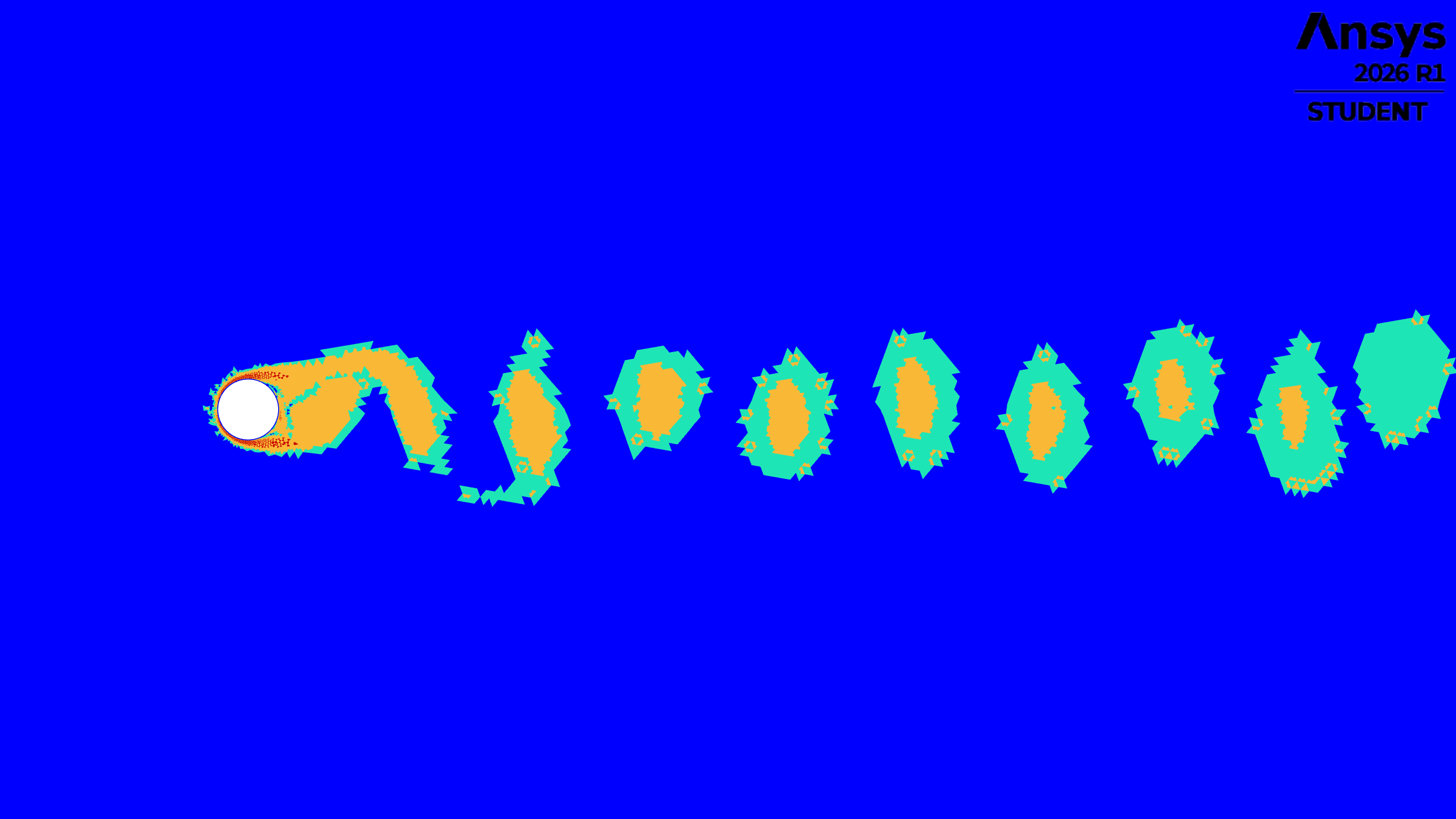
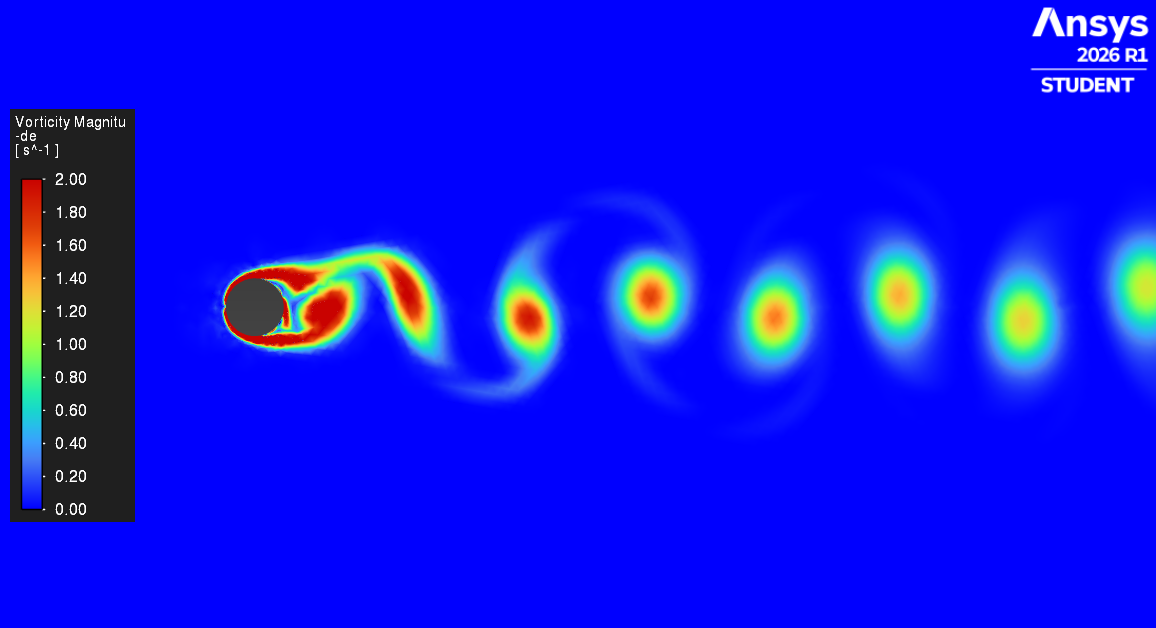
Which corresponds to this flow scenario, so there should be clear mesh refinement gaps between vortex and not the continuous refinement sheet that advances with the vortex as shown in my previous reply:
For more context I am leaving here the exact refinement settings that I am trying:
Cell registers (6 in total):
L1_ref -> field: vorticity-mag -> more-than: 0.20
L1_coa -> field: vorticity-mag -> less-than: 0.18L2_ref -> field: vorticity-mag -> more-than: 1.25
L2_coa -> field: vorticity-mag -> less-than: 1.00L3_ref -> field: vorticity-mag -> more-than: 5.00
L3_coa -> field: vorticity-mag -> less-than: 4.00Note that a value range gap is kept intentionally to avoid mesh flip-flop refinement near the limit values.
Automatic mesh refinements (3 in total):
AMR_L1 -> frequency:1
AMR_L1 -> refinement_expression: AND(AMR_L1_ref,CellRefineLevel<1)
AMR_L1 -> coarsening_expression: AND(AMR_L1_coa,CellRefineLevel>0)AMR_L2 -> frequency:1
AMR_L2 -> refinement_expression: AND(AMR_L2_ref,CellRefineLevel<2)
AMR_L2 -> coarsening_expression: AND(AMR_L2_coa,CellRefineLevel>1)AMR_L3 -> frequency:1
AMR_L3 -> refinement_expression: AND(AMR_L3_ref,CellRefineLevel<3)
AMR_L3 -> coarsening_expression: AND(AMR_L3_coa,CellRefineLevel>2)If I understand correctly the following logic should apply:
- A cell that has a vorticity value of 8 s-1 and hasn't been refined yet (CellRefineLevel==0), should be refined 3 times on that time step because it is affected by the three automatic refinement.
- A cell that has a value of 0.15 s-1 and CellRefineLevel=1 will be coarsened once (affected by AMR_L1)
- A cell that has a value of 1.5 s-1 and CellRefineLevel=1 will be regined once by AMR_L1 and AMR_L2 as it has reached it'smaximum refinement level allowed by these 2 automatic methods. (Or maybe here is my problem that it will be refined twice as both methods are triggered)
Are my rules interpretations correct? Or is there any other appropiated good practice to apply in this scenario?

-
- You must be logged in to reply to this topic.
-
6880
-
1906
-
1544
-
1344
-
1217
© 2026 Copyright ANSYS, Inc. All rights reserved.