Ansys Assistant will be unavailable on the Learning Forum starting January 30. An upgraded version is coming soon. We apologize for any inconvenience and appreciate your patience. Stay tuned for updates.
3D Design

3D Design

Topics related to Ansys Discovery and Ansys SpaceClaim.

Rotation Boundary condition

    • ansysquestions2995
      Subscriber

      When deciding the boundary conditions for symmetry how do we apply the rotational BC's.


      Like ROT X and ROT Y=0.Where do I find It?


      I know how to apply displacement ,but i am unable to find rotational  BC's in Ansys workbench.?


      Please Help

    • peteroznewman
      Subscriber

      Please insert some images of your model and show where you want to apply symmetry.

    • ansysquestions2995
      Subscriber


      Let us assume we want to apply some boundary conditions for symmetry ,then how do we do it for above geometry as we can see 


      it is bi-symmetric.I can put the plane at which they are symmetric displacement to zero,but what about the rotations?How to do that?

    • peteroznewman
      Subscriber

      There are three methods to have an accurate symmetry BC.  Choose one, don't do more that one at a time.


      1) Use DesignModeler.


      Insert Symmetry. You have to pick a plane. It will automatically create the proper BC in Mechanical, behind the scenes.


      2) Model branch in Mechanical.


      Insert Symmetry Region. Pick a face or edge. Make sure the Axis direction is correctly specified. In earlier releases, it would default to the X axis even if the symmetry plane  was parallel to the XY plane and the proper value for normal direction was the Z axis. This was a source of error. I think the 2020 R1 release sets the direction properly automatically.  Once you have done that, the proper BC are set for you behind the scenes.


      3) Insert BCs explicitly into Static Structural branch.


         a) For solid elements on the symmetry plane, set the displacement to 0 on component normal to the plane, leaving the other two displacements free.


         b) For shell or beam elements, in addition to the displacement set in a), you must also insert Fixed Rotation for the two axes that lie in the symmetry plane.


      Method 3 is all that the first two methods are doing behind the scene.


      Though you didn't ask, I will add two comments on the image you inserted. First, the elements are too large, especially around the hole. Use a Mesh Control to force smaller elements on the edge of the hole.  Second, the stress is way too large. I expect the load is orders of magnitude too large.

    • lollo
      Subscriber
      Dear I found out you're a master in usying ANSYS so I'd like to ask you a question.nUsing the remote displacement option to implement TWO rotations, i.e. Rx and Ry, around the origin of the global coordinate system, does ANSYS calculate the matrix productnRx*Ry or Ry*Rx? Or otherwise: how can I know what it is calculating?nThanks for replyingn
    • peteroznewman
      Subscriber
      nI don't know the answer to that question. When I don't know what ANSYS will do, I sometimes read the ANSYS Help documentation, but most of the time I build a small model and observe what happens. I recommend you do that. Build the model and reply with what you learned.n
    • lollo
      Subscriber
      I found out that without specifying any local reference system, Ansys rotate the model around the axis of the global reference system so that implemententing the Ry*Rx product!!n
    • lollo
      Subscriber
      Dear I still have a doubt.nIs there any way to let a local coordinate system move DURING the simulation with the body it is associated with?nIf I define a local CS and then I impose two rotation, the second one does not happen around a current axis, but still around the original axis of the local CS.nThanks in advancen
    • peteroznewman
      Subscriber
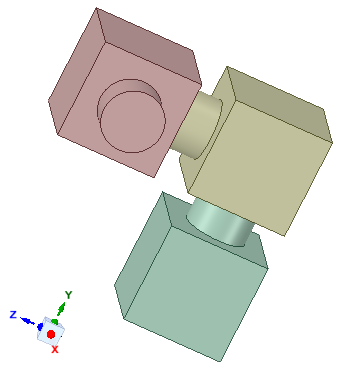
      nA model has three bodies and three revolute joints.nThe red body has a rotation relative to ground about a local X axis.nThe yellow body has a revolute joint to the red body and that is initially along the Z axis, but when the revolute to ground on the red body rotates about the X axis, the axis of the second revolute moves with the red body.nThe green body has a revolute joint to the yellow body and that is initially along the Y axis, but when either of the first two revolute joints rotates, the axis of that third revolute joint moves through space.nn
    • lollo
      Subscriber
      Thanks nBut I think it's not the answer to my question! You're talking about 3 bodies and everyone of them has its own CS.nI'm talking about simultaneous rotations applied to one body. nExample to clarify what I'm saying: I have a body with its local CS called S. I'm imposing 3 rotations: the 1st about an X axis, the 2nd about a current Y axis and the 3rd about the current Z axis. Since I want rotations about current axis I expect that during the 1st rotation about the X axis, the CS S change to a S' CS to which is referred the 2nd rotation about the axis that will be Y' (not equal to Y belonging to S) and so on.nHope I clarified my questionn
    • peteroznewman
      Subscriber
      ArraynIt could be the answer to your question if you consider the green body is the one you want to apply rotations to. The yellow and red bodies are called dummy bodies and exist solely to transfer rotation along the chain. They can be rigid bodies so they don't contribute to the flexibility of your structure. All three joints can be coincident, I have spaced them out to show the concept.nOn a related topic, some people have a force applied to their structure and as the structure deforms, they want the direction of the force to follow the deformation of the structure. Normally, applied forces point in a fixed direction, but if you have large deflections, the tip of a flexible cantilever can end up pointing in a very different direction. Pressure loads follow the deformation of the structure since they are always normal to the face that they are applied to. But if you want that effect with a force, then you use the Follower Force capability described in the Ansys Help system. https://ansyshelp.ansys.com/account/secured?returnurl=/Views/Secured/corp/v202/en/ans_elem/Hlp_E_FOLLW201.html?q=follower%20forcen
    • lollo
      Subscriber
      Thank you so much n
Viewing 11 reply threads
  • The topic ‘Rotation Boundary condition’ is closed to new replies.
[bingo_chatbox]