-
-
December 23, 2018 at 3:52 pm
Mordrag
SubscriberHi everyone!
Â
I need to simulate a two-link structure connected by hinges which allow rotation in Z-direction in the Rigid Body Dynamics module with all the bodies considered rigid. I want to prescribe an input rotation to the revolute joint connected to the ground and observe the resulting moments and behaviour of the structure.
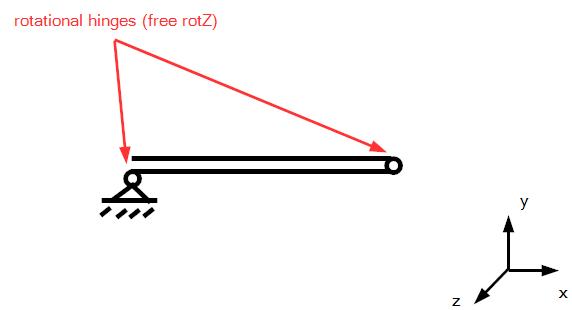
In order to make the simulation more realistic, I want to include nonlinear stiffness characteristic of the joints and I also want to include the friction in joints. Revolute joint supports friction, but only a single value for joint stiffness.
So far, I have managed to implement the nonlinear stiffness characteristic by using the general joint with all DOFs but rotZ fixed between a dummy rigid body and the actual link scoped by remote point. I will then apply the input rotation condition to the rigid cylinder and the rotation will transfer to the actual link as a moment including the nonlinear stiffness. Problem is, that if I use the general joint instead of a revolute joint, I lose the option of specifying a friction to the joint.
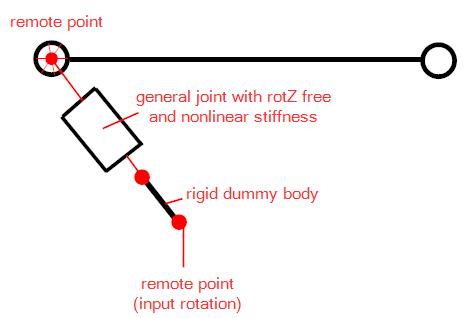
I also tried to use a torsional spring instead of a general joint which would allow me to input friction in the revolute joint, but the torsional spring does allow only a single value for stiffness.
Do you have any idea how to implement the friction and nonlinear stiffness characteristics together?

-
December 23, 2018 at 5:22 pm
peteroznewman
SubscriberYou can add another dummy body.
From the ground, there is a revolute joint with an input load of rotational displacement to linkA(end1).
LinkA(end2) connects to LinkB with a general joint that implements the nonlinear stiffness.
LinkB connects to LinkC with a revolute joint that implements friction.
Regards,
Peter
Â
-
December 24, 2018 at 7:42 am
Mordrag
SubscriberThis is a really simple and elegant solution which didn't occur to me! I can't test it right now, but as soon as I will I will let you know.
Thanks for your advice Peter! -
December 24, 2018 at 1:43 pm
peteroznewman
SubscriberIf it works, please click Is Solution under my post to close this discussion, or ask another question.
-
January 2, 2019 at 2:31 pm
Mordrag
SubscriberHi Peter,
I have modified my analysis like you suggested:
- Input rotation to revolute joint which connects ground and dummyA
- general joint which connects dummyA to dummyB (nonlinear stiffness)
- revolute joint with defined friction which connects dummyB to the actual link that should be driven
But I have found out that no significant rotation is transfered through revolute joint with friction. This makes sense to me, because this joint has free rotation in Z so that moment transfered from general joint provides no rotation. I think I can put another revolute joint directly from linkA to ground, where I define friction, but then I won't be able to simply view the moment required to drive this assembly. Also the solver starts to behave quite weird, like solution time increases from few seconds to few minutes, crashes etc.
-
January 2, 2019 at 7:36 pm
peteroznewman
SubscriberPlease show the General Joint details.
Did you set Z rotation = 0 for that joint? That is required so that the revolute can deliver the Z rotational freedom.
-
January 2, 2019 at 7:54 pm
Mordrag
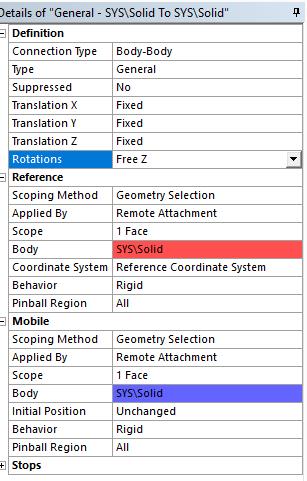
SubscriberPlease see below the screenshot of general joint settings.
I set all DOFs equal to 0, except for rotZ which is kept free to allow relative rotation, also stiffness can only be added for non-zero DOFs. Once stiffness is set to non-zero value, rotation is transfered between connected bodies with finite value of stiffness (as opposed to fixed joint)
I believe that the problem lies in transfering the moment from dummyB to link by revolute joint. When the moment from general joint is transfered, it will not provide rotation, because the relative rotation of dummyB and link is free (from the definition of revolute joint). And this is not the same as providing joint load by moment to a revolute joint, because the moment will be defined as relative between the reference and mobile side of the revolute joint.
-
January 3, 2019 at 1:09 pm
peteroznewman
SubscriberYou only want two joints to have Z-rotation free to rotate; that is the two Revolutes. The first Revolute to ground has an input rotation. The problem is that you have added a third joint with Z-rotation free: the General joint. Set All Rotations Fixed on the General joint. The General joint is there to provide the displacement flexibility.
From the ground, there is a revolute joint with an input load of rotational displacement to linkA(end1).
LinkA(end2) connects to LinkB with a general joint that implements the nonlinear stiffness.
LinkB connects to LinkC with a revolute joint that implements friction.
Â
-
January 3, 2019 at 2:13 pm
Mordrag
SubscriberThe problem is, that stiffness for general joint (or any other joint) can only be defined for DOFs which are set to free (that makes sense to me). Hence I need to have the free Z-rotation in general joint definition to be able to input stiffness.
- when stiffness is set to 0 in rotZ in general joint:
- Â Â Â rotation which goes into general joint from previous member results in M = 0 (M=k*phi)
- when stiffness is set to non-zero value in rotZ in general joint:
- Â Â Â general joint provides moment according to M=k*phi
The general joint with all rotations fixed does not provide any displacement flexibility and acts only as a redundant member by outputting the same rotation as was inputted in it.
- when stiffness is set to 0 in rotZ in general joint:
-
January 4, 2019 at 1:41 am
peteroznewman
SubscriberYou say that a general joint with all DOF free allows you to supply a stiffness values for all DOF. Doesn't that give you what you want?
If you share your model by Attaching a ,wbpz file to your post, I could see what you have and what it does.
-
January 16, 2019 at 2:08 pm
Mordrag
SubscriberSorry for the long pause from my side. I have managed to implement nonlinear stiffness and decided to add friction manually by commands. But now I'm facing another issue. Please see attached my simple project illustrating this issue.
- 3 bars are connected with revolute joints with defined STOPs (so that they can't penetrate each other)
- constant counter-torque 1Nm is applied to each revolute joint to simulate the resistance against movement (which will be driven by rotation input)
- after solving this model and probing the joint for moment reaction, I get reactions:
- Â Â revolute joint 1: 1Nm
- Â Â revolute joint 2: 2Nm
- Â Â revolute joint 3: 2Nm
Now this is not in aggreement with the boundary conditions. Reaction in each joint should be equal to 1Nm. Same behaviour occurs when I add counter-torque only to rev. joint 2 or 3.
I get the right reactions of 1Nm if I input some arbitrary coefficient of friction to any joint, but this is really weird behaviour as the friction coefficient alone should not do anything without other geometrical dimensions (inner radius...).
Here is the list of things I have tried:
- ramping the torque in more steps - same result
- trying different RBD solver integration type, stabilization, correction and assembly type - same result
- solving the same analysis in static structural module - this will show correct reactions of 1Nm
- solving the same analysis in transient module - same result as in RBD module, no matter if ramped or stepped applied
 Do you have any idead how to fix this? I can't use the friction coefficient fix in my large project.Â
-
- The topic ‘Rigid body dynamics simulation with non-linear stiffness and friciton’ is closed to new replies.
-
6379
-
1906
-
1457
-
1308
-
1022
© 2026 Copyright ANSYS, Inc. All rights reserved.