

-
-
January 4, 2021 at 3:57 am
Ranjitha
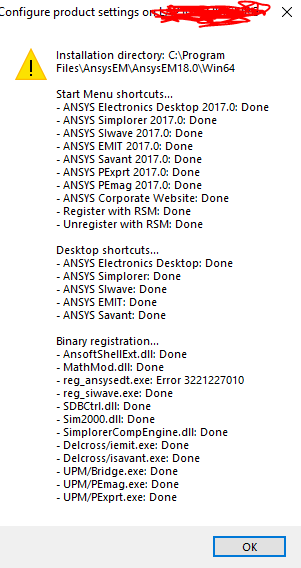
SubscriberI have installed Ansys 18.0. But unable to open. I saw this forum for the solution, tried running configThisMachine got an error. How to get resolve this issue?
January 4, 2021 at 2:24 pmMatt Madore
Forum ModeratorThis issue is due to a Windows Update, Microsoft update KB4571756. The solution for version 18.0 is to uninstall the Update.n To uninstall the Windows update:n1. Select the start button or Windows Desktop Search and type update history and select View your Update history.n2. On the Settings/View update history dialog window, Select Uninstall Updates.n3. On the Installed Updates dialog window, find and select KB4571756, and then click the Uninstall button.n4. Restart your Windows device.n nAdditionally, you may be able to run the following from an elevated CMD to uninstall the update:n wusa /uninstall /KB:4571756 /quiet /promptrestartnnFor versions 2018.0 (19.0) and newer, you may try setting the environment variable ANSYS_EM_DONOT_PRELOAD_3DDRIVER_DLL=1 to get around the problem.n nFor guidance on creating an Environment Variable please refer to this link. You need to create a NEW Variable.nhttps://www.onmsft.com/how-to/how-to-set-an-environment-variable-in-windows-10n nNew Variable Name: ANSYS_EM_DONOT_PRELOAD_3DDRIVER_DLLnNew Variable Value: 1n nThank you,nMattn nJanuary 4, 2021 at 9:08 pmSubscriberI tried everything. But it's not happening. I followed each step and did. nJanuary 4, 2021 at 9:14 pmForum ModeratorCan you please provide a list of all current Windows Updates installed?nOpen Search/Cortana.nSearch for 'cmd'.nOpen a command prompt with admin privileges. (right-click -> Run as administrator)nType systeminfo.exe and press Enter.nUnder the Hotfix(s) section, you can find the list of Windows updates that you have installed on your device.nPlease send a screenshot of the outputnnJanuary 4, 2021 at 9:20 pmSubscriber n
January 5, 2021 at 2:01 pmForum ModeratorWhat happens when you try to open Electronics Desktop? Do you see any error messages or does it just not do anything? Have you tried installing a newer version?.ThanksnMattnJanuary 5, 2021 at 7:03 pmSubscriberWhen I try to open it. It will just load but does not open. No error. Can you send a newer version link? I mean for Electronics Desktop.nJanuary 5, 2021 at 8:50 pmSubscriberThank you. I downloaded Ansys 19 version. It worked. nJanuary 6, 2021 at 3:20 pmForum ModeratorThat's great, happy to hear it!nViewing 8 reply threads
n
January 5, 2021 at 2:01 pmForum ModeratorWhat happens when you try to open Electronics Desktop? Do you see any error messages or does it just not do anything? Have you tried installing a newer version?.ThanksnMattnJanuary 5, 2021 at 7:03 pmSubscriberWhen I try to open it. It will just load but does not open. No error. Can you send a newer version link? I mean for Electronics Desktop.nJanuary 5, 2021 at 8:50 pmSubscriberThank you. I downloaded Ansys 19 version. It worked. nJanuary 6, 2021 at 3:20 pmForum ModeratorThat's great, happy to hear it!nViewing 8 reply threads- The topic ‘reg_ansysedt_error’ is closed to new replies.
Innovation Space Trending discussions
 Top Contributors
-
peteroznewman
 4723
4723 -
scabo
 1565
1565 -
Dennis Chen
 1386
1386 -
javat33489
 1242
1242 -
Shyam Prasad V Atri
1021
Top Rated Tags
© 2026 Copyright ANSYS, Inc. All rights reserved.
Ansys does not support the usage of unauthorized Ansys software. Please visit www.ansys.com to obtain an official distribution.
-


The Ansys Learning Forum is a public forum. You are prohibited from providing (i) information that is confidential to You, your employer, or any third party, (ii) Personal Data or individually identifiable health information, (iii) any information that is U.S. Government Classified, Controlled Unclassified Information, International Traffic in Arms Regulators (ITAR) or Export Administration Regulators (EAR) controlled or otherwise have been determined by the United States Government or by a foreign government to require protection against unauthorized disclosure for reasons of national security, or (iv) topics or information restricted by the People's Republic of China data protection and privacy laws.

 You are navigating away from the AIS Discovery experience

