-
-
June 2, 2023 at 2:01 am
Yalcin Sevimay
SubscriberHi guys I am looking a feature to increase the mesh size towards inside of the solid ( I know Patran had) also increasing the element size towards to edge that I can reduce the model by increasing element size for the not interested areas.
Peter ? I am sure you have something to say. Thanks in advance.
-
June 2, 2023 at 8:48 am
Claudio Pedrazzi
SubscriberPerhaps other more experienced users can suggest better ideas. I could imagine achieving this by specifying an element size for the overall body, and a smaller size for the surfaces (possibly all of them) where I want a more refined mesh. This is a trivial example where I specified a size equal to half in the two surfaces on the left and top.
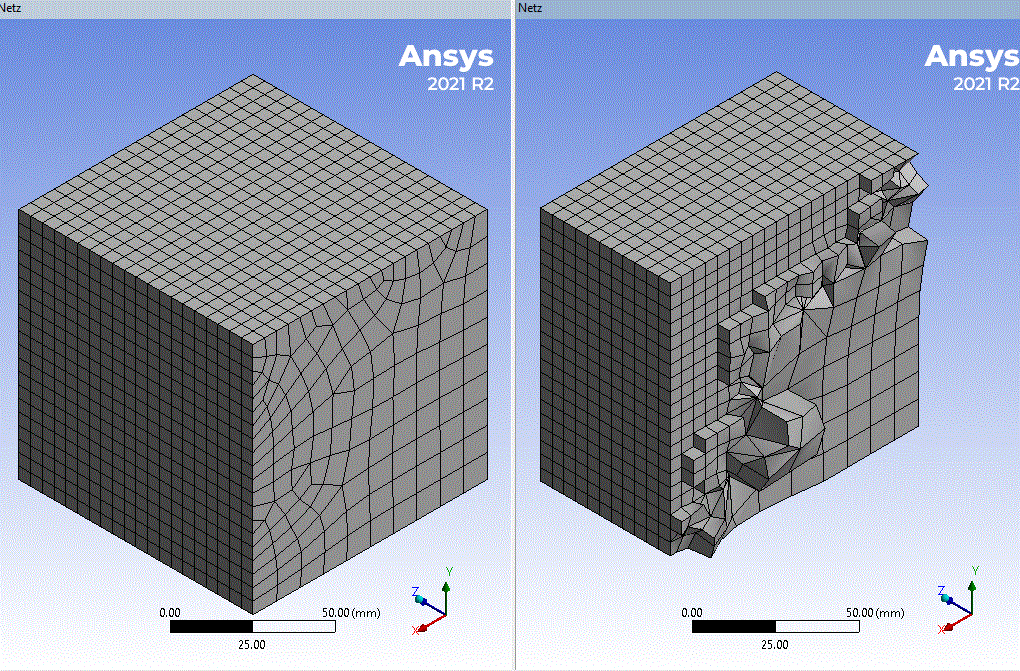
For the second part of the question, the Bias Type and Bias Option should be what you are looking for. They work only if you select a line, of course.
Extract from Help:
Bias Type and Bias Option
For edges only, use Bias Type to adjust the spacing ratio of nodes on an edge. This feature is useful for any engineering problem where nodes need to be clustered on an edge or group of edges, or if there is a need to bias the mapped mesh of a face towards a specific direction with respect to the edges of the face. -

June 2, 2023 at 9:20 am
Aniket Chavan
Forum ModeratorAssuming that you are using workbench mechanical, please take a look at:
https://ansyshelp.ansys.com/account/Secured?returnurl=/Views/Secured/corp/v231/en/wb_msh/msh_glo_and_loc.html
Please note you can not increase a mesh size larger than global size (https://ansyshelp.ansys.com/account/Secured?returnurl=/Views/Secured/corp/v231/en/wb_msh/ds_Sizing_Group.html). You will have to use largest required global mesh size first and then use local sizes (https://ansyshelp.ansys.com/account/Secured?returnurl=/Views/Secured/corp/v231/en/wb_msh/ds_Meshing_Sizing.html) to refine the mesh as required.
-Aniket
-
- The topic ‘Reducing the model size’ is closed to new replies.
-
6450
-
1906
-
1457
-
1308
-
1022
© 2026 Copyright ANSYS, Inc. All rights reserved.








