TAGGED: Reverse Engineering, spaceclaim
-
-
November 28, 2018 at 4:47 pm
Yohann Biran
SubscriberHello,
We have a customer who has a specific need with spaceclaim.
They have been customers for 4 months and they make car protection films.
They have a scanner to scan the bumpers of cars, import the scan into spaceclaim to do the reverse engineering with the skin surface tool.
And finally, he realizes the unroll of the result to know the flattening for the cutting.
The problem is that the unroll tool gives inconsistent results.
Here is a video example to illustrate the problem : https://www.screencast.com/t/J2rjoqCidMvHere a link to download the file : https://we.tl/t-yC8lt6spK6
In 3D, the distance between two points is about the same (watch the vidéo), but when you do the unroll and make a measurement between the two points in question, there is a 20 cm gap.
The result is therefore absurd.
The customer is blocked and has lost confidence in the application, do you have a solution to bring to this problem?Best regards
Yohann
-
November 29, 2018 at 9:36 am
subashni.satish
Forum ModeratorHi NOVACAD
We're very sorry to hear that the customer is disappointed. We will put our best efforts forward to help you. Please note that the queries posted by you will be blocked until approved by the moderators if you add any links to it. It is a basic security measure we take to check the quality of content being posted here.
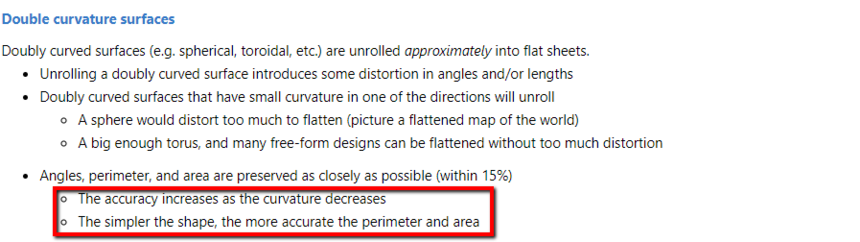
Now coming to your question, the geometry that you are working with seems a little complex for achieving the highest accuracy with 'unroll'. In Discovery SpaceClaim help documentation (place the cursor on 'Unroll' and press F1) it is mentioned that simpler the shape higher the accuracy of the perimeter and area.
In the geometry that you are working with, there are multiple curvatures hence the accuracy of 'Unroll' seems to have reduced. A workaround I'd suggest is to divide the surface into few parts and then use the 'Unroll' tool individually on these parts.
-
November 29, 2018 at 4:20 pm
Yohann Biran
SubscriberHi,
Thanks for the feedback!
Unfortunately, the problem with dividing the surfaces is that the unroll are different at the common segment level and it is therefore very complicated to glue them back together later.
Do you have more information about how this unroll function works (other than the online help)?When using the unrolled function it is necessary to select a face of the geometry, does the choice of one face or another have an impact on the unrolled ?
Do you have any advice to share with me so that the final result is as accurate as possible?
Yohann
-
November 29, 2018 at 4:59 pm
Ethan Geometry Rabinowitz
Forum ModeratorNOVACAD SMO Plus from partner CATALCAD does advanced sheet metal unfolding that might be able to segment it and unfold more accurately https://catalcad.com/fr/nos-logiciels/spaceclaim
-
-
November 30, 2018 at 8:23 am
Yohann Biran
SubscriberYes, I know catalcad and SMO Plus. I have SMO plus in my computer but it's not the good product for this need. SMO Plus is for sheet metal and boiler making.
For this application it's not good because the surface in too complex.
Soo, I have to find the best way to have the more accurate unroll fot the customer.
if I understand correctly, the more patch there is in the model, the more likely we are to get false results.
So the idea would be to try to make patches big enough and if possible cut the model into several pieces ?Yohann
-
November 30, 2018 at 9:03 am
subashni.satish
Forum ModeratorNOVACAD
More complex the curvature the more inaccurate the result. That's how I'd put it. You will have to cut the model to minimize the complexity of curvature per piece.
-
November 30, 2018 at 2:17 pm
Yohann Biran
SubscriberHi,
I spoke to the client on the phone this morning to discuss his problem with the process.
He told me that splitting the file into several pieces was not a viable solution for him because it distorted the actual deformity of the unroll.This customer is led to do reverse engineering all day long on different models of luxury cars, often with complex shapes.
He told me that on some models, more complex than the one I sent you, the result was perfect.Its problem is not necessarily the 15% deviation (as mentioned in the help) that the unroll can give, but rather the fact that the result is not at all homogeneous, for example you can compare the left and right side as can be easily measured on the file I sent you or the image bellow.
On the other hand, the customer told me that his on version 2019.1 he did not have this kind of problem, the problem is regular only since version 2019.2. Do you know if the “unroll” function has been modified between the two versions?
Yohann
-
December 18, 2018 at 9:10 am
Yohann Biran
SubscriberHi,
For information, I realise different test for this case, it seems that when you merge the surfaces together, the result of unfolding is better. If you have any ideas that can improve the quality of the deployment, feel free to let me know !
Best regards
Yohann
-
- The topic ‘Problem with the unroll tool’ is closed to new replies.
-
6465
-
1906
-
1458
-
1308
-
1022
© 2026 Copyright ANSYS, Inc. All rights reserved.
.png)