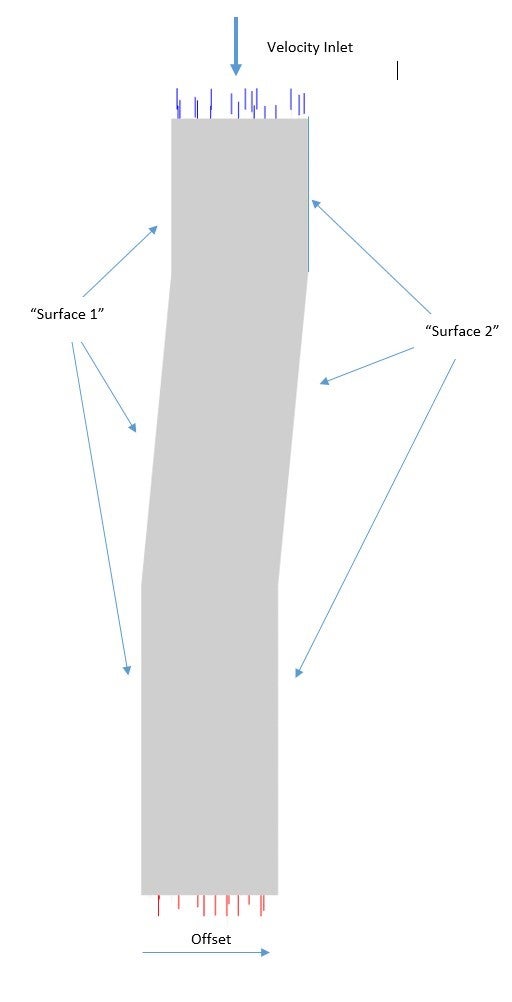
Hi everyone, this is my first time posting to this forum, so hopefully my post follows the guidelines okay. For some reason it won't allow me to upload a photo of my geometry...
Setup: I am simulating flow around a 3D airfoil cascade in Fluent 2021 R2. I am modelling only one airfoil and applying translational periodic boundary conditions to the two sides of the air domain (Surface 1 & 2). I want to study the effect of airfoil angle of attack.
I made my original CAD in SOLIDWORKS and I have ‘attached’ this CAD model to Design Modeler. I used ANSYS Meshing to create my mesh (no-matching controls) and loaded into Fluent.
For simplicity, I created a non-conformal periodic translational boundary condition in Fluent by first creating a mesh interface between Surface 1 & 2. I have no issue setting up/running this initial case manually.
I create my various design points in Workbench by varying the angle of attack parameter in each design point. This will alter the airfoil angle of attack, and the angle of the middle section of the domain. Here are the two problems…
Problem 1: When creating the periodic boundaries, I disable “Automatic Compute Offset” and input the offset manually, as the offset is the same for all angles of attack. However, when I close the interface setup window and re-open it, “Automatic Compute Offset” is enabled again…
Problem 2: This is causing issues in the parametric study. I cannot consistently update the design points, as for some design points Fluent throwing an error like “Automatic Offset Computation Failed” and “Cannot Apply Some Mesh Operations”. For some design points, there is no issue (the new mesh is loaded perfect into Fluent and the calculation is carried out). This seems to happen randomly at some design points…
Does anyone know how to solve these issues? Is there any way to ensure that “Automatic Compute Offset” stays disabled? And if not, why does the “Automatic Compute Offset” fail at some design points and not others?
I would greatly appreciate anyone’s help on this issue… thank you very much !


















 You are navigating away from the AIS Discovery experience