Ansys Assistant will be unavailable on the Learning Forum starting January 30. An upgraded version is coming soon. We apologize for any inconvenience and appreciate your patience. Stay tuned for updates.
Fluids

Fluids

Topics related to Fluent, CFX, Turbogrid and more.

post processing

    • mdfaizan444
      Subscriber

      how to save video from ansys fluent? I have save it but it saved in hff file and it is not opening?

    • raul.raghav
      Subscriber

      In Fluent: Go to "Calculate Activities"; Under "Automatic Export" choose Create -> Solution Data Export; Choose file type "CFD-Post compatible", this will create .cdat extension files which can be imported into CFD-Post; At right you'll see panel Quantities - here you should select with mouse-probe button variables, that you like to postprocess in CFD-Post. These variables will be written to file at every n-th time-step, value of "n" is selected under Frequency (Time Steps) in this dialog box; Run your transient simulation.


       In CFD-Post: File -> Load Results; Select the last timestep FFF-00xx.cdat file; Choose "Load complete history as -> A single case" at right. After loading, Tools -> TimeStep Selector, and you will see all the timesteps. Refer to the attached document to see how to create the video.
      Animation or Images of Fluent transient cases

    • Muchanical
      Subscriber

      Hello Rahul,


      I have a similar problem and I thought it isn't necessary to open a new post if it's fine. I would be really happy if you or someone can help me.
      My question is easy: Do I need to save every case-file? I mean can I disable Write Case File if I want to load every timestep in CFD-Post after simulation with Fluent? It would be advantageous using less storage space.


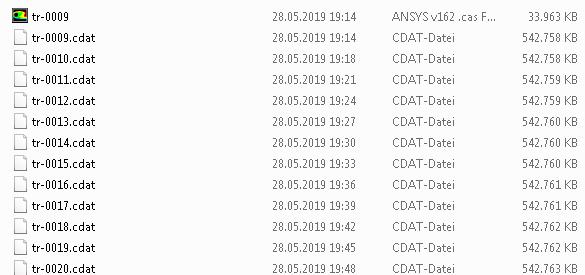
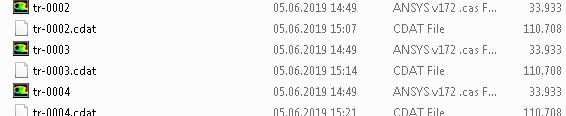
      In my case, I have already tried both but one time it worked with loading only the last *.cdat-file without the *.cas-files (every timestep was after this automatically loaded, see picture 1) and on another case, I needed every each *.cas-file  in the same folder (see picture 2). Otherwise, if I loaded the last *.cdat-file only the last timestep was opening. 


      That is a little bit strange.


      Thank in advance.


      Greeting,
      Mustafa


      1)


      2)

Viewing 2 reply threads
  • The topic ‘post processing’ is closed to new replies.
[bingo_chatbox]









