Ansys Assistant will be unavailable on the Learning Forum starting January 30. An upgraded version is coming soon. We apologize for any inconvenience and appreciate your patience. Stay tuned for updates.
General Mechanical

General Mechanical

Topics related to Mechanical Enterprise, Motion, Additive Print and more.

Plot a pressure distribution along the curve (3D model analysis)

    • nts1209
      Subscriber

      Hi Ansys Community


      Thanks you very much for your useful discussion. I have been learning a lot from them and I am really appriciated your contribution.


      I am making a ansys project and encountered some problems. Hope you can give me some advice


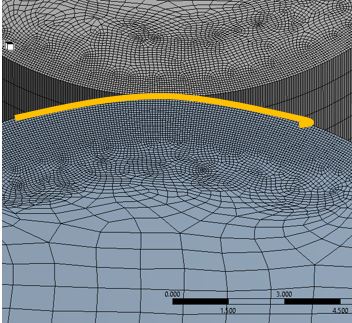
      There is a contact between 2 rollers. Now I want to plot the grapth of the pressure distribution on the contact area


      Interns of on the direction along the rollers, we can sketch a straight line and plot the results along that path. How about in the perpendicular direct (along the nip width – the highlight curve) it is a curve, how can we plot the pressure distribution in this direction (or plot a result along a curve)


      Thank you very much.


    • Sandeep Medikonda
      Ansys Employee

      Hi,


      Yes, you can also plot the frictional stress using the Contact Tool. Please see this section from the help.


      For the latter question, yes you can define a construction path/surface and assess the results as well. Please see this section from the help and this video from about the 10 minute mark.


      https://www.youtube.com/watch?v=mQFsEcK-jII


      You might find this article useful as well.


      Regards,
      Sandeep
      Guidelines on the Student Community

    • nts1209
      Subscriber

      SandeepMedikonda, Thanks you very much for your help.


      By the way could I ask you one more thing that.


      I have 5 simulations with 5 values of force (F1 = 100N; F2 = 200N;F3 = 300N;F4 = 400N;F5 = 500N). Is there any function in Ansys which allow me run it automatically.(After finishing case 1, It will solve case 2 automatically and so on)


      Thank you and best regards

    • peteroznewman
      Subscriber

      Here is a general method that works on loads, properties and geometry. You just click the box next to the Magnitude of the force and a P will fill the box. Then you go to one of the results that you like and find a box next to a Maximum and click it to put a P in that box. Now you have defined a Parameter Study and there will be a Parameter set box under your Static Structural system in Workbench. Click on the Parameter Study and you can type in four new rows after the 100 N row. Then you click Update All Design Points and ANSYS will go off and automatically analyze all five forces and report the max result in the Parameter table. Here is an example for a material property, but the same method is for a load.


      A different and simpler approach for your model (which only works on loads) is to click on Analysis Settings and where it says Number of Steps, type 5 instead of 1. Then the Force that is 100 will have four rows below it. Type in 200, 300, etc. When you hit solve, there will be results for Step 1, Step 2, Step 3, etc. You can make a result plot for Time =1, Time = 2, Time = 3 etc. This is far more efficient than the method I initially described, which must be used when changing things that are not load, such as material properties or geometric shapes.


Viewing 3 reply threads
  • The topic ‘Plot a pressure distribution along the curve (3D model analysis)’ is closed to new replies.
[bingo_chatbox]