-
-
June 11, 2020 at 3:51 pm
teoman
SubscriberHi Everbody
I have modeled an helicopter with four blades.I used UDFs to define blade's pitching and flapping motion with Define_CG_Motion ,naturally.
And I gave the rotation of blades by Mesh Motion.While performing a compressible transient solution Fluent gives the attached error after some time-step.
Fluent looses connection node's coordinates while repartitioning..(Metis)
Has anyone experienced such a problem.?
Thanks a lotÂ
Teoman
-
June 14, 2020 at 3:03 pm
RK
Ansys EmployeeHello,Â
As Ansys employees, we will not be able to view attached files, can you please insert them as an image? Thanks!Â
-
June 14, 2020 at 5:40 pm
teoman
SubscriberDear RahulÂ
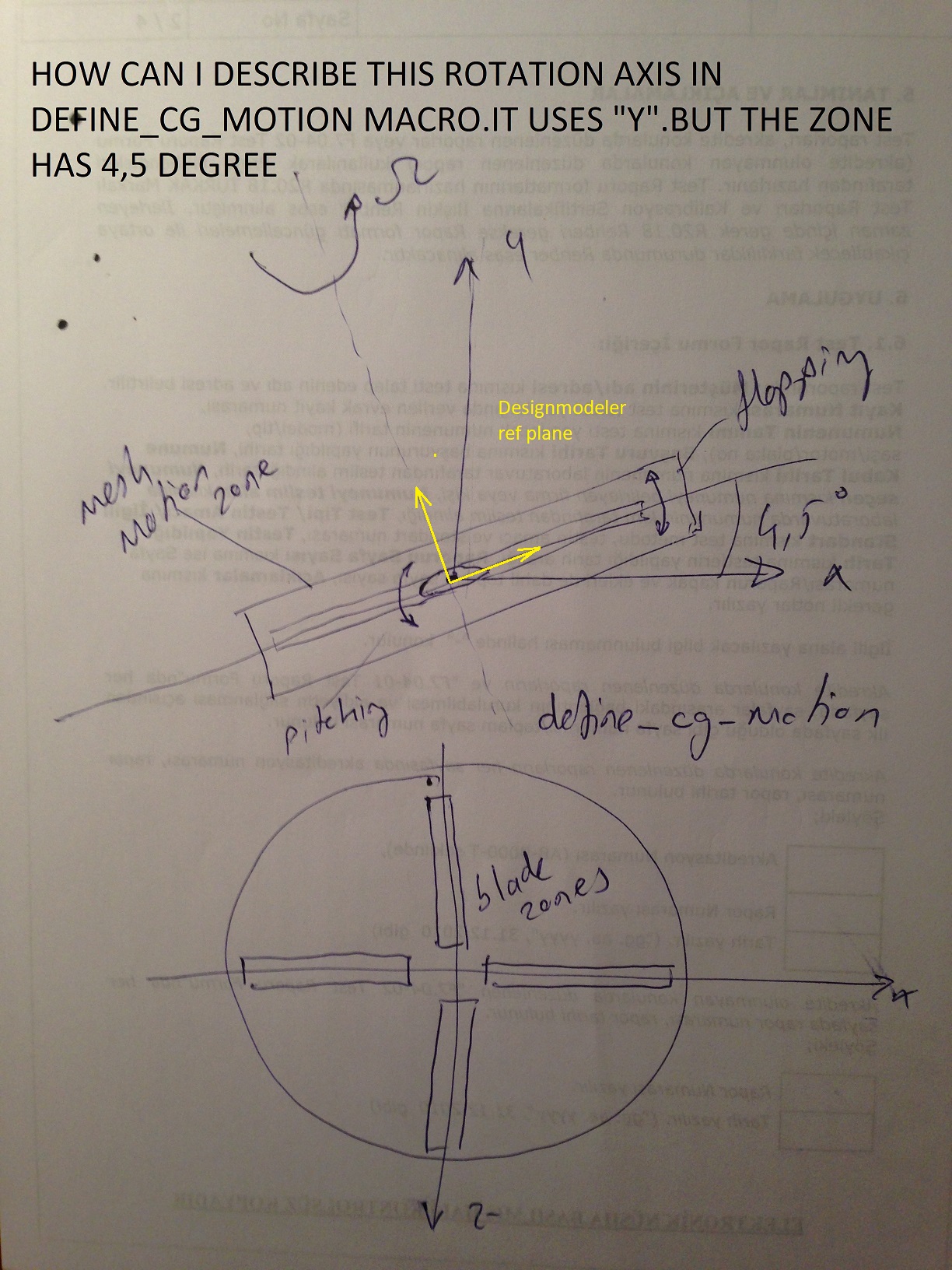
IÂ have noticed that The main problem is , while 4 bladed prop was making pitching and flapping in the mesh motion zone ,blades come too much close to
the mesh motion zone then repartition becomes necessary.
I figured out that my UDF's (cg_motion) rotation axis does not match with the rotor disc (mesh motion zone) rotation axis .
Mesh Motion rotation axis ; ( x= -0.07846 ,y=0.99692 , z=0 )
Despite UDF Manual says cg_motion uses local referance frame (that is why I used inclined plan to design rotor disc in DM) , But it is rotating about global ref frame. Y axis.
Please see the picture below.
Many thanks and regards
Teoman
-
- The topic ‘Partition smoothing error in Fluent dynamic mesh’ is closed to new replies.

- JACOBI Convergence Issue in ANSYS AQWA
- Is it able to solve turbomachinery using density-based solver in Fluent?
- Two-way FSI simulation
- Ensight Force_per_unit area_EV
- RIBBON WINDOW DISAPPEARED
- Fluent Meshing Error when .dsco not .stp
- Ansys Fluent for modelling Ocean Wave reactions to Wave Barriers
- Battery Pack cooling
- ISAT ABORT error
- UNASSIGNED INTERFACE ZONE DETECTED FOR INTERFACE…
-
4597
-
1495
-
1386
-
1209
-
1021
© 2025 Copyright ANSYS, Inc. All rights reserved.