-
-
May 22, 2020 at 6:44 pm
Prerak99
SubscriberRespected Gentleman,Â
I am facing difficulties getting outlet temperatures in Fluent. My problem statement is, In a single-phase, laminar tube flow, 200 m pipe, and 20 cm dia at an inlet temperature of 293 K and outside wall temperature is given 273 K. But every time I am getting the value around the inlet temp like 292.0584 K. Even with the increasing velocity, the same outlet temperature I am getting. I tried to solve other problems and I always get the outlet temperature closed to inlet temp. Can you please tell me why i am facing this difficulty? It is because of Meshing or boundary condition? or other factors? currently I am using Ansys 2019 R2. I am working on a project on heat exchanger enhancement techniques and we have to submit it in a few days. It will be a great help if you look over my issue! Hope to hear from you soon!Â
-
May 23, 2020 at 3:11 am
Prerak99
SubscriberPlease try to solve my issue as soon as possible! I dont know why I am not getting accurate results depending upon the inlet parameters!! Is it my software issue or setup file issue? I am very new to this software like it has been only from 10 days I am learning it all my own! Your reply will be really appreciated!
-
May 23, 2020 at 3:38 am
peteroznewman
SubscriberYou have laminar flow with a high temperature inlet and a low temperature wall.
I expect the outlet temperature to be lower with reduced velocity, because there is more time for the heat transfer to occur.
You say "Even with the increasing velocity, the same outlet temperature I am getting."
It sounds like you are expecting the outlet temperature to be lower with increasing velocity. Am I reading your comment correctly?
Please insert an image of the mesh in your reply.
-
May 23, 2020 at 3:51 am
Prerak99
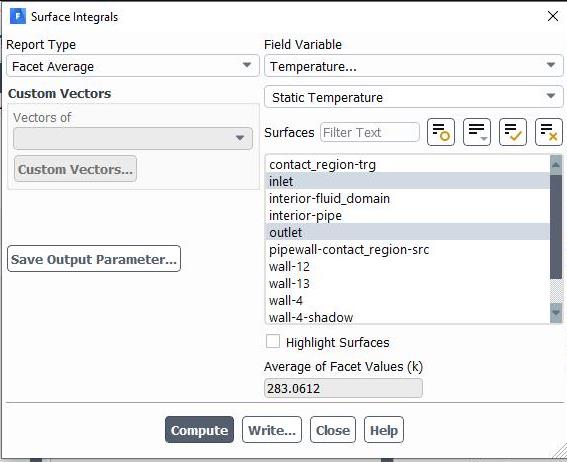
SubscriberI am happy to get your reply! Actually sir, it is not only laminar flow, for any kind of flow and other inlet parameters, I am getting outlet temperature sometimes around the inlet temperature and sometimes around the wall temperature that I have given. Maybe is it a initialization problem? because when I give standard Initialization of all zones, it shows the temperature sometimes(If I have put wall temp=273, it shows 273.0053 after initializing) then I run the iterations and check the results of surface integrals - Facet Average. it does not show accurate! or is it a method problem?
-
May 23, 2020 at 4:18 am
-
May 23, 2020 at 5:02 pm
Prerak99
SubscriberDid you get the solution of my issue sir? please reply!
-
May 23, 2020 at 5:48 pm
peteroznewman
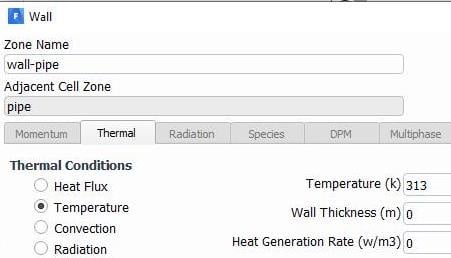
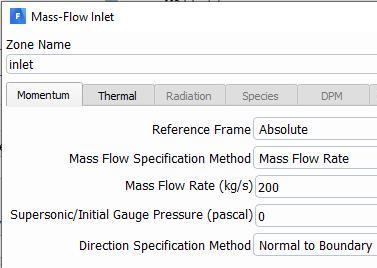
SubscriberThe numbers you describe in your original post don't match the numbers in the images.
Â
Here you show the wall temperature is set to 313 K but you said 273 K originally.
You have a Mass Flow Rate of 200 kg/s, but what velocity in m/s does that translate into? What is the Reynolds Number at that velocity?
In the Surface Integral tab, you seem to be averaging the Inlet and the Outlet by having them both selected.
The mesh is way too coarse. You need to add inflation layers and use much smaller elements.
Finally, you don't need to mesh the pipe, you can just have a fluid domain and put the pipe properties in the wall definition.
-
May 23, 2020 at 7:26 pm
Prerak99
SubscriberI'm extremely sorry to confuse you sir! Actually I was trying to show if we apply some change in input parameters, does the outlet parameter vary? But it didn't..as always it shows the outlet temperature just around the inlet.. even I applied more meshes like face, edge, inflation but it didn't impact to get accurate parameters? Should I reinstall the software? Also one thing I marked it's it shows shell conduction by default 1 layer and on some YouTube videos I found by default 0 layer..is it a point need to be noted? Btw is there any possible way to contact you personally via emails or whatever you suggest? As I am new to this software, I really need someone to guide me well! -
May 24, 2020 at 4:40 pm
Prerak99
SubscriberWhy Heat Transfer is not happening in my model? What I have not included? What are the primary condition to get Heat Transfer accurately? Please advise me as soon as possible! I am waiting for your reply!Â
-
May 24, 2020 at 8:14 pm
peteroznewman
SubscriberHow can I help you if you don't follow my advice and don't answer my questions?
Use a single solid for the fluid. You said in the original post that the pipe diameter is 20 cm but the geometry looks like it is 20 mm.
Mesh with an Inflation mesh control on that solid and put 5 layers on it.
Use a smaller global element size.
Use a Velocity on the Input instead of a Mass Flow Rate since you did not answer my question on what the velocity is or what the Reynolds number is.
What is the fluid?
You could save some time if you created an Axisymmetric model, so I suggest you do some research on that topic. Hint: draw a rectangular surface 10 cm tall and 200 m along the X axis. The bottom of the rectangle must be on the X axis and the surface is on the +Y side of the X axis. This surface must be on the XY plane so Z=0. You have to set the Analysis Type on the Geometry cell to 2D before you start building the model, so you really have to start over, but that may be for the best anyway. In Meshing, the top of the rectangle is the Wall and the bottom of the rectangle is the axis of the pipe.

Â
-
- The topic ‘Outlet temperature in laminar tube flow’ is closed to new replies.
-
6635
-
1906
-
1469
-
1312
-
1022
© 2026 Copyright ANSYS, Inc. All rights reserved.
.jpg?width=690&upscale=false)