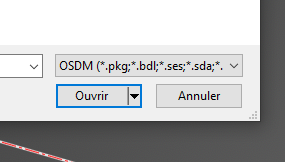
TAGGED: addin, Ansys Discovery
-
-
March 21, 2023 at 12:55 pm
-
March 21, 2023 at 2:23 pm
Atharv Joshi
Forum ModeratorHello GUICAD ,
If it's possible, can you please share the files? I will check it at my end and get back to you.
Thanks and Regards
-
March 22, 2023 at 6:13 am
Guillaume ANFOSSI
SubscriberHello Atharv ,
Sure, here it is.
🛈 This post originally contained file attachments which have been removed in compliance with the updated Ansys Learning Forum Terms & Conditions -
March 22, 2023 at 11:42 am
Atharv Joshi
Forum ModeratorHello GUICAD ,
Thanks for sharing the files. I will check and let you know.
-
March 24, 2023 at 8:38 am
Atharv Joshi
Forum ModeratorHi GUICAD ,
Do you have Creo installed on your machine? If its installed, then it should be able to import in Discovery Successfully.
If its installed, then please check CAD configuration from the following path.
Start Menu>> Ansys 2023R1 Folder >> CAD configuration Manager >> Check Creo Elements/ Direct Modeling >> Move to CAD Configuration >> Configure Selected CAD Interface.Then try importing files in Discovery. Let me know if you face any issue.
Thanks and Regards
-
- The topic ‘OSDM files’ is closed to new replies.
-
5649
-
1885
-
1404
-
1303
-
1021
© 2026 Copyright ANSYS, Inc. All rights reserved.