

TAGGED: acp, element-orientation, human-bone, orthotropic, orthotropic-materials
-
-
August 26, 2021 at 2:00 pm
jonaslindberg
SubscriberWhen defining material properties for human bone, I'm using the surface coating feature in order to create an outer shell of cortical bone while the infill consists of solid geometry with trabecular bone properties.
I want to ensure that the orthotropic properties of the cortical bone is relative to the surface of the geometry and not the global coordinate system. I am aware that this is possible to achieve with the ACP-tool. Explained in the discussion thread linked to: /forum/discussion/comment/126002#Comment_126002, the surface coating feature creates shell elements on the selected surface. When I'm trying to open the model in ACP, however, the following error messages show up:
"The mesh doesn't contain any shell elements. This may be because the model is not compatible with Section Data providers."
"ACP Input Validation Failure. There is no data contained in the input mesh file"
- Is the surface coating feature not compatible with the ACP-tool? Is there any way to solve this?
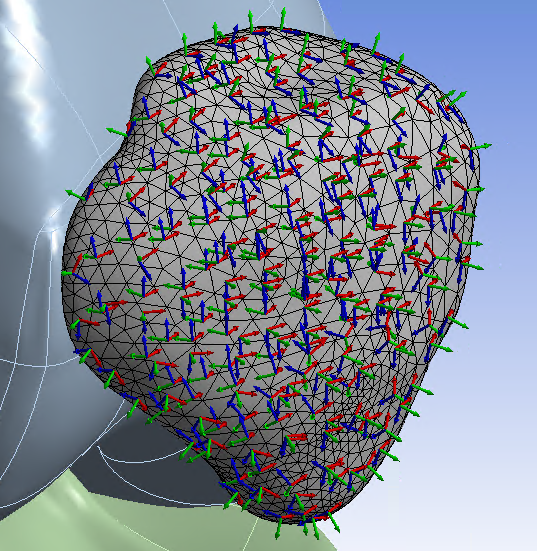
I have been trying to find a workaround for the problem, using the element orientation in mechanical (Geometry→Modify→Element Orientation), which visually (pictured below), at least, seems to be an alternative to the ACP-proces. However, I can't figure out how to link the element orientation with the orthotropic material properties of the cortical bone.
- Is there a way to do this or any alternative measures for ensuring proper orientation of the orthotropic properties? (2021 R2)
September 2, 2021 at 7:38 pmSean Harvey
Ansys Employee
Thanks for your inquiry. So there is no way to link the element orientation to the surface coating. Behind the scenes, those shell elements of the surface coating are being generated before the solve, so they don't exist in the database.
There are two ways I can think of right now that can work.
In edit the geometry in spaceclaim, pick the surfaces you wish for that material, and issue ctrl-c, ctrl-v. This makes a surface body of the solid faces.
In the tree, pick the parent component (in this case sys as shown) and then in properties change the share topology to Share
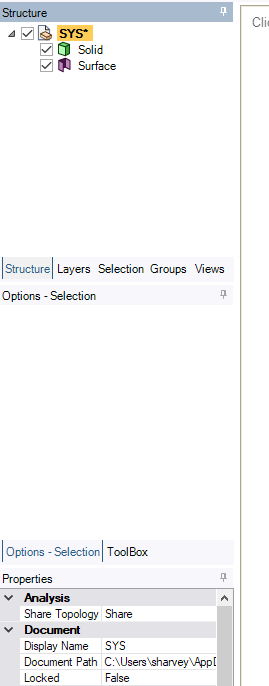 Now when you open in Mechanical, the surface and solid mesh will share nodes. Since you likely have a lot of tri shaped elements you want to use quadratic for the element order, so under mesh, change the element order to quadratic. Lower order tri elements are overly stiff.
You can now specify the element orientation to that surface body. Be careful not to assign to the face of the solid. Then verify the orientation using the results, coordinate system, element triads scoped to that surface body.
You may run into limitations like apply a pressure boundary condition to a shared face, etc.
An alternative method is to not share topology and use bonded contact. Then there will not be limitations on the boundary conditions.
Both of these methods would permit you to take the model into ACP if you needed to better orient the material direction, if the mechanical element orientation was not sufficient.
Please try and circle back with feedback. Thank you!
Regards Sean
Viewing 1 reply thread- The topic ‘Orthotropic material properties relative to surface of geometry – Human bone’ is closed to new replies.
Innovation Space Trending discussions
 Top Contributors
-
peteroznewman
 6485
6485 -
scabo
 1906
1906 -
Dennis Chen
 1458
1458 -
javat33489
 1308
1308 -
Shyam Prasad V Atri
1022
Top Rated Tags
© 2026 Copyright ANSYS, Inc. All rights reserved.
Ansys does not support the usage of unauthorized Ansys software. Please visit www.ansys.com to obtain an official distribution.
-


 You are navigating away from the AIS Discovery experience