-
-
February 9, 2023 at 6:13 pm
chinna.devarapu
SubscriberHi, thanks in advance for your attention.
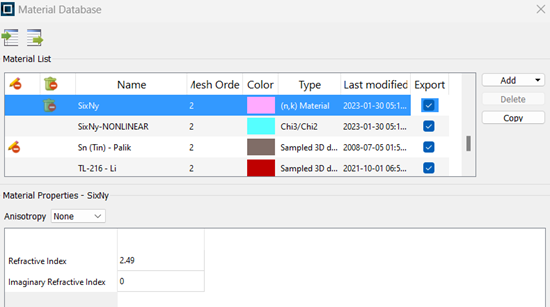
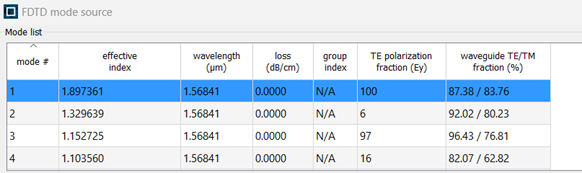
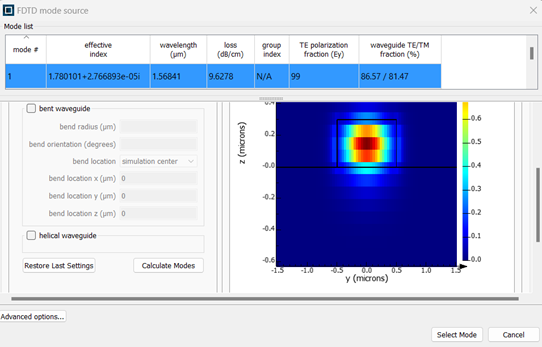
I am using FDTD 3D in Lumerical to model and analyze a Multi-Mode Interferometer coupler whose material to implement is Silicon-rich Silicon Nitride with a linear refractive index of 2.49 and a nonlinear refractive index of 1.61e-18 m^2/W at 1550 nm operating wavelength. When I insert in Material Database a material with only the linear refractive index of 2.49 I can obtain an effective source mode to launch as follows:

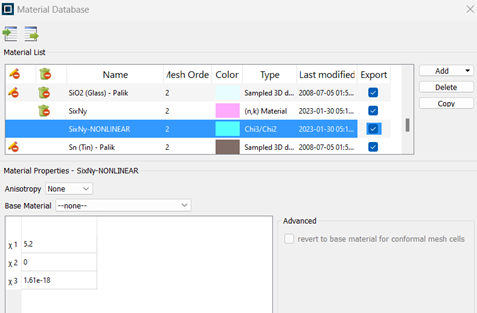
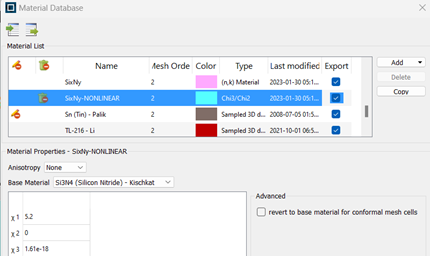
If I insert the nonlinear refractive index through inserting the linear (obtained by the square of linear refractive index minus 1) and third order susceptibilities (for example this value known) by using this new material:
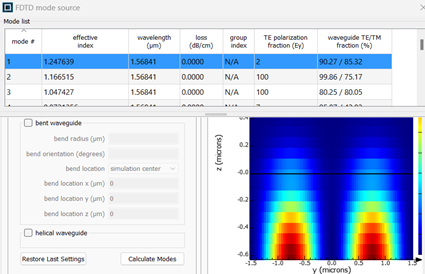
I obtain very different effective index value with the same geometry and same in linear regime:
Also by using a base material, it improves but not the same value:

I would ask you how to make a convergence between the results but at the same time defining the linear and nonlinear refractive index of my material.
Thanks! -
February 9, 2023 at 11:51 pm
Amrita Pati
Ansys EmployeeHello Chinna,
The mode solution calculation doesn’t account for the nonlinearity of the material. In other words, the susceptibility values shouldn’t have any impact on the mode.
When you solve for the mode without using any base material, it completely ignores the susceptibilities and assumes the material to have a refractive index of 1. As a result, you see the power residing in the substrate as opposed to the non-linear material itself. This also explains the large deviation seen in the effective index values.
The best practice would be to use the desired base material, leave χ1 as 0 (as the permittivity of the base material would be automatically chosen from the Material Database) and only use χ3 values for your FDTD simulations.
Before you run your simulation, I would also suggest you to look at the permittivity/refractive index fitting from the Material Explorer. The losses you see in your last figure could be a result of improper fitting of the data. You can change the fitting parameters to obtain more accurate fitting.
For more information on fitting and Material Explorer, please refer to the following link:
https://optics.ansys.com/hc/en-us/articles/360034915033-Using-the-Material-Explorer-to-view-and-adjust-optical-material-models
For more information on convergence of non-linear simulations, please refer to this:https://optics.ansys.com/hc/en-us/articles/360041727474-Nonlinear-and-gain-methodology
Thank you. -

February 10, 2023 at 10:45 am
chinna.devarapu
SubscriberOk, thank you for the fast reply.
So if my material is silicon-rich silicon nitride I need to insert the desired third order susceptibility and using as base material the nearer included in the Material Database ( I think is the silicon-nitride ) and fitting it to keep near to the desired value.
Is it right?
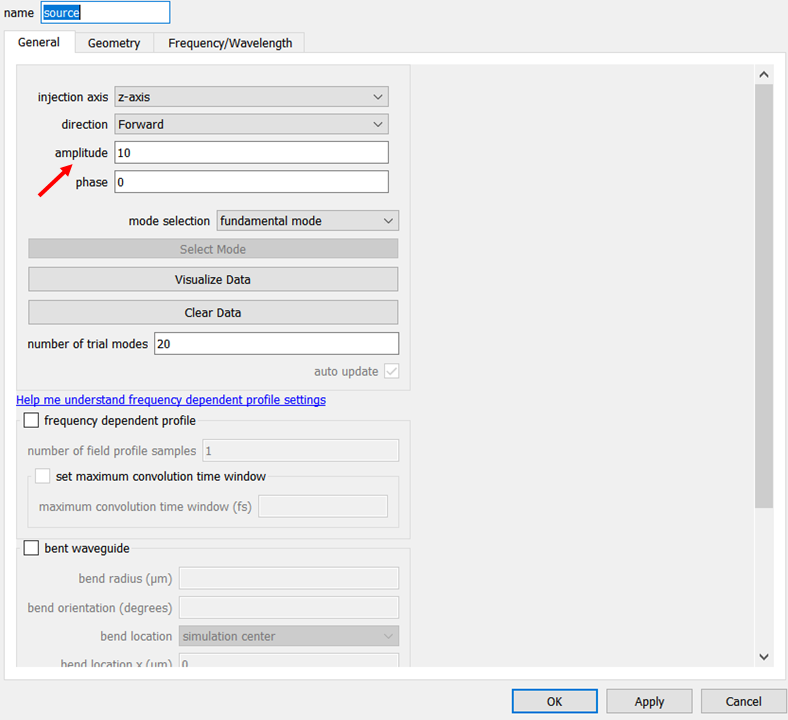
For nonlinear analysis, I want to ask how I can make sure to launch very high power values (like 10 W or 100 W) because it is not clear how to modify the source amplitude to make sure of doing an analysis for different high power values.
Thank you in advance. -
February 10, 2023 at 6:29 pm
Amrita Pati
Ansys EmployeeYes, you are correct. Additionally, if you do not wish to include the material dispersion of the non-linear material from the Material Database, then you can use the (n,k) material with index 2.49 you defined earlier as your base material. But in any case, it is recommended to check the permittivity/index values from the Material Explorer before you run a simulation.
You can change the amplitude of the source (to obtain the desired power) from the General tab in the source settings:

You can also verify the change in the power by using the sourcepower script command.
More information on sourcepower can be found on the following page:
https://optics.ansys.com/hc/en-us/articles/360034925313-sourcepower-Script-command
Thank you.
-
- The topic ‘Nonlinear material analysis’ is closed to new replies.
-
6450
-
1906
-
1457
-
1308
-
1022
© 2026 Copyright ANSYS, Inc. All rights reserved.