-
-
May 31, 2020 at 1:19 pm
destroy
SubscriberHello everyone,
I was always using 17.2 version of fluent and now Im switching to newer versions, as from 2019 and 2020.
Now I got two problems that was not present in 17.2:
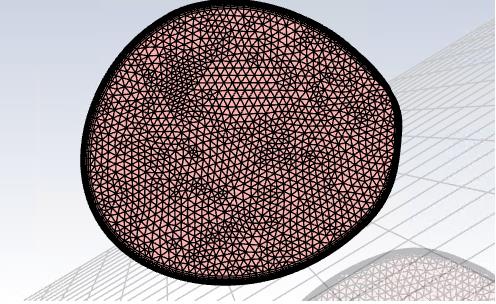
1) The xy plane is displayed in the Fluent graphical interface, which is unconvenient when I want to save a picture - it obstures the body surfaces that Im interestedÂ
Â
Â
2) The journal reading in Calculation activities does not work properly, for example I got commands done in the every timestep:Â q q file r-j journal.txt q q q, and Fluent says:
Error: Journal file "q" not found.
Error Object: #f
Â
Which is very problematic when some automation is done
Â
Please give me some idea on how to hide this xy plane and how to edit the commands in Calc. Activities
Â
Kind regards
Destroy
-
June 1, 2020 at 11:06 am
Karthik Remella
AdministratorHello,
Are you looking to hide the XY plane or are you talking about the shadows in Fluent GUI?
Also, regarding your second question - why is your command starting with a 'q'? Could you please remove q q before 'file ......' and try?
Thanks.
KarthikÂ
-
June 1, 2020 at 11:19 am
destroy
Subscriber"Are you looking to hide the XY plane or are you talking about the shadows in Fluent GUI?" - both
The second question - I already solved it, I had to put the comma (,) instead of "q" to quit the selection mode in TUI
-
June 2, 2020 at 1:27 am
Karthik Remella
AdministratorTo hide the XY plane, please use the 'Display' dialog box and turn off the 'XY plane' of interest.
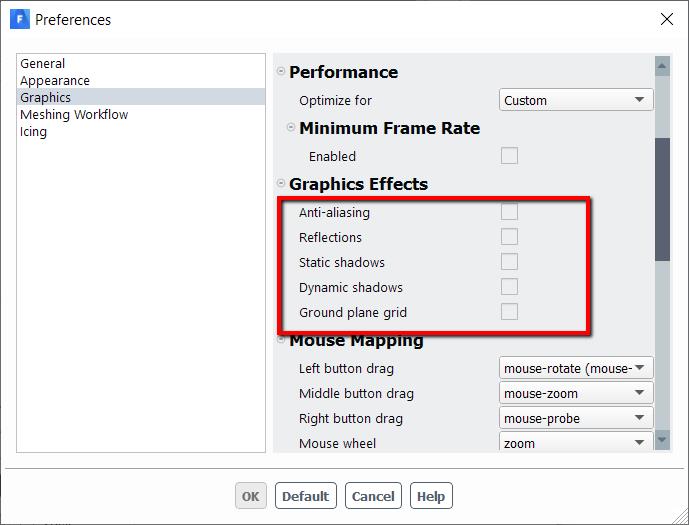
To change the shadows and other new GUI features, please go to 'File' -> 'Preferences' -> 'Graphics' and turn off the following options.
If this answers your question, please mark this as 'Is Solution' so this might benefit others.
Thanks.
Karthik
-
- The topic ‘Newer fluent versions – problem with postprocessing’ is closed to new replies.

-
4628
-
1535
-
1386
-
1215
-
1021
© 2025 Copyright ANSYS, Inc. All rights reserved.