

TAGGED: 2-way-fsi, boundary-conditions, cell-zone, dynamic-mesh, fluent
-
-
November 24, 2021 at 6:03 pm
Xbuddyin
SubscriberDear Friends,
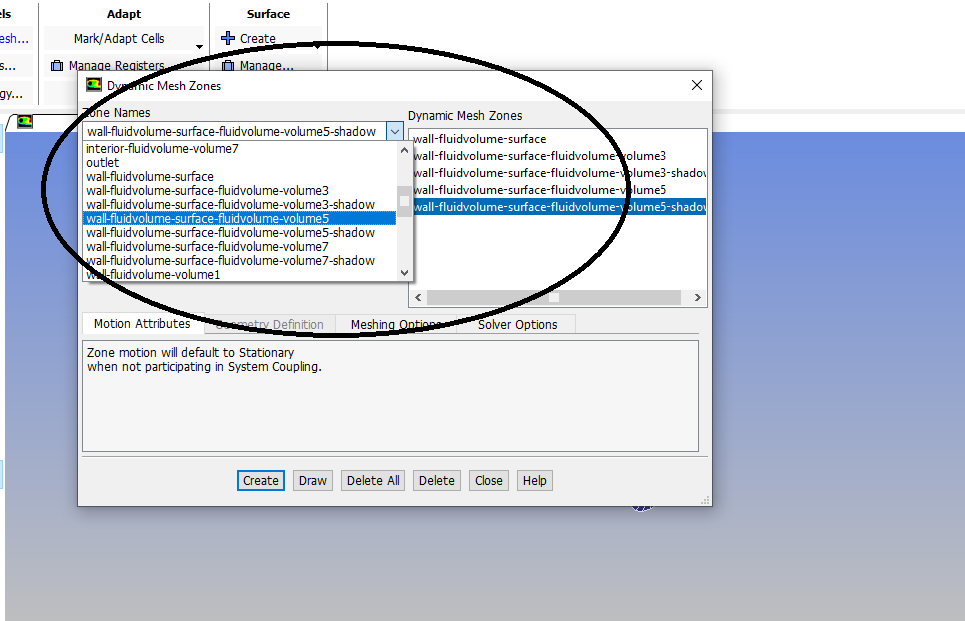
I am doing a 2-way FSI simulation using the Ansys fluent and Transient structural systems. I have a multibody Fluid domain, it also has the input, output, and wall zones. In Ansys, whenever, I try to create the dynamic mesh using the option create, I see the multiple zone name is there any other way we can merge those different zones into the single wall volume and choose directly from there.?
November 25, 2021 at 3:56 pmRob
Forum ModeratorIf you have multiple fluid zones then the wall boundary will split such that each fluid is bounded by a different wall. This is automatic. If the fluid zones aren't needed (ie they're just volumes that could be one volume in labelling terms) then use a named selection for the fluid zone prior to moving into Fluent. Note, if you need to it's possible to combine cells in Fluent, you can then combine the surface zones.
November 25, 2021 at 5:31 pmAmine Ben Hadj Ali
Ansys Employee.
December 2, 2021 at 8:40 pmSubscriberA. I try to merge or fuse them in the Boundary condition, I am getting something like Not fusing zones 26 and 31, element count is different. Should I use the same element to like tetrahedron, currently my meshing setting includes an automatic one?
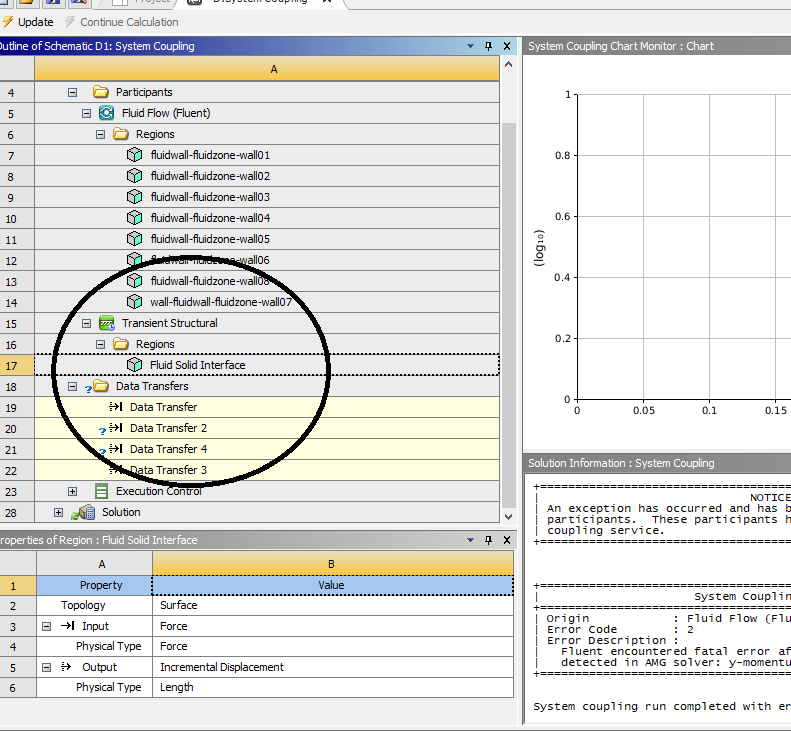
B. System Coupling ErrorSystem Coupling Error:
My fluid domain has multiple fluid zone parts. The problem I am facing is that I am getting the error on the multiple data transfer in the system coupling, do I need to create 8 Fluid Solid Interfaces separately for the 8 Fluid wall zone? When you choose the fluid-solid interface in the transient analysis system then I was able to easily choose the multiple faces within the region. Do i need to make the fluid interface for each encapsulated fluid zone? I need to get a single fluid zone.
December 3, 2021 at 9:13 amForum ModeratorNot fusing faces, that's to remove duplicate surfaces and if you have those you have far bigger problems. If you use Named Selections in meshing to pick multiple volumes and (separately) faces or merge cell zones in Fluent you can reduce the number of labels.
Viewing 4 reply threads- The topic ‘Multiple Zones in Wall Boundary Condition’ is closed to new replies.
Innovation Space Trending discussions
 Top Contributors
-
peteroznewman
 4858
4858 -
scabo
 1587
1587 -
Dennis Chen
 1386
1386 -
javat33489
 1242
1242 -
Shyam Prasad V Atri
1021
Top Rated Tags
© 2026 Copyright ANSYS, Inc. All rights reserved.
Ansys does not support the usage of unauthorized Ansys software. Please visit www.ansys.com to obtain an official distribution.
-


The Ansys Learning Forum is a public forum. You are prohibited from providing (i) information that is confidential to You, your employer, or any third party, (ii) Personal Data or individually identifiable health information, (iii) any information that is U.S. Government Classified, Controlled Unclassified Information, International Traffic in Arms Regulators (ITAR) or Export Administration Regulators (EAR) controlled or otherwise have been determined by the United States Government or by a foreign government to require protection against unauthorized disclosure for reasons of national security, or (iv) topics or information restricted by the People's Republic of China data protection and privacy laws.

 You are navigating away from the AIS Discovery experience

