Ansys Assistant will be unavailable on the Learning Forum starting January 30. An upgraded version is coming soon. We apologize for any inconvenience and appreciate your patience. Stay tuned for updates.
Fluids

Fluids

Topics related to Fluent, CFX, Turbogrid and more.

Modular mesh in Fluent meshing

TAGGED: 

    • cesarj.95plus
      Subscriber

      Is it possible in Fluent meshing to use a mesh as starting point of a second one? I want to use an existing grid with a common interface with a geometry and mesh the new geometry while keeping the nodes at the edges in order to build a conformal mesh. Like this I could build my grid by modules and change local regions without have to mesh everything again. 

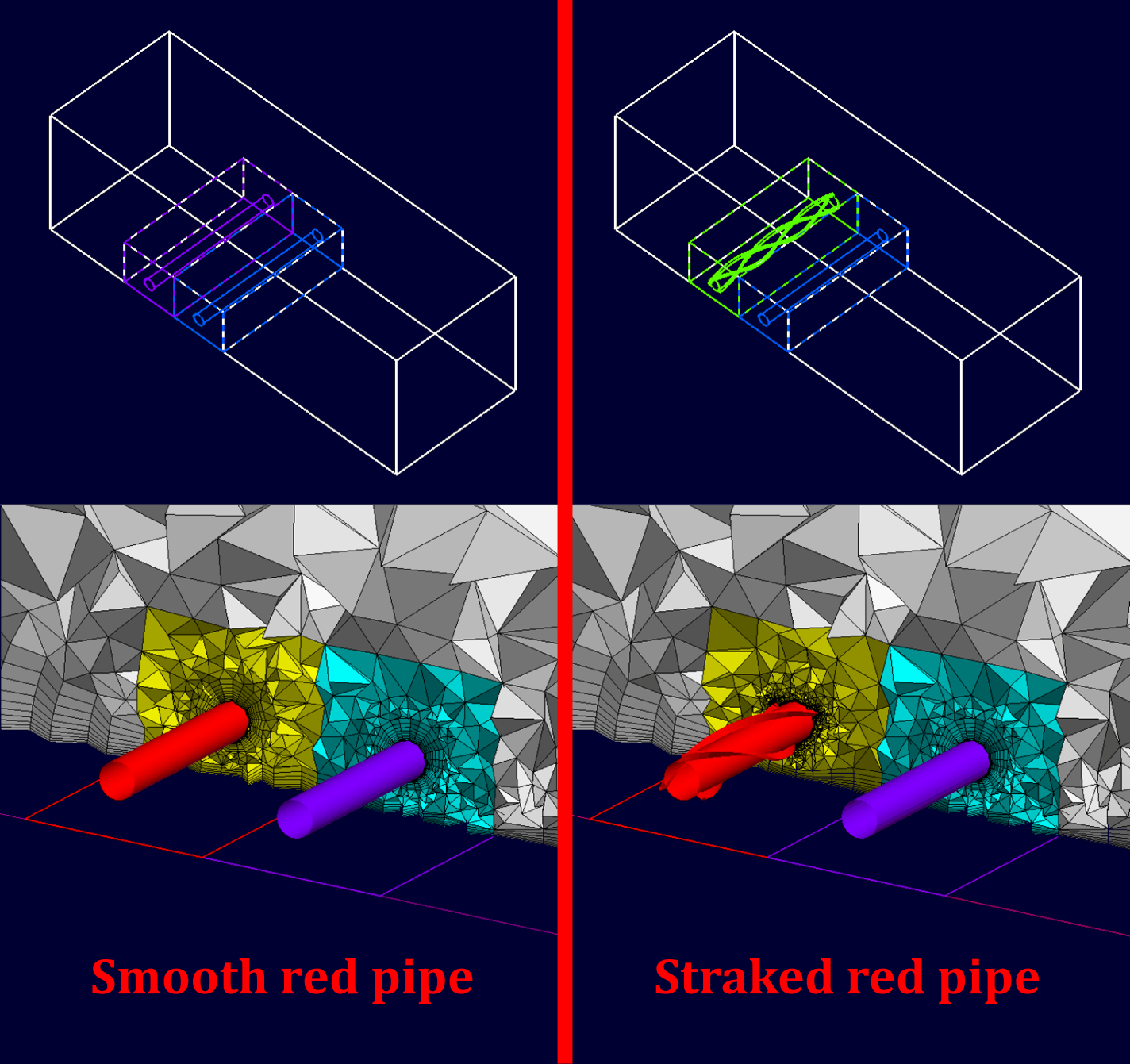
      The best example that I could find on the internet similar to that I would like to achieve is a modular meshing methodology by Centaur Meshing: https://home.centaursoft.com/software-page/grid-generator/key-capabilities/parts-based/modular-geometry-and-mesh/

      As you can see in the image below, two red pipe designs are tested, one is a smooth pipe and the second is a straked pipe. The main grid (in grey) and the blue grid (in blue) are constant as the outer geometry and the second pipe do not change and don't need to be remeshed. Only the yellow mesh changes because the pipe is different. Like this you can save a significant amount of time, still have conformal grids and don't be affected by solution changes due to the remeshing of the outer zone:

    • NickFL
      Subscriber
      Short answer, yes (probably). How to do it is dependent upon a couple things. Where was the original mesh created? If in Fluent Meshing, the same workflow should just work. If in another program requires a bit more thought. Do you have/want shared nodes between the domains (yellow, cyan, grey)? You may be able to just mesh the yellow region with the contact faces fixed. Then you would only need to replace the mesh in the yellow zone with the "Replace Zone" in the toolbar.
    • cesarj.95plus
      Subscriber

      Thanks for the reply. My intentions is to use exclusively Fluent meshing and build conformal meshes always. At the moment I am doing 2D tests (using the 2D workflow) but even if I manage to do one 2D mesh and save it (in .msh or msh.h5). I cannot load back the 2D mesh and start from there. I've also tried to load a 3D mesh (which works) but then I cannot load another extra unmeshed CAD geometry that I want to mesh based on the previously loaded mesh. 

Viewing 2 reply threads
  • You must be logged in to reply to this topic.
[bingo_chatbox]








