-
-
February 25, 2026 at 6:18 am
sfsalharthi1
SubscriberHi all, I’m running a 3D Maxwell Transient simulation of an electrical motor (geometry is inherently 3D, so 2D is not an option). My model includes PMs + rotor steel, band (motion), outer/inner regions, stator region ,stator steel, coils. My main issue is mesh quality / stability: I’ve tried multiple meshes but I still see noise and extra harmonics in results (e.g., torque / back-EMF). I’m not sure if this is expected physics/numerics or if my meshing approach is wrong. Right now my “quick” approach is basically Length Based → Inside Selection applied to most parts with ~5 mm. What I’m looking for (practical guidance): Mesh seeding strategy per part Where do you usually apply Length Based on faces vs inside volumes (PMs, rotor steel, stator teeth/yoke, coils, regions)? Any advice on using surface approximation settings vs just length-based refinement? Meshing for rotating motion / band setup For motion, I understand the moving parts should be isolated with a band, and the re-meshed region is inside the band each timestep. What’s the best practice for the band mesh operation and for stabilizing torque/force results (to avoid mesh-driven noise)? Airgap modeling question (band + air regions) Do I need an explicit vacuum “airgap volume” object? In my geometry, the band sits in ~1/3 of the airgap and the stator-side region is ~1/3; the remaining ~1/3 is currently just “empty space”. If I create an airgap volume it will touch/overlap the band, so I left it. Is this a problem, and what’s the recommended way to partition the airgap volumes around the band? If helpful, I can share screenshots of the band/airgap layout + current mesh settings.
-
March 12, 2026 at 2:45 pm
MirandaH
Ansys EmployeeYou can improve mesh stability in the airgap by introducing multiple radial layers and positioning the band strategically within the gap. A common best‑practice layout is:
- Inner airgap layer (from rotor to ~¼ of the gap)
- Band region centered around ~½ of the gap
- Outer airgap layer (from ~¾ of the gap to the stator)
Placing the band at the midpoint of the airgap and defining the inner and outer air regions as separate volumes ensures more uniform element distribution and smoother re‑meshing during rotation.
Additionally, segmenting the band (i.e., dividing the cylindrical band faces into several circumferential slices) significantly improves mesh quality. These segments help control element distortion and maintain consistent facet alignment as the rotor moves.
Finally, using a segment size aligned with the mechanical motion per timestep, for example, matching the circumferential element length to ~1° of rotation per timestep, reduces mesh‑induced torque noise. This keeps the sliding interfaces synchronized with the rotor’s angular progression and minimizes numerical harmonics that can appear in torque or back‑EMF results.
-
March 23, 2026 at 7:14 am
sfsalharthi1
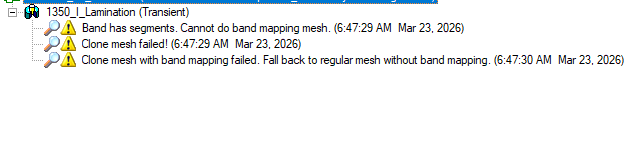
SubscriberI used a faceted cylindrical band at 2–3° per facet and also a regular polyheron as a band, but Clone Mesh fails with “Band has segments. Cannot do band mapping mesh.” Since the help also says Band Mapping Angle supports cases where the band of motion is a true surface, please confirm which band geometry is required for Clone Mesh/Band Mapping in this model and Maxwell version 2022 R2
Also,My design cannot be simplified into a 2D model or a circumferential sector because of the slot/pole arrangement. The model has to remain fully 3D, with only a half-model reduction if symmetry allows.
What I want to understand is the proper mesh sizing to use. For example, if I have a rectangular permanent magnet with dimensions 6 mm × 10 mm × 5 mm, and the magnetisation is normal to the 6 mm × 10 mm face, how should I choose the mesh element lengths in each direction?
-
- You must be logged in to reply to this topic.
-
6034
-
1906
-
1425
-
1308
-
1021
© 2026 Copyright ANSYS, Inc. All rights reserved.