

TAGGED: anys-mechanical, contact-body-view
-
-
December 22, 2021 at 8:50 am
Lyster
SubscriberI'm fairly new to Ansys and was just working through one of th tutorials and noted a possible display issue.
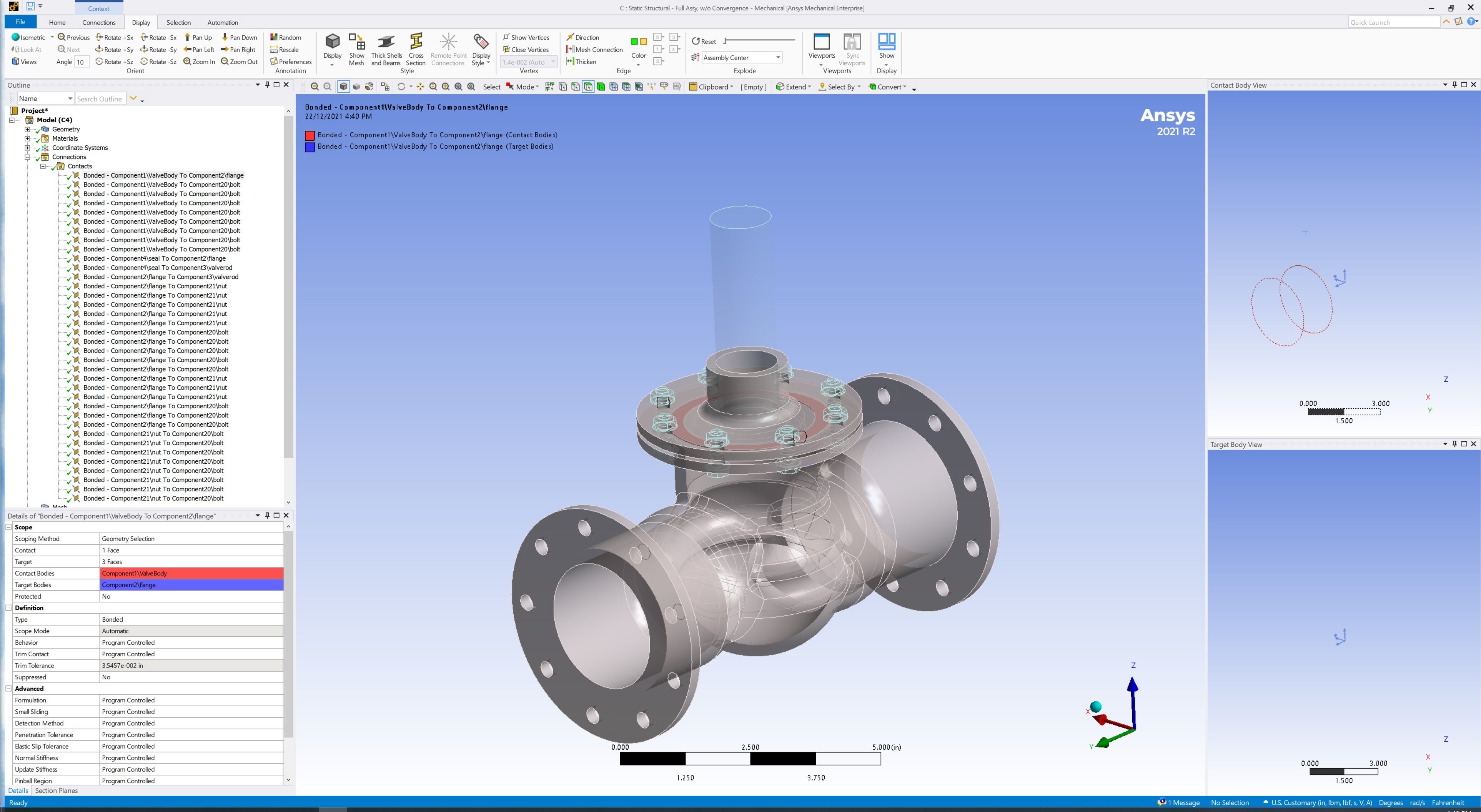
Nothing shows up in contact body view even though the bodies are there as they are selectable, refer to picture.
Is there something I'm missing.
December 22, 2021 at 1:43 pmAkshay Maniyar
Ansys Employee
I am not sure why this is happening. Can you try to click on other contact and click on zoom to selection. Make sure that no bodies are hidden.
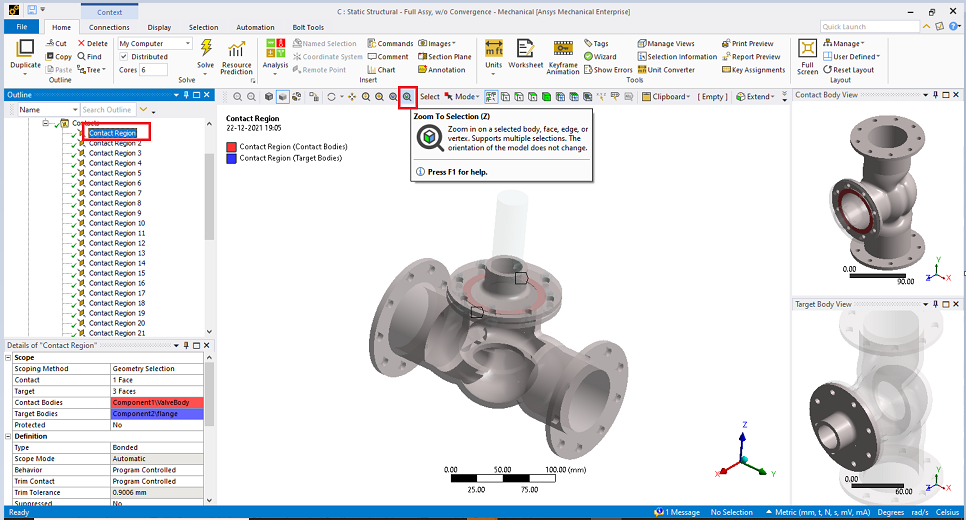
Thanks amaniyar
January 4, 2022 at 5:40 amSubscriber
Thanks for your reply. I've tried what you've said and confirmed there are not bodies hidden and there's no change.
January 4, 2022 at 5:53 amAnsys Employee
Can you try resetting APPDATA folder.
Step 1: Close all Workbench sessions
Step 2: Type %appdata% in the search field of Windows
Step 3: Open the folder named Ansys
Step 4: Locate the folder corresponding to your installation, for instance if you are having error with R19.0 installation, then locate the folder named v190 (similarly, locate v191 for R19.1).
Step 5: Rename this folder as v190_old and start a new WB session.
This will create a fresh copy of the v190 folder (which contains WB environment files) and resolve such issues. The procedure is same for different versions of WB so you just need to rename the appropriate folder.
Thanks amaniyar
January 4, 2022 at 6:39 amSubscriber
Thanks again for your reply. I've completed all you've said and it was the same result.
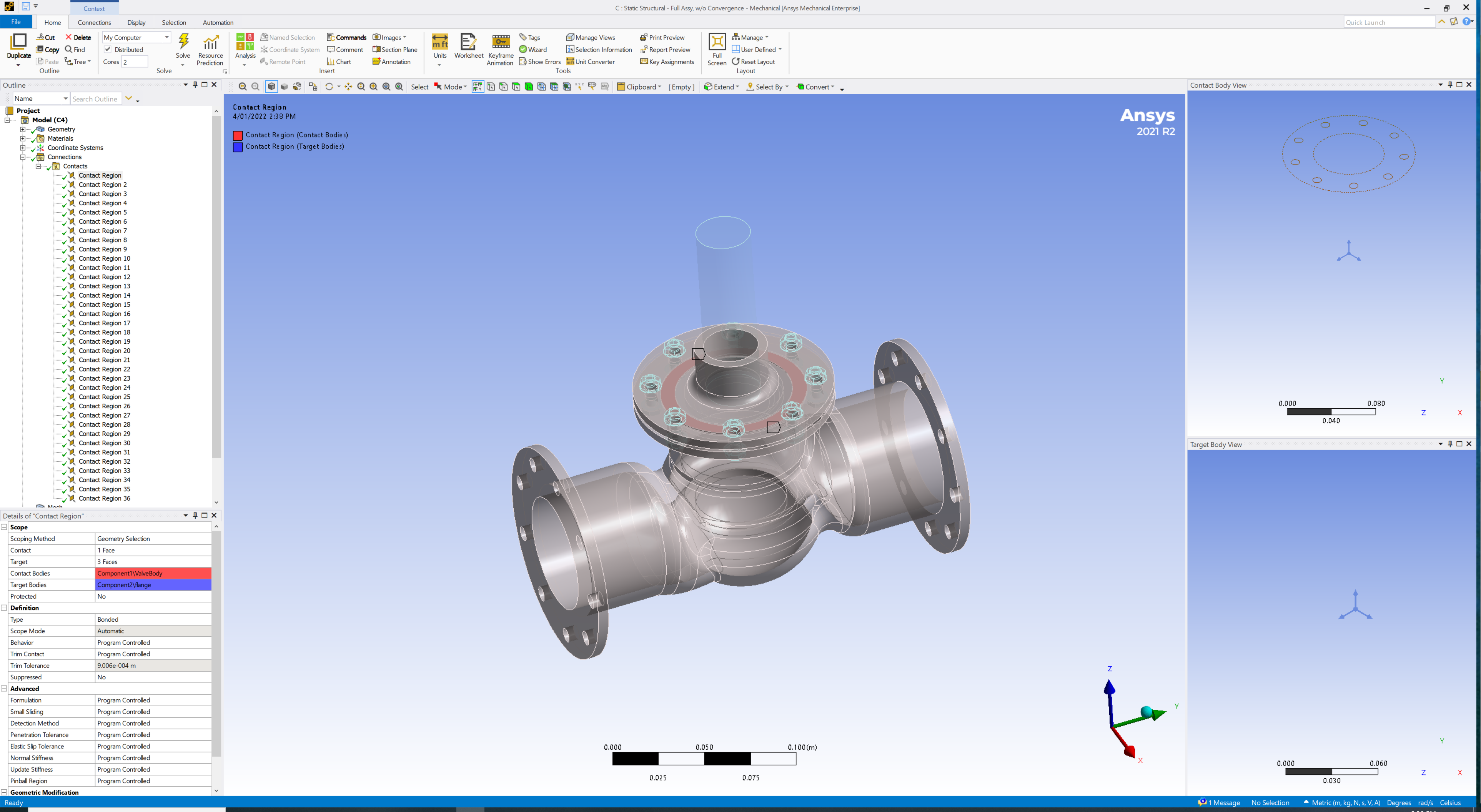
January 18, 2022 at 8:38 amGary_Lozik
SubscriberI have similar problem only for Ansys2021
January 19, 2022 at 8:12 amSubscriberIt is looks like Ansys 2021 setting. the same model in Ansys 2019 working perfect and shows contact and target bodies in appropriated windows
January 25, 2022 at 2:09 amSubscriberThanks for the confirmation . sounds like a bug, is there way to register it as bug to get it rectified?
January 25, 2022 at 1:05 pmAnsys Employee
I have checked it on my system and with same model(the screenshot I have attached above), it is working fine.
Is it happening with all the model you are working ? What kind of license you are using?
Can you try updating your graphics driver, and see if issue still occurs?
Thanks Amaniyar
March 4, 2022 at 2:52 pmAnsys Employee
We have a known issue with some AMD cards causing the body view window to be blank. We are working to resolve this hopefully by the next release. In the meantime, you can set this Windows environment as a workaround:
ANS_USE_202_GRAPHICS_DRIVER = 1
Thanks Amaniyar
October 1, 2022 at 9:38 pmSebastian Ramos-Roux
SubscriberI have tried implementing this workaround by going into "Advanced System Settings" > "Environment Variables" and adding a new variable titled "ANS_USE_212_GRAPHICS_DRIVER" under "System Variables" and setting the value to 1, however it is not making any difference in my ability to see the contact bodies. Am I doing something wrong?
Viewing 10 reply threads- The topic ‘Mechanical – Contact Body View not Showing Anything’ is closed to new replies.
Innovation Space Trending discussions
 Top Contributors
-
peteroznewman
 6625
6625 -
scabo
 1906
1906 -
Dennis Chen
 1469
1469 -
javat33489
 1311
1311 -
Shyam Prasad V Atri
1022
Top Rated Tags
© 2026 Copyright ANSYS, Inc. All rights reserved.
Ansys does not support the usage of unauthorized Ansys software. Please visit www.ansys.com to obtain an official distribution.
-


The Ansys Learning Forum is a public forum. You are prohibited from providing (i) information that is confidential to You, your employer, or any third party, (ii) Personal Data or individually identifiable health information, (iii) any information that is U.S. Government Classified, Controlled Unclassified Information, International Traffic in Arms Regulators (ITAR) or Export Administration Regulators (EAR) controlled or otherwise have been determined by the United States Government or by a foreign government to require protection against unauthorized disclosure for reasons of national security, or (iv) topics or information restricted by the People's Republic of China data protection and privacy laws.

 You are navigating away from the AIS Discovery experience