Ansys Assistant will be unavailable on the Learning Forum starting January 30. An upgraded version is coming soon. We apologize for any inconvenience and appreciate your patience. Stay tuned for updates.
Ansys Products

Ansys Products

Discuss installation & licensing of our Ansys Teaching and Research products.

Mechanical 2025 R2 error “AnsysWBU.exe has encountered a problem

    • gtderomance
      Subscriber
      Dear Ansys community,
       
      I need help with Mechanical 2025 R2 within a student license. I've been following the introductory and modeling courses with Discovery, but launching Mechanical 2025 R2 seems impossible. After double-clicking the "Model" button within a Static Structural element, I get the error visible in the first attached image. Even when trying to launch the program directly through execution, it crashes. I thouroughly checked the system requirements, and there seems to be no issue there, these are the details of my computer:
      • 16GB physical RAM
      • Nvidia GeForce RTX 3073 Laptop GPU, 8GB
      • AMD Ryzen 7 6800H with Radeon Graphics, 3.2 GHz
      • Windows 11 24H2
      Nothing seems to work. I have visited the troubleshooting threads in support forums, reinstalled the entire suite, tried the name replacements (ansys to ansys_old), etc...
       
      Any help will be greatly appreciated.
      Thank you!!
    • Ashish Khemka
      Forum Moderator

      Hi,

      Can you try creating a new model/ project and see if the error persists?

      Regards,

      Ashish Khemka

      • gtderomance
        Subscriber

        Hello,

        I tried creating a different geometry, but still doesn't work.

        For reference, I can start Mechanical APDL with no apparent issues, so I'm guessing that the problem comes from the Mechanical GUI?

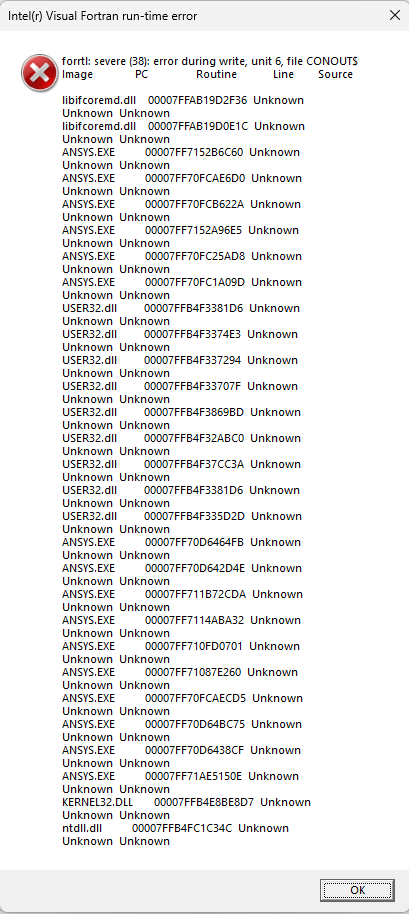
        I've tried opening Mechanical directly again, and I get a different error message that I have attached.

        Thank you for your answer so far!

        • MangeshANSYS
          Ansys Employee


          Hello,

          please check for and remove any spaces in job names and paths to avoid the error above


          i.e. save projects to something like c:\my_projects\Simulation\Project_abc_123\

          etc etc (as you can see the only characters i used are a to z, 0 to 9 and underscore


          Also please check free disk space and if an antivirus is blocking access by Ansys applications to the disk or from running


          let me know if that helps


    • Ashish Khemka
      Forum Moderator

      Hi,

      Please let me share this with the team, and they can comment more.

      Regards,

      Ashish Khemka

Viewing 2 reply threads
  • You must be logged in to reply to this topic.
[bingo_chatbox]








