Ansys Assistant will be unavailable on the Learning Forum starting January 30. An upgraded version is coming soon. We apologize for any inconvenience and appreciate your patience. Stay tuned for updates.
General Mechanical

General Mechanical

Topics related to Mechanical Enterprise, Motion, Additive Print and more.

Measure Stress at Interface

    • liamjstrachan
      Subscriber

      Hello,


      Below is my model of a compression test to measure residual stress in a thermally sprayed disc specimen. I am looking to produce stress vs distance graphs at the interface of the coating and substrate to show the mismatch in stress.


      However, I am not entirely sure how to measure the stress on the coating and substrate interfaces, since the two parts are connected together.


      Anybody got a solution?


      Thanks in advance.


    • Sandeep Medikonda
      Ansys Employee

      Under the scoping method, instead of All Bodies, why not select just the surface and evaluate those results? You can insert 2 results for the 2 contacting surfaces and that way you can see the difference.


      Regards,
      Sandeep
      Guidelines on the Student Community

    • liamjstrachan
      Subscriber

      Okay I see, however I cannot select the contacting surface of each component, that is my problem.


      Apologies for the lack of understanding, I have only been using ANSYS for a short period of time.


    • peteroznewman
      Subscriber

      You have a multibody part. The first item under Geometry that says Part is where the disk substrate and coating solids can be found. Those two solids share a common face. This is called Shared Topology. It means that no contact is needed under the Connections folder to hold the coating to the substrate.


      When you have a multibody part, you can't plot the stress on the shared face.


      You can plot the stress on each body separately, the coating and the substrate.


      There is a different way to build this model, that is without Shared Topology and using Bonded Contact to hold the two faces together.


      In DesignModeler, you Explode the Part to get two separate bodies that don't share a face.


      In Mechanical, you need to have a Contact that Bonds the two faces together. Then you can plot the stress on each face separately.


      Regards,
      Peter

      • Nima Salajegheh
        Subscriber

        Although using contacts between parts generates stress output at the interface between parts, I am seeing that the interface shear/normal stresses are highly dependant on the contact formulation and parameters in addition to the element size. Have you had experience with other methods (e.g., using multibody parts or MPC contact formulation and creating a surface construction geometry at the interface to probe results)? If not, is any of the contact formulations preferred for extracting results right at the interface? I am assuming Normal Lagrange would be most realistic(?). Thanks,

    • liamjstrachan
      Subscriber

      Great, Thanks!


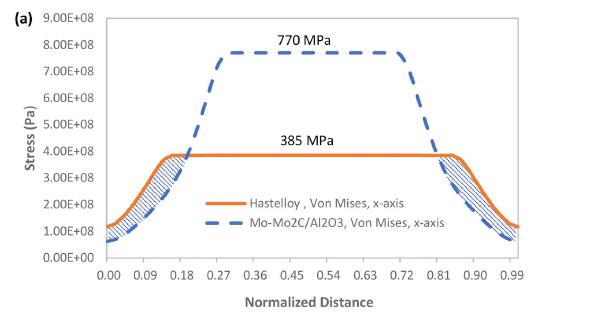
      Once I have determined the stress at the interface, is it possible to measure stress at given intervals? for example, I want to determine the stress at 1mm intervals from the bottom of the disc to the midpoint in the Y direction to produce a graph like shown below.


    • peteroznewman
      Subscriber

      In Mechanical, RMB on Model and Insert > Construction Geometry


      RMB on Construction Geometry and Insert > Path


      Fill out the Details on the Path you just created.


      You can Click on each face to fill out the coordinates of the centroid.


      The default number of points to sample is 47. You might want more, I typed 100.
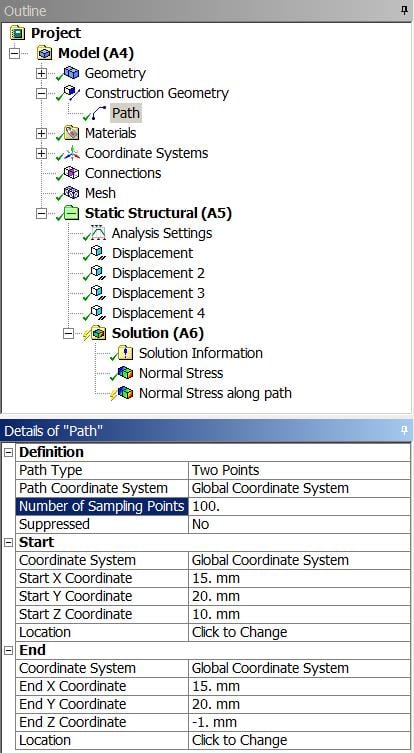


      Insert a Stress result into the Solution branch and select Path instead of Geometry.
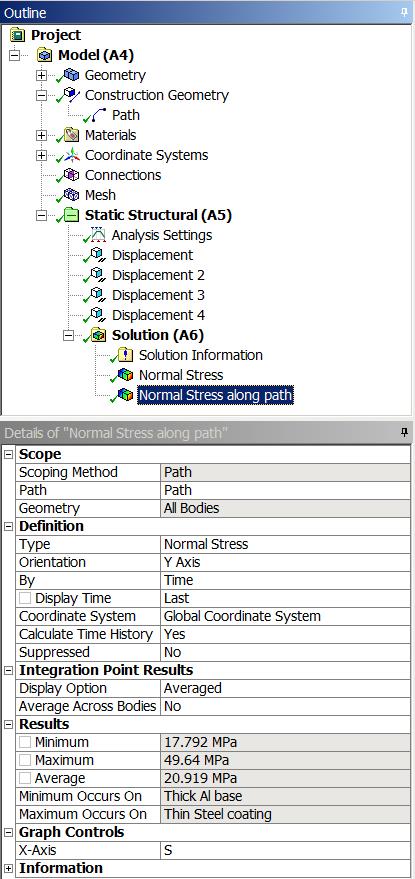


      You will get the tabular data and a graph with 100 points.
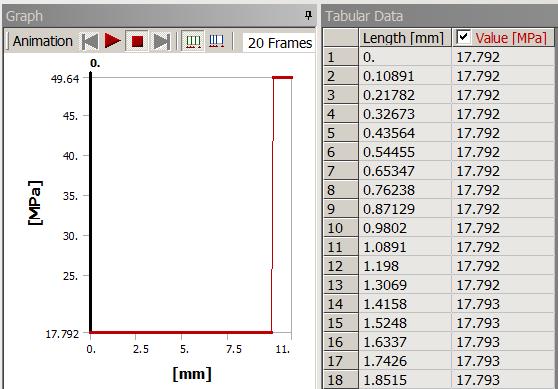


      The length is the true distance from point 1 to point 2. In my case, I had a 10 mm thick substrate and a 1 mm thick coating.


      You can take the tabular data into Excel and normalize the distance.


      Regards,
      Peter


      If this answers your question, please click the Is Solution link below or reply with a follow-up question.


       

Viewing 5 reply threads
  • The topic ‘Measure Stress at Interface’ is closed to new replies.
[bingo_chatbox]