Hello,
maybe a simple question, but I was not able to find an answer yet: When I work through a system, the different categories (engineering data, geometry, model, ...) ususally get a green tick, which means that this category is fully defined and calculated, right? A question mark indicates, that there is missing some information. And a flash means, that it is fully defined, but not calculated yet.
Now I did a simulation in Mechanical. I also got results in Mechanical and the structure tree of Mechanical is full of green ticks. In the Workbench Project Tab, I get the following symbols:
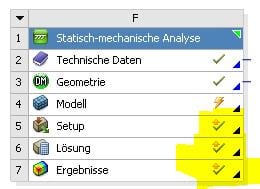
What do thosee ticks with an arrow upwards mean? And how can I have a flash at Modell here, but when I am in Mechanical, the full tree is marked with green ticks?

Regards,
amnteno


















 You are navigating away from the AIS Discovery experience